

DS-2000 Frequently Asked Questions
Question Number FAQ-0723
Caution Regarding the Auto-Zero Function in the DS-2000 Series
Some application software for the DS-2000 allows you to switch the auto-zero (zero calibration) function for each input channel ON or OFF. Auto-zero is a function that automatically adjusts the DC offset voltage generated in analog circuits (amplifiers/filters, etc.) to zero. By turning auto-zero ON, the offset voltage is suppressed, enabling higher precision measurements. Normally, please use it in the ON state.
The procedure for setting auto-zero is as follows.
■ Setup Method
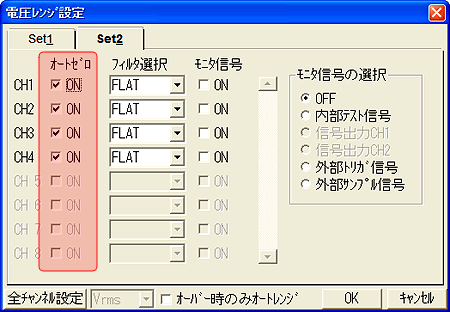
In the case of DS-0221/0222 (FFT/Tracking Analysis Software)
Selecting [Input (I)] → [Voltage Range Setting (V)] from the menu will display the 'Voltage Range Setting' dialog box.
Clicking the [Set2] tab will switch to the "Set2" property page.
Check the "Auto Zero ON" checkbox.
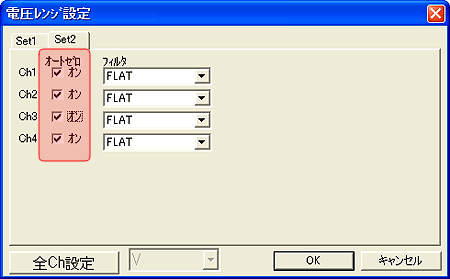
In the case of DS-0250 (Throughput Disk Software)
Selecting [Input (I)] → [Voltage Range Setting (V)] from the menu will display the 'Voltage Range Setting' dialog box.
Clicking the [Set2] tab will switch to the "Set2" property page.
Check the "Auto Zero ON" checkbox.
Last updated date: 2007-11-19