

DS-2000 Frequently Asked Questions
Question number FAQ-0691
After replacing the notebook PC ONO-LINK II <Card> DS-0297 with DS-0297A, the computer does not recognize the DS-0297A card.
It is necessary to install the corresponding driver for DS-0297A.
To use with DS-0297A, you need to upgrade the 'Configuration' of the 'software related to hardware' and set the 'configuration' settings. Please also upgrade your 'analysis software' at the same time as the hardware upgrade. If you have the latest CD-ROM for the upgrade software, you can use it from the CR-ROM, or download the latest version from our website under 'DS-2000 Series Software Download'.
Notes on Downloading
- The latest version upgrade software can be registered by users on the this "DS-2000 User Registration Form" page, then proceed to the "DS-2000 Series Software Download" page, and download the necessary software according to the instructions provided there.
Additionally, it is necessary to input a 'customer number' during user registration.- Please open "KeyViewer" to check your customer number.
- Please perform version upgrades for all main software (software related to hardware) and the application software you are using (for example, DS0221, etc.). Note that the upgrade software will be executed to overwrite the old version, so there is no need to uninstall the current software.
If the version you are currently using is a new one, then an upgrade is not necessary.- Please check the contents of the "Configuration" settings below.
- There are specific instructions regarding the order of version upgrades for system software (software related to hardware) and application software. Please refer to the 'Version Upgrade Method' on the 'DS-2000 Series Software Download' page.
Configuration settings
Click on the [Share] folder from the DS-2000 program files, and then click on [DS-2000Configuration] from the utilities that appear.
The "Configuration Utility" will start. The Configuration Utility is an application that has functions for setting the interface conditions between the personal computer and the DS-2000, checking the hardware information of the DS-2000, and updating the DSP.
Click on the [Standard] tab of the "Configuration Utility" and set the items for "Bus Width" and "I/F CardType" as follows according to the I/F type. For the driver compatible with DS-0297A, the setting for Bus Width in DS-2000Configuration has been updated to include "32 bits (DMA)". Therefore, if you are using DS-0297A, please select Bus Width: 32 bits (DMA). This is faster than the conventional 32 bits (Fast).
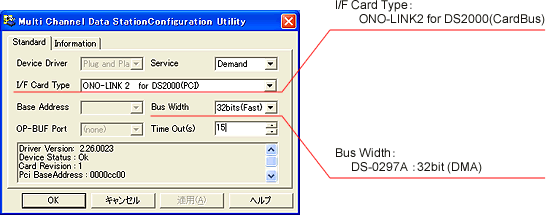
The driver for DS-0297A is also compatible with the DS-0297 interface card. When using the DS-0297, please select Bus Width: 32 bits (Fast). Note that while the DS-0297A interface card will operate with the Bus Width: 32 bits (Fast) setting, you will not gain the benefits of increased speed, so please be aware.
Last updated: November 17, 2008