

DS-2000 Frequently Asked Questions
Question number FAQ-0688
How can I correctly display both the sound pressure values (Pa) and the sound pressure levels (dB) from frequency analysis after importing an ORF file recorded with the DS-0250 into OS-2000 series Professional?
When you calibration the microphone with the DS-0250 Flow Function with an acoustic calibration and record sound pressure data, importing it into OS-2000 series Professional results in very large values.
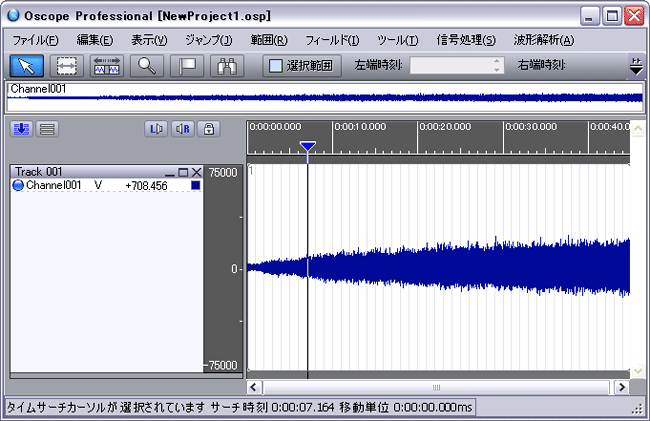
When executing sound quality evaluation with this data, the analysis results exceed 130dB. Since there is no definition of loudness above 130dB, the analysis cannot be performed.
■ Cause
When performing the calibration method for the DS-2000 on our company website, the value of EU/V becomes very large. The standard reference value for sound pressure at 0dB is 20μPa, but for the DS-0250, the 0dB reference value is considered to be 1V. When calibrating sound pressure, the 0dB reference value is set to 1Pa, which causes the value of EU/V to become very large.
Supplement (Reference: Our web page)
When the DS-2000 microphone was calibrated with the acoustic calibration device, the EU/V value became very large, but why?]}
The sound level in dB is set at 0 dB, which corresponds to 20 μPa (Pascals). If we denote the measured sound pressure (RMS value) as P (Pa), the sound pressure level A (dBspl) is expressed by the following formula.

In the DS-2000, the input signal is voltage, so 0dB is taken as 1Vr (RMS). The dBVr value "C" when the signal voltage is B (Vr) is
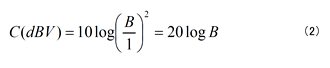
A microphone is a sensor that converts sound pressure into voltage, so if the sensitivity of the microphone is K (Pa) per 1V, then the sound pressure P (Pa) when the voltage signal is D (Vr) is
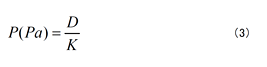
It can be obtained as. Substituting this into equation (1) results in.
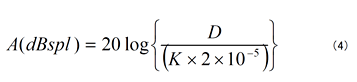
When comparing the logarithms of equations (2) and (3)
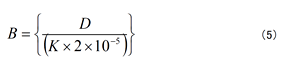
According to this, C (dBVr) = A (dBspl). From this, the value of V/EU is derived. By configuring this, you can see that the DS-2000 can display the conversion as C (dBVr) = P (dBspl). Additionally, on the OS-2000 series Professional, the EU value is set as EU/V, so it becomes the reciprocal of the set value.
Measures
In order to handle the above data as sound pressure in Pa on the OS-2000 series Professional, change the signal type, multiply the EU value by a coefficient (20μ), and then set the EU value again.
As an example, import the sound pressure data file (Sample48K.orf) recorded with the DS-2000 into OS-2000 series Professional. The imported data consists of three channels: "sound pressure," "acceleration," and "rotational speed."
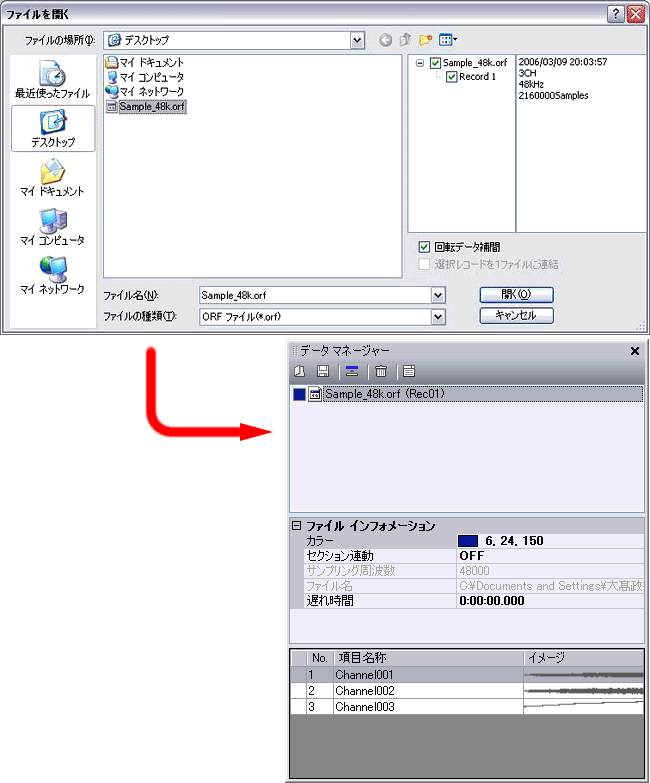
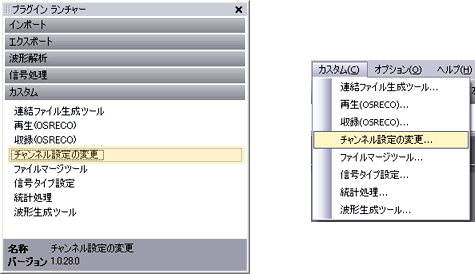
Please change the channel settings in the custom item of the plugin launcher or click on 'Change Channel Settings' in the custom commands from the tools menu.
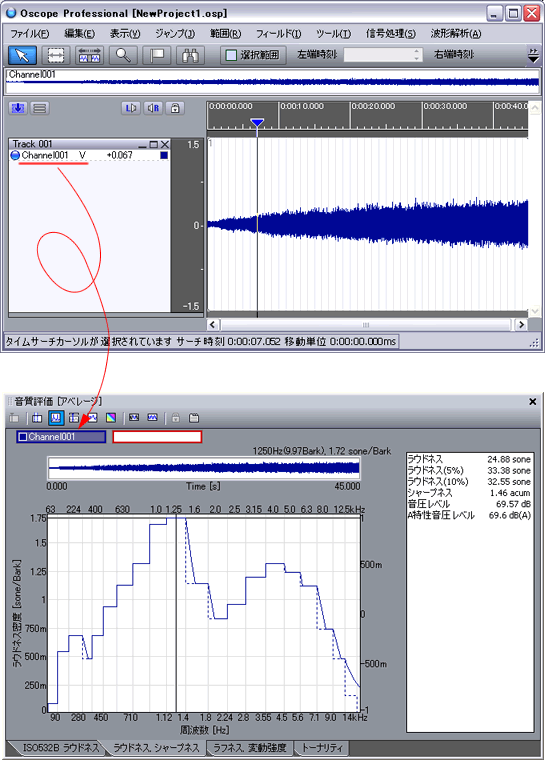
In the channel settings change dialog, "Channel1" will be the sound pressure signal, so first change the signal type from "Voltage" to "Sound Pressure Level", then copy the EU value and calculate "EU value x 0 dB reference value" (137975.29935836792 *0.00002), and set the obtained EU value (2.7595059871673584) again, then click the "OK" button.
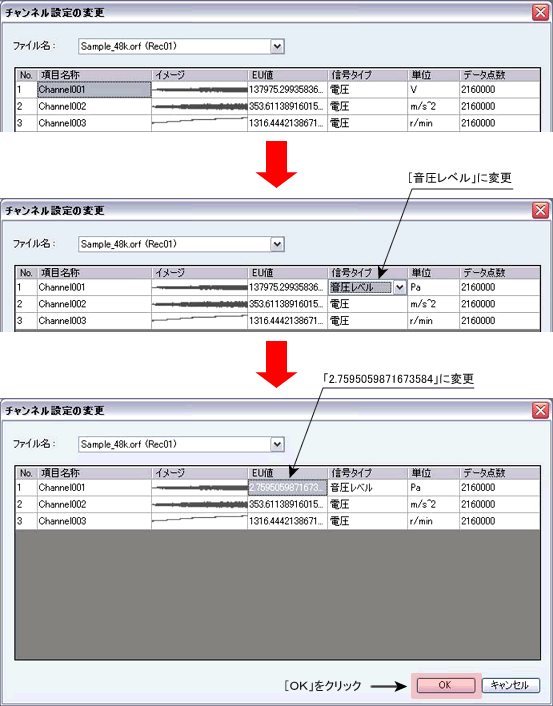
Check if the EU value has been changed. Drop [Channel001] into the main field from the data manager to check the waveform. By default, it is set to autoscale, so the maximum and minimum scale values have been changed from 75,000 ~ -75,000 to 1.5 ~ -1.5. Also, by multiplying the coefficients and re-calibration the sound pressure data, sound quality evaluation analysis can also be performed.
Last updated: 2008-05-19