

DS-2000 Frequently Asked Questions
Question number FAQ-0683
When analyzing ORF data with the DS-0223 real-time octave software, there is a momentary spike in levels at the beginning of the analysis that becomes problematic during averaging. What is the solution to this issue?
When starting the analysis of data from ORF files from the beginning or from a midpoint, data is suddenly input into the octave filter, resulting in an impulse-like data input. At this time, the sound pressure level for each frequency data becomes larger than it should be. This problem does not occur during online filtering, as it is continuously filtered. Particularly in measurements with very low noise levels, when seeking the MAX value through averaging, the initial sound pressure level can be the highest, preventing the true MAX value from being obtained.
Response Method
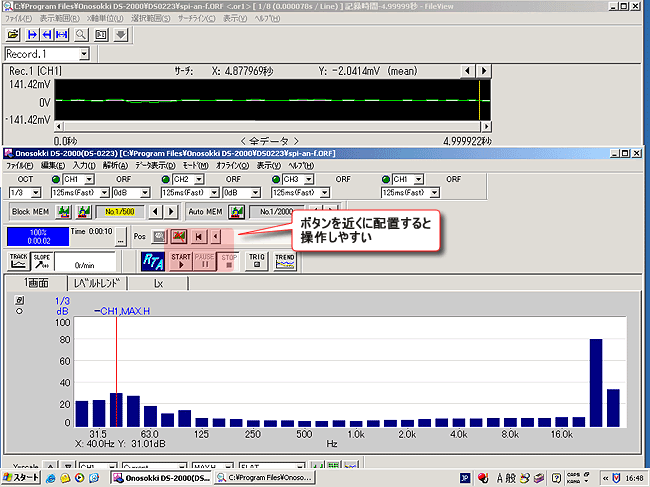
Offline processing ON/OFF button When OFF, the average start button.
 Clicking will automatically turn the offline processing ON/OFF button ON.
 We will begin the analysis. However, this will be affected by the filter. Therefore, first, turn the offline processing ON/OFF button to OFF.from ONAfter doing that, delay the time a little.
 Click to start the analysis. This allows for averaging the processing after the effects of the startup have settled. If the time constant is 10 ms, a delay of 0.5 seconds is sufficient. While observing the analysis position cursor on the viewer screen, after 1 second has passed,Please click. Please change the delay time according to the time constant.
Last updated date: 2007-11-19