

DS-2000 Frequently Asked Questions
Question number FAQ-0678
Procedure for saving power spectrum data of tracking diagrams at arbitrary rotation speeds using DS-0222 tracking analysis software.
You can save the power spectrum of the rotational speed at an arbitrary cursor position in a tracking diagram in text format.
Operation Procedure
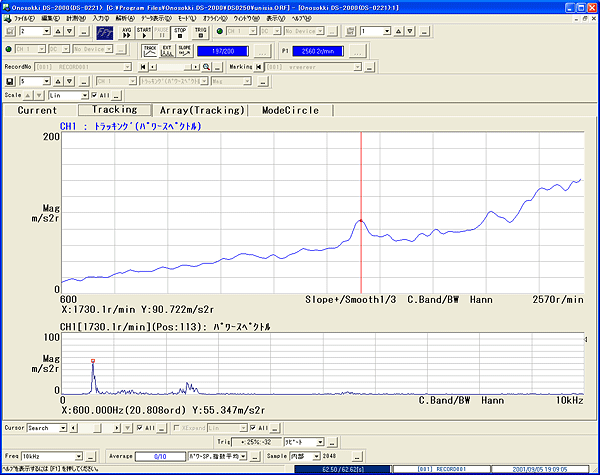
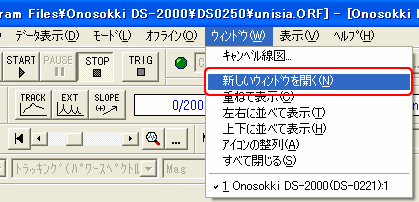
Open the tracking diagram, and from the menu select [Window] → [Open New Window] to display another waveform window.
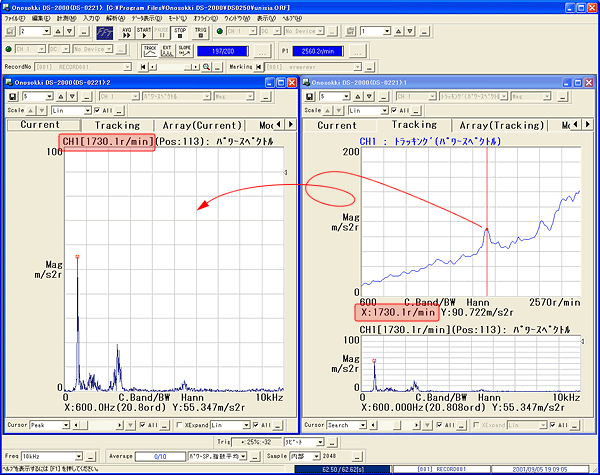
Select 〔Window〕→〔Tile Vertically〕 from the menu to display the two opened windows side by side. The new window opened in step 1 will be set to display the power spectrum in a single screen.
On the tracking screen, move the search cursor to the position of the rotation speed you want to save the text, and while holding down the left mouse button, move the mouse into the newly opened power spectrum screen (drag and drop). The power spectrum data for that rotation speed will be displayed on the power spectrum screen.
Select 'File' → 'Display Data' from the menu, and save the displayed power spectrum data in text format.
Last updated date: 2007-11-19