

DS-2000 Frequently Asked Questions
Question number FAQ-0670
Why is the display time limited to a maximum of 15 seconds during preview display when performing offline analysis with DS-0221 or DS-0223?
This is because the option 'Create preview file' was not selected on the ORF file creation screen when recording on the DS-0250 throughput disk.
If there is an ORF file, it is possible to create a preview file later.
How to create a preview file.
Start DS-0250.
Click on the File menu.
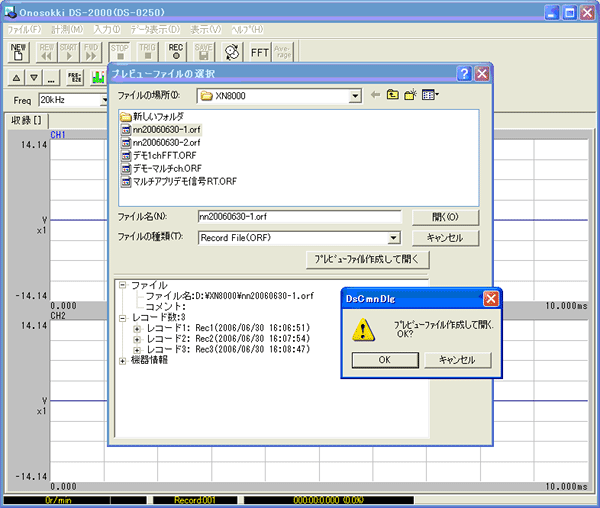
Click on "Display File Preview" to open the "Select Preview File" page.
When you click the "Create and Open Preview File" button, a message saying "Is it okay to create and open the preview file?" will be displayed.
Clicking 'OK' will display a message saying '...creating', and once completed, the data will be shown in 'FileView'.
Ending DS-0250.
When viewing files in Explorer, in addition to ***.orf, files with the following extensions have been created, for example.
- ****.orf (data)
- ****.or1 (Preview data downsampled by 1/16)
****.or2 (Preview data downsampled by 1/256)
****.or3 (Preview data downsampled by 1/4096)
****.or4 (Preview data downsampled by 1/65536)
Last updated: July 18, 2006