

DS-2000 Frequently Asked Questions
Question number FAQ-0662
Simple calibration method between DS-0221 and sound level meter
When performing noise analysis using the AC output terminal of the sound level meter, unit calibration is carried out so that the dB values can be read in the same unit as the sound level meter. Here, using the CAL signal output from the sound level meter, '1 kHz, 84 dB', as an example, I will explain the method of simple calibration when the sound level meter's range is set to 90 dB. Please ensure proper calibration is done with an acoustic calibrator.
Operation Procedure
A. Operation of the sound level meter
Input the analog output signal from the sound level meter into the DS-0221 and set the sound level meter to the desired measurement level range (here, the 90 dB range is selected).
Set the frequency weighting characteristic of the sound level meter to the C characteristic.
Press the CAL button on the sound level meter. An internal calibration signal will be output from the sound level meter. Generally, the CAL signal from the sound level meter outputs a signal at a frequency of 1 kHz, which is 6 dB below the upper limit of the set level range, and this dB value is displayed. Here, the level range of the sound level meter is set to 90 dB, so it will display 84 dB, which is 6 dB below.
B. Operation of DS-0221
Click 'START' to enter measurement mode.
Set the frequency range (20 kHz) and voltage range (1 Vr). The spectrum of the sound level meter CAL signal (1 kHz) will be displayed.
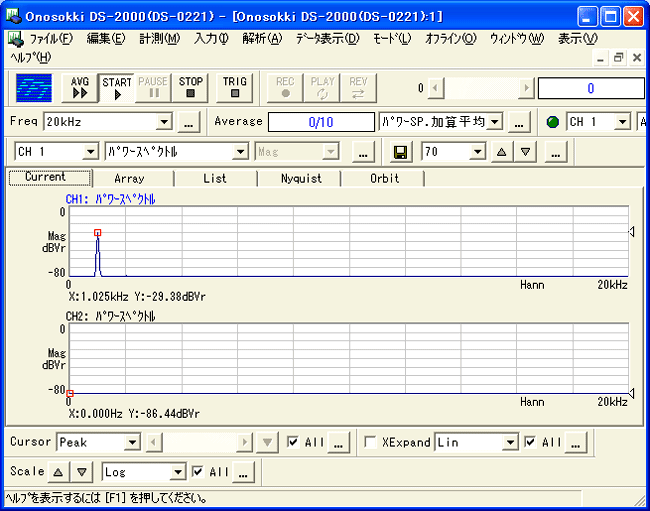
unit calibration
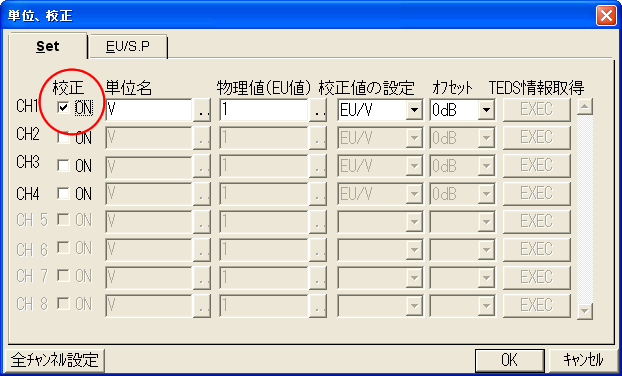
Select [Input] → [Unit Calibration] to open the unit calibration dialog and check the box for 'calibration'.
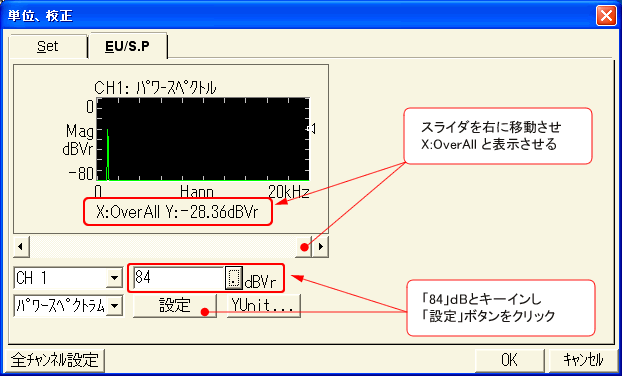
Click the dialog tab 'EU/S.P' to open the 'EU/S.P' dialog.
-1. Align the cursor in the window with the X-axis OVERALL.
-2. Enter "84" dB and click the "Set" button. Overall
calibration will be performed to achieve 84 dB.
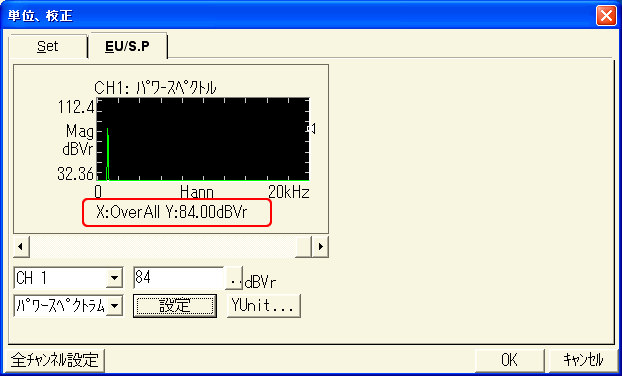
-3. Confirm that it has changed to 'X: OverAllY: 84dBVr'.
-4. Click 'OK' to close the dialog and confirm.
On the measurement screen, set the cursor to Search and align it with Overall, confirming that it reads 'X: Overall, Y: 84.0dB', and the calibration is complete.
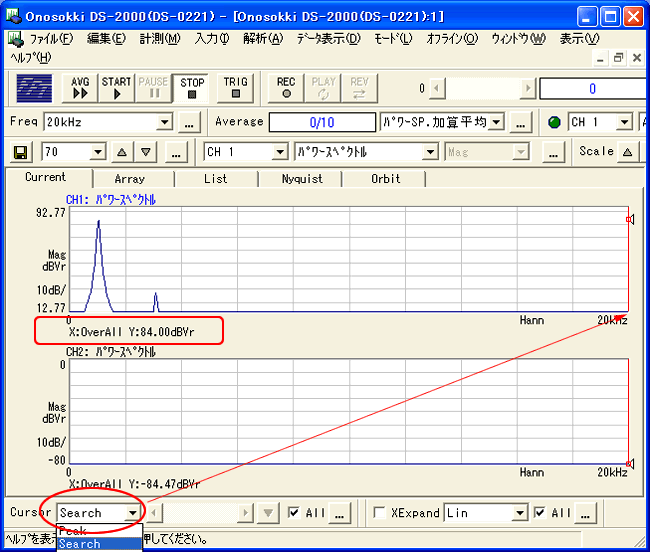
Open the 'unit calibration' dialog from [Input] → [Unit Calibration].
-1. The correction value is automatically calculated and entered as "Physical value 4.358E+004EU/V"
.
-2. "Enter the unit name, such as SPL (Sound Pressure Level)."
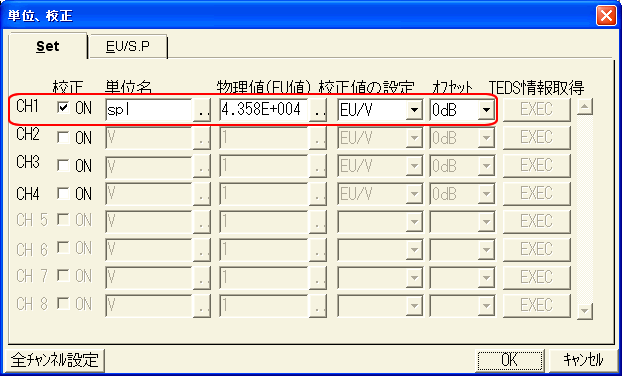
Remarks
After calibration, if the range of the sound level meter is changed from 90 dB to 80 dB, it is possible to make a simple correction by setting the "Offset: -10 dB" in the "Calibration" dialog of section 3-ⅳ-2. However, it is recommended to perform calibration again after changing the range of the sound level meter, as one might forget that this setting is still applied during the next measurement.
Press the 'CAL' button on the sound level meter to return to the measurement state.
Set the frequency characteristics of the sound level meter (A, C, FLAT) and the time weighting characteristics (FAST, SLOW).
Please note that the AC out of the sound level meter generally outputs a signal that has frequency characteristic correction applied.
We will conduct noise analysis with DS-0221.
Remarks
The FFT analysis of the DS-0221 differs from the signal processing of the sound level meter, so in cases of significant changes in noise analysis, the displayed values from the sound level meter and the overall FFT values will not match.
Last updated: April 20, 2009