

DS-2000 Frequently Asked Questions
Question number FAQ-0658
How can I correctly display both the sound pressure value (Pa) and the sound pressure level (dB value) from frequency analysis when loading an RCD file recorded with the DS-0221 into OS-2000 series Professional?
■ Operating Procedures
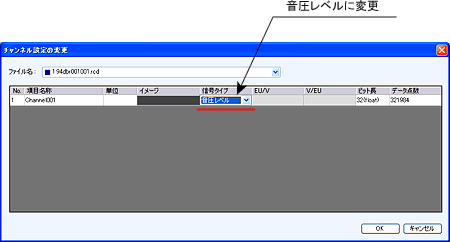
After loading the RCD file, change the channel settings in the custom items of the plugin launcher or open the tool menu and navigate to [View] → [Plugin Launcher] → [Custom] → [Change Channel Settings], and change the "signal type" to "sound pressure level."
Open the [Signal Processing] → [Simple Calculation] from the signal processing items in the plugin launcher. Check the 'All Sections' box in the right column, set the calculation formula below to "* (multiplication)" and "2E-5 (20μPa as the 0dB reference)", and then click the execute button.
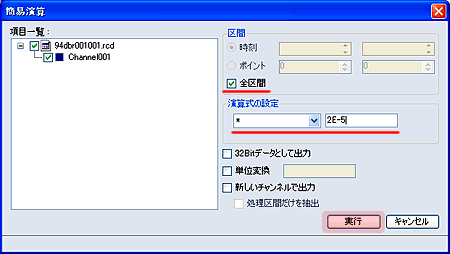
With this, the sound pressure values (Pa) of the time waveform and the sound pressure levels when analyzed in frequency can be displayed correctly.
Last updated: 2007-05-19