

CF-4700A/CF-4700 Frequently Asked Questions
Question number FAQ-0309
What items are not saved in the panel condition settings on the CF-4700?
Version 1.0.1.12 compatible version
■ Items not saved in the condition section
| place | Content | explanation | Initial value |
|---|---|---|---|
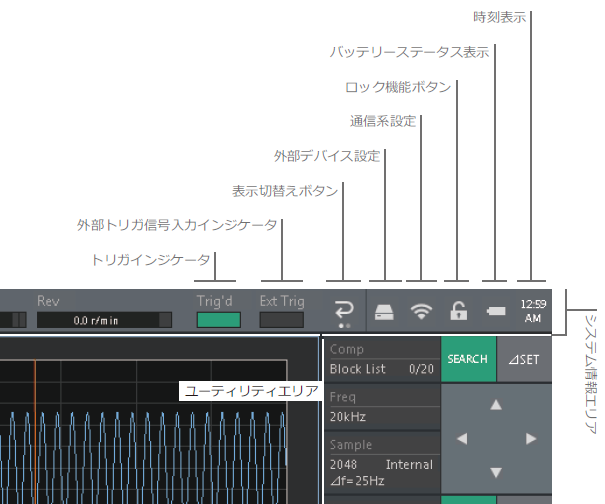
| System Information Area | |||
| Display switching button | Switching between channel display and communication settings display. | CH display | |
| External device settings | USB Mass StorageFolder Sharing on LAN | USB Mass Storage Function ON/OFF Folder sharing via LAN ON/OFF | OFF OFF |
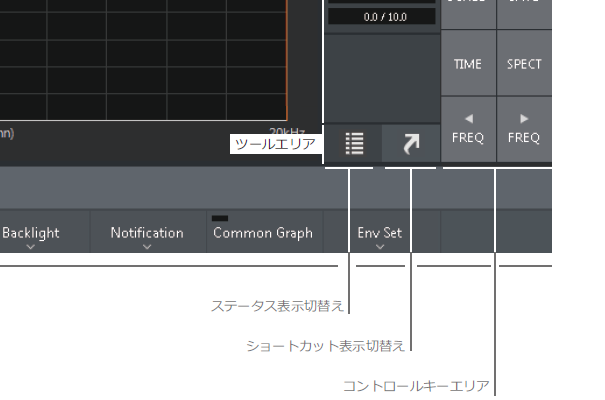
| Utility area | |||
| Status display switching | Switch between status display and shortcut display | ON | |
| Shortcut display toggle | Switch between status display and shortcut display | OFF | |
| Control Key Area | |||
| TRIG | Trigger ON/OFF | OFF | |
| COMP | Comparator ON/OFF | OFF | |
| AVG | Average ON/OFF | OFF | |
| START | Measurement Start | OFF | |
| PAUSE | Measurement pose | OFF | |
| STOP | Measurement stopped | ON | |
| SCHED | Schedule ON/OFF | OFF | |
| Home (Setting Key Area) | |||
| Memory | |||
| Data | Auto Save | Autosave | OFF |
| USB flash drive 4 GB (Swissbit) | - | PE19B1977 |
■ Items stored on the CF-4700 unit
(Exporting is not possible; settings are only available on the CF card itself, and data cannot be transferred to other CF cards via USB, SD card, etc.)
| place | Content | explanation | Initial value |
|---|---|---|---|
| System Information Area | |||
| Lock function button | Screen lock | OFF | |
| Password Lock | Require password to unlock screen (ON/OFF) | OFF | |
| Password | password | Not set | |
| Utility area | |||
| Shortcut area | Shortcut | Setting Key Shortcut Registration | Not set |
| Home (Setting Key Area) | |||
| Input | |||
| BPF & Monitor | Monitor Volume | Monitor volume of filtered data | 0 |
| Memory | |||
| Location | Destination media | Internal | |
| Data | folder | 1~10 | 1 |
| Active No | Current Active Data Index (storage location) | 1 | |
| Protect | Data protection | ON | |
| Save Result Type | Saved data filter during comparison | All | |
| Save Type | TEXT | Text saving ON/OFF | ON |
| TRC | TRC file saving ON/OFF | ON | |
| BMP | BMP save ON/OFF | OFF | |
| Condition | Start Type | Startup Condition | Condition at the end of the previous session |
| Startup | Startup-time specified file name | Not set | |
| Active No | Current Active Data Index | 1 | |
| Relay Load | Load DIO settings ON/OFF | ON | |
| Ext Control | |||
| RS-232C | BPS | RS-232C communication settings | 9600 |
| Character Bit | RS-232C communication settings | 8 | |
| Parity Check | RS-232C communication settings | None | |
| Stop Bit | RS-232C communication settings | 1 | |
| Flow Control | RS-232C communication settings | None | |
| Terminator | RS-232C communication settings | CR | |
| System | |||
| Common Graph | Data Common Settings ON/OFF | OFF | |
| Backlight | Timer Off | Timer to turn off the screen after a set amount of time | OFF |
| Off Time Set | Interval between the last operation and the screen being turned off | 1min | |
| Notification | Confirm Dialog | Confirmation dialog display ON/OFF | ON |
| Beep | Beep sound ON/OFF | OFF | |
| Event Log | Event Log | Not set | |
| Done Event | Average Done | average completion | OFF |
| Schedule Done | Schedule complete | OFF | |
| Compare Done | Comparison complete | OFF | |
| Status Event | Trig'd | The trigger was activated. | OFF |
| A/D Over | A/D ratio exceeded | OFF | |
| CCLD Disconnect | The CCLD ON sensor is disconnected. | OFF | |
| Compare NG | Comparing was rejected. | OFF | |
| Env Set | Language | Language settings | English |
| Assistance Function Dialog | OK Data Folder | 1~10 | 1 |
| NG Data Folder | 1~10 | 1 | |
| ActiveOK Data Index | 1 | ||
| ActiveNG Data Index | 1 | ||
| Configuration mode | License Information | Depends on the purchased license | |
| Date and time settings | - | ||
| Keyboard language settings | Japanese keyboard | ||
| Computer name | CF-4700 | ||
| IP Address | IP address | 192.168.3.59 | |
| Subnet Mask | Subnet mask | 255.255.255.0 | |
| SSID for wireless LAN | CF4700 | ||
| Wi-Fi password | 1234567890 | ||
| Allow remote desktop access | OFF |
Last updated: 2016-11-21