

CF-4700A/CF-4700 Frequently Asked Questions
Question number FAQ-0300
How can I automatically turn on data auto-saving and comparison after powering on?
By using DO and DI, it can be executed.
.Register Analysis Done to Out1 of DO's StatusOut.
With this setting, Out1 will be On (Low level) during the analysis start.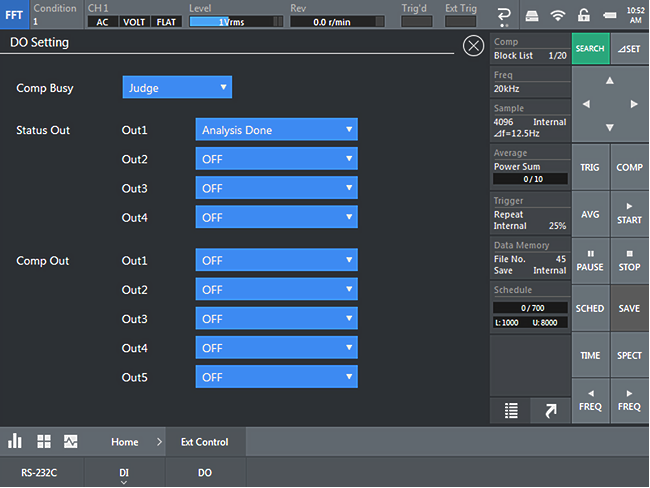
I will register the following command to DI No. 9.
KSP (stop) CMT (Comparate ON) CMM,2 (Automatic saving of display data ON) IFS9,0 (DI No.9 input acceptance OFF, to operate only once at startup) 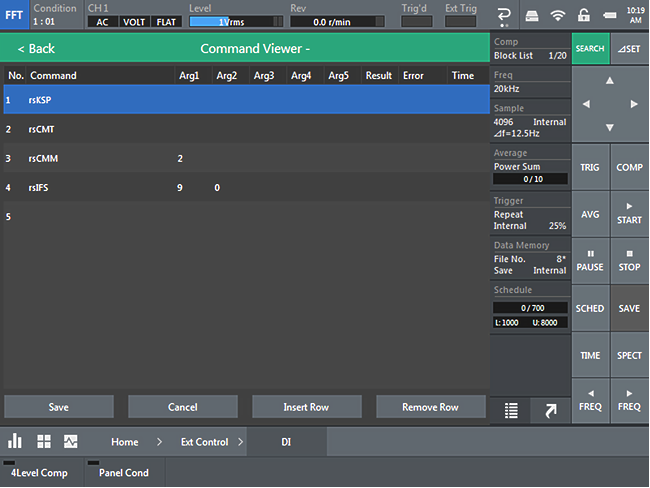
When registered, it will be displayed with the characters "rs" at the beginning.
Set all measurement conditions, relay conditions, and judgment conditions, and save them to the condition memory.
Register that condition memory number to STARTUP.
When you click Register,- Startup -will be displayed.
Set Start Type to Specified Project.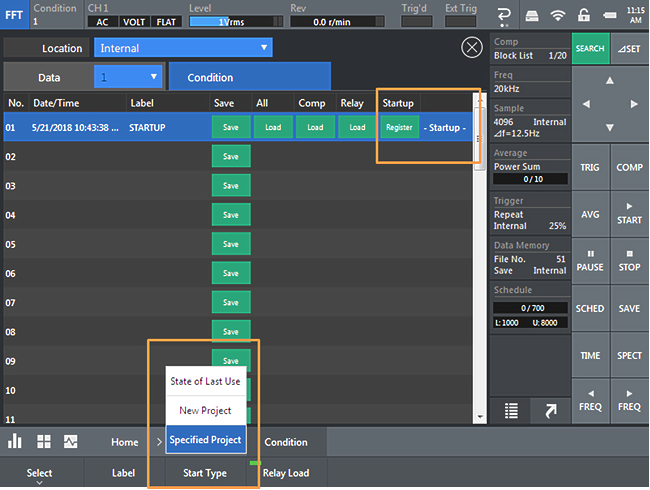
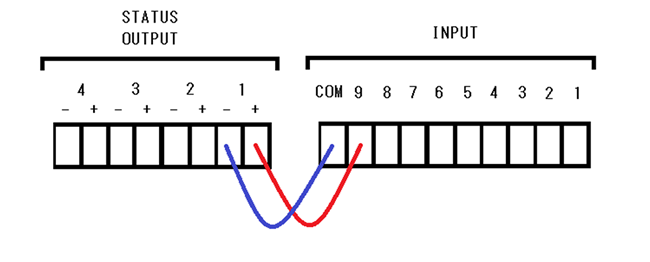
Connection of DI DO terminal block
Command Introduction
LAN command RS-232C command Stop KeySTOP KSP TRIG ON SetTrigOnOff,1 TRO COMP ON DoCompareOnOff,1 CMT SCHED ON SetTrackAnalysisModeOnOff,1 ----- AutoSave ON SetMemoryAutoStoreOnOff,1 CMM,2 DI No.9 OFF ----- IFS9,0
Last updated: 2018-06-18