

CF-4500 Frequently Asked Questions
Question number FAQ-0299
I want to determine two trace lines with different degrees of tracking results using separate shapes. What is the method to control this with INPUT RELAY?
This is a procedure based on the following structure.
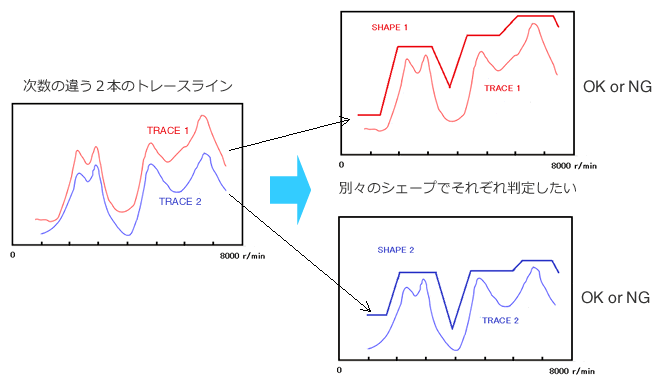
First, set the judgment lines for Shape 1 and Shape 2.
Turn SINGLE compare ON.
Register the command to judge on Shape 1 with INPUT RELAY1 trace line 1.
Register the command to judge on Shape 2 with INPUT RELAY2 trace line 2.
INPUT RELAY3 registered the compare end command.
When tracking is complete,
INPUT RELAY1 displays Trace 1, enables the judgment for Shape 1, and executes the judgment.
Read the OK and NG results.
Display trace 2 with INPUT RELAY2, enable judgment for shape 2, and execute the judgment.
Read the OK and NG results.
Turn off the comparator with INPUT RELAY3.
Below is a list of commands.
| RELAY No. | command | explanation |
|---|---|---|
| INPUT3 | DoCompareStop | Comparison completed (clearing the previous results) |
| INPUT1 | SetOrdAnalysisLineOnOff,0,1 | Turn on tracking line 1. |
SetOrdAnalysisLineOnOff,1,0 | Turn off tracking line 2. | |
SetCompareShapeActiveNo,1 | Activate Shape Line 1 | |
| SetCompareShapeNGCountValue,1 | Set the NG count for Shape Line 1 to 1. | |
SetCompareShapeActiveNo,2 | Activate Shape Line 2 | |
SetCompareShapeNGCountValue,0 | Set the NG count of Shape Line 2 to 0. | |
DoCompareStart | I will read the comparison execution judgment results. | |
| INPUT3 | DoCompareStop | Comparison completed (clearing the previous results) |
| INPUT2 | SetOrdAnalysisLineOnOff,0,0 | Turn off tracking line 1. |
SetOrdAnalysisLineOnOff,1,1 | Turn ON tracking line 2. | |
SetCompareShapeActiveNo,1 | Activate Shape Line 1 | |
SetCompareShapeNGCountValue,0 | Set the NG count of Shape Line 1 to 0. | |
SetCompareShapeActiveNo,2 | Activate Shape Line 2 | |
SetCompareShapeNGCountValue,1 | Set the NG count of Shape Line 2 to 1. | |
DoCompareStart | I will read the comparison execution judgment result. | |
| INPUT3 | DoCompareStop | Prepare for the next measurement. |
Last updated: 2015-06-29