

CF-4500 Frequently Asked Questions
Question number FAQ-0294
I want to determine based on the results of averaging a repeatedly occurring signal multiple times.
1. 単発現象の取り込みなので、トリガ機能のリピートトリガを使います。
(参考)まれに発生する現象を捉えて解析する方法
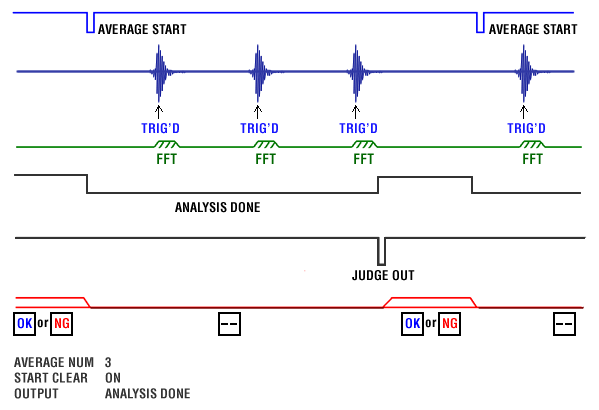
2. Turn on the average function, set the average count, and use the judgment function in average processing.
3. Turn on the Compare's start clear function to clear the judgment results every time an average start is made.
4. The confirmation of average completion after multiple triggers is detected by specifying ANALYSIS DONE in the OUTPUT RELAY.
5. The timing to read the judgment results uses JUDGE OUT.
Setting:
Set NUM (average count) in MAIN-ANALYSIS-AVERAGE-SET.
Turn ON MAIN-COMPARE-COMP COND-START CLEAR.
Set MAIN-COMPARE-OUTPUT RELAY-BUSY OUT to JUDGE.
Register AVERAGE START as "AST" in INPUT RELAY.
Turn ON the TRIG of the panel SW.
(Make sure to set the trigger level and trigger position in advance.)
Flow:
Last updated: 2013-10-03