

CF-3600A/3800A Frequently Asked Questions
Question number FAQ-0268
What is the front protective cover mentioned in the catalog (accessory)?
This is a cover to protect the LCD panel of the CF-3600. It is translucent, allowing you to see the screen while the cover is on. When transporting, please attach the protective cover and carry it quietly by the handle. The method for attaching and detaching is as shown in the next figure. First, remove all peripherals and the AC adapter. Also, if the stand is open, close the stand.
- When installing
cover the panel surface with the claws of the front cover that protects the LCD touch panel, in the order from left side 1 to right side 2.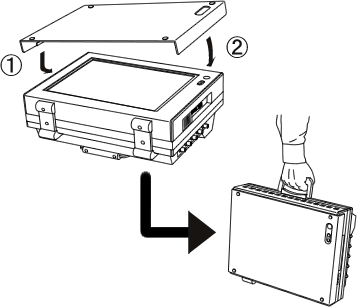
- When removing
Please remove the claws in the order from right side 2 to left side 1, in the reverse of the installation.
Last updated: 2005-02-14