

CF-3600A/3800A Frequently Asked Questions
Question number FAQ-0265
The mouse tool has disappeared.
You can launch 'RButton.exe' from the Start menu to make it visible again.
■ Launching RButton.exe
Select 'All Programs' from the Start Menu and click on 'RButton.exe' in the Startup section.
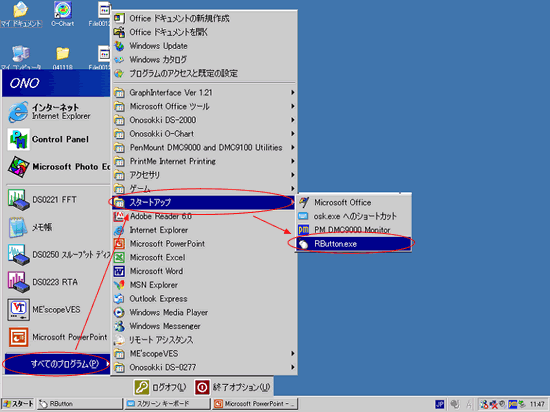
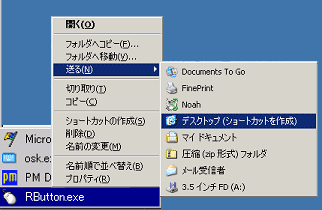
Additionally, it is convenient to create a shortcut for 'RButton.exe' on the CF-3600 screen. You can create the shortcut by selecting 'All Programs' from the Start menu, right-clicking on 'RButton.exe' in the Startup folder, and choosing to create a shortcut on the desktop. From the next time onwards, you can simply double-click the shortcut on the desktop.
| shortcut icon
|

Last updated: 2005-02-14