

Digital Gauge Frequently Asked Questions
Question number FAQ-0097
Description of MAX/MIN/R measurement modes for DG-825, DG-925, DG-525, DG-525H.
In MAX /MIN /R mode (R: maximum value - minimum value), the maximum and minimum values are continuously captured, and the display holds the peak. (Since the data sampling time is approximately 30 ms, it may not be able to hold the true value during that time.)
MODE:○Press lightly and release
The display switches in the order of Normal Mode → MAX Mode → MIN Mode → R Mode → Normal Mode.
| Maximum Value Display Pressing the MODE switch once from the normal mode changes the display to MAX mode, which holds the maximum measurement value. | 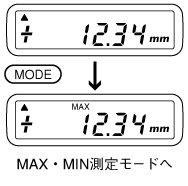 |
| Minimum value display Pressing the MODE switch once more from MAX mode will switch to MIN mode, which holds the minimum measurement value displayed. <3> Display of range (maximum value - minimum value) Pressing the mode switch again from MIN mode will change it to R mode, displaying the value of the maximum minus the minimum (MAX - MIN). to normal mode If you press it one more time, it will return to normal mode. | 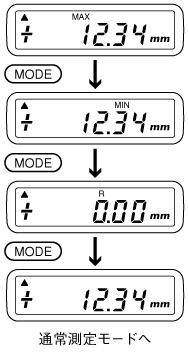 |
| Reset Data To reset the data, return the spindle to the reference point and press the reset switch. |
Last updated: 2001-01-12