

Digital Gauge Frequently Asked Questions
Question number FAQ-0095
DG-825, DG-925, DG-525, DG525H screen and switch description
(1) I will explain the screen (LCD display section).
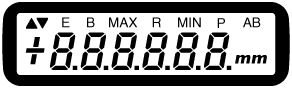
・mm
Indicates that the measurement is in mm.
During preset settings, the mm unit display will disappear.
・MAX (maximum)
Indicates that it is the maximum value display in MAX/MIN measurement mode.
The display will not change unless a value larger than the displayed value is entered.
・R(range)
Indicates that it is the range (maximum value - minimum value) display in MAX/MIN measurement mode.
・P (preset)
This displays the preset measurement function.
It shows the measurement value from the preset value. The P mark blinks when the preset value is set.
・AB (absolute)
This displays the absolute measurement function.
It is the measurement value with the power on set as the zero point.
・B (battery)
It will be displayed when the battery voltage falls below the specified value.
If "B" is displayed, please charge it or use it with an AC adapter.
(Charging method)
・E (error)
Indicates an error display. It appears when the spindle operation exceeds the maximum response speed, indicating that the measurement values are unreliable. If "E" is displayed, please press the power switch to turn off the power once and then redo the measurement.
・ ▲
This is the direction display. When you push the spindle, the measurement counts in the positive direction.
In the opposite case, it counts in the negative direction.
・ ▼
This is the direction display. When you push the spindle in, the measurement counts in the negative direction.
When it is the opposite, it counts in the positive direction.
・+(−)
Displays the polarity of the measurement value + (plus) or − (minus).
It does not display when it is zero.
Explanation of the switch section.
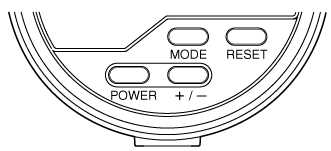
・POWER (Power Switch)
Turns the power on/off.
・+/− (Direction Switch)
It switches the counting direction. It is related to the ▲ ▼ display.
・MODE (Mode Switch)
Switches between MAX/MIN measurement modes.
It also serves as a switch for changing measurement functions.
・RESET (Reset Switch)
Resets the displayed value.
It also serves as a switch for changing measurement functions.
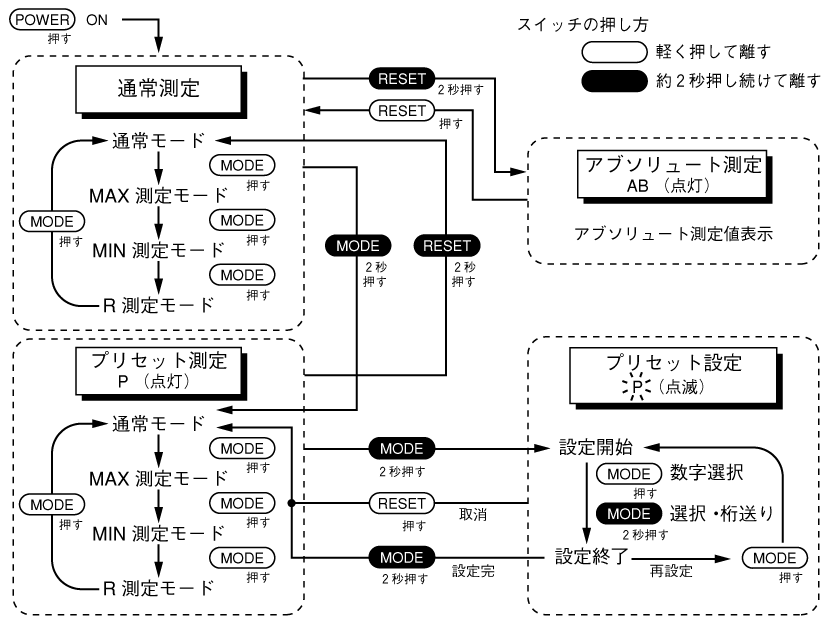
Operation of the switch
The mode switch and reset switch have two ways to be pressed. When switching measurement functions, you perform the operation of "holding for about 2 seconds."
The table below shows the list of operations.
Press lightly and release.
Press briefly as if to touch.
Press and hold for about 2 seconds, then release.
Press and hold for about 2 seconds. The moment the display changes is the timing to release the switch.
| Function / Switch | POWER | RESET | MODE | +/− |
|---|---|---|---|---|
| normal measurement | Power on/off (reset E error) | Zero Reset Reset of MAX/MIN/R Measurement To AB testing |
○Switching between MAX/MIN/R measurement modes ● To P measurement | ○ Counting direction switch (disabled during MAX/MIN/R measurement) |
| Absolute Measurement AB | Power off (reset to origin) | Reset to preset values Reset of MAX/MIN/R Measurement To normal measurement |
− |
− (Counting direction is fixed upwards ▲) |
| Preset measurement P |
Power off. | Reset to preset values Reset of MAX/NIM/R measurement To normal measurement |
○Switching between MAX/MIN/R measurement modes ●To P settings |
− |
| preset settings \|/ |
Power off. | Cancel P setting Return to P measurement |
Select setting values for each digit. Setting the values for each digit. And proceed to P measurement after setting the digit shift. |
− |
Supplementary explanatory diagram
Last updated: March 16, 2009