

Digital Gauge Frequently Asked Questions
Question number FAQ-0088
How to operate the absolute measurement function of DG-825, DG-925, DG-525, DG525H.
This measurement function uses the spindle's position at the moment the power is turned on as the zero point, and it continuously measures with that position as zero until the power is turned off.
You can view this value from any display of the normal measurement function by switching. (Turning off the power will also reset the measurement values of the absolute measurement function.)
Resetting the normal measurement function at any position does not affect the zero point of absolute measurement.
It is effective in cases where both relative and absolute values are read.
Measurement Method
The display shows the normal measurement function when the power is on.
Press and hold the RESET switch from the normal measurement function for about 2 seconds, and release the switch when the 'AB' mark is displayed. <Note> Please be aware that if the button is pressed for too short a time, the displayed value of the normal measurement function will be reset to zero. | 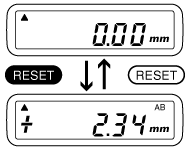 |
Method of Return
To return to the normal measurement function, please press the RESET switch. It will revert to the mode used when switching to the absolute measurement function.
(3) Switch operation during absolute measurement
RESET:
Returning to normal measurement function.
POWER:
Turn off the power. To reset the zero in the absolute measurement function, please toggle the POWER switch off and on again.
+/−:
The direction switch is disabled in absolute measurement mode. The counting direction is fixed to the ▲ mark, so it may be opposite to the normal measurement function.
Last updated: 2001-01-12