

Digital Gauge Frequently Asked Questions
Question number FAQ-0080
Can the high-resolution gauge counter DG-5100 be used in combination with a gauge sensor that is not high-resolution?
The high-resolution gauge counter DG-5100 can also be combined with a non-high-resolution remote display type gauge sensor from Ono Sokki. However, the following three settings are necessary.
(1) A connection conversion cable AA-8910 (or a cable with the same specifications) is required.
Since the sensor input connector of the DG-5100 and the output connector of the non-high-resolution gauge sensor have different shapes, a conversion cable is necessary.
(2) You need to change the input signal format of the DG-5100.
The input signal format of the DG-5100 is set to "line driver format" at the factory default.
You need to change this to "voltage format". To change to "voltage format", the following two tasks are required.
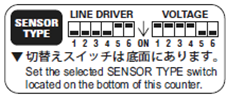
1. Please change the bit switch on the bottom of the DG-5100.
According to the label on the side of the DG-5100, please change the bit switch on the bottom using a flathead screwdriver or similar tool.
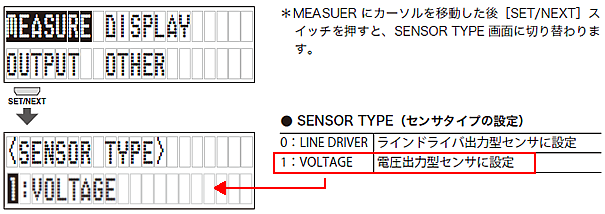
2. Change the input signal format in the DG-5100 internal menu.
In the DG-5100 menu settings, change the 〈SENSOR TYPE〉 within「MEASURE」to「1:VOLTAGE」.
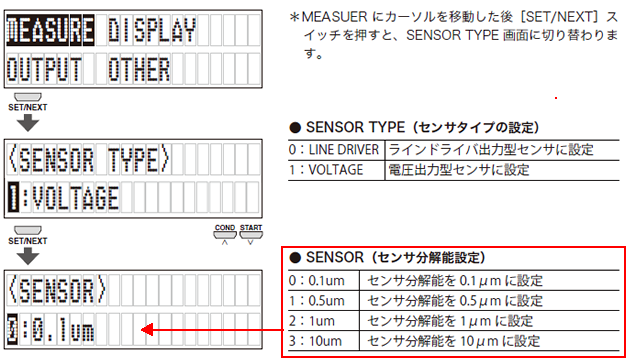
3. Set the display resolution of the DG-5100 to match the connected gauge sensor.
By default, the DG-5100 is set to a display resolution of "0.1μm".
In the DG-5100 menu settings, please select "MEASURE" and then choose <〈SENSOR〉 to match the gauge sensor you are using.
Last updated date: 2017-06-15