

Digital Gauge Frequently Asked Questions
Question number FAQ-0079
DG-4340 Comparator Operation - 2 (OK/NG Mode)
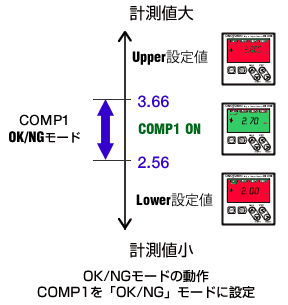
The "OK/NG" mode of DG-4340 sets the "Lower value" and "Upper value" for one channel.
When the measured value is greater than this "Lower value" and less than the "Upper value", the configured relay will operate.
In "OK/NG mode", when the comparator is activated and the relay operates, the screen changes to green.
■ DG-4340 Operation Example 1
Operation in OK/NG mode (Set COMP1 to "OK/NG" mode)
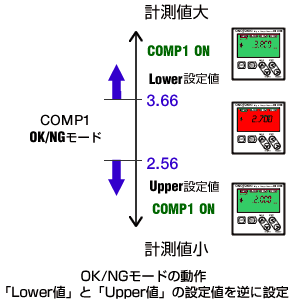
■ DG-4340 Operation Example 2
By reversing the set values of the "Lower value" and "Upper value" of the OK/NG comparator, it is possible to invert the screen display color and the comparator operation.
Last updated: 2021-06-01