

Digital Gauge Frequently Asked Questions
Question number FAQ-0078
DG-4340 Comparator Operation - 1
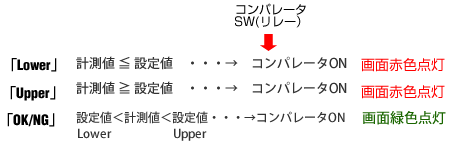
The DG-4340 comparator output has three channels: Comparator 1 (COMP1), Comparator 2 (COMP2), and Comparator 3 (COMP3). For each channel, you can set the "Lower" mode, "Upper" mode, and "OK/NG" mode.
In "Lower" mode, a single judgment value is set, in "Upper" mode, a single judgment value is set, and in "OK/NG" mode, two judgment values, "Lower" and "Upper", are set.
In "Lower" mode, the relay turns ON when the measured value is below the set value (the screen lights up red), and in "Upper" mode, the relay turns ON when the measured value is above the set value (the screen lights up red). In "OK/NG" mode, the relay turns ON when the measured value is between the "Lower set value" and the "Upper" set value (the screen lights up green).
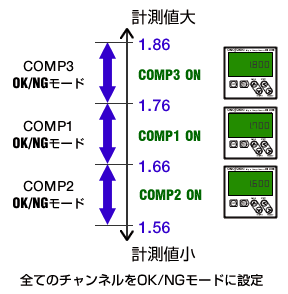
■ DG-4340 Operation Example 1
Set all channels to OK/NG mode
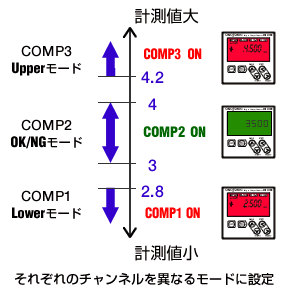
■ DG-4340 Operation Example 2
Set each channel to a different mode
Last updated: 2021-06-01