

Digital Gauge Frequently Asked Questions
Question number FAQ-0068
DG-4240 Comparator Function
Set the upper and lower limit values, which serve as the criteria for pass/fail judgment, on the front panel's UPPER digital switch and LOWER digital switch.
The judgment is as follows.
| criteria for judgment | Judgement | Display and output of judgment results |
|---|---|---|
| LOWER setting value ≥ display value | LOWER | ・The COMPARATOR indicator light for LOWER is lit in red ・LOWER output relay (NO.10, 11) is ON ・SCD OUT connector LOWER output (pin 22) is ON |
| LOWER setting value < display value < UPPER setting value | OK | ・The OK indicator of the COMPARATOR lights up green ・OK output relay (No. 12, 13) ON ・SCD OUT connector OK output (pin 22) ON |
| UPPER setting value ≤ display value | UPPER | ・The COMPARATOR indicator light for UPPER is lit in red ・UPPER output relay (No. 14, 15) is ON ・BCD OUT connector UPPER output (pin 23) is ON |
When pressing the gauge sensor's spindle, consider whether it counts as positive (+) or negative (−), where the decimal point is displayed, and where to set the zero point, in order to establish the upper and lower limits.
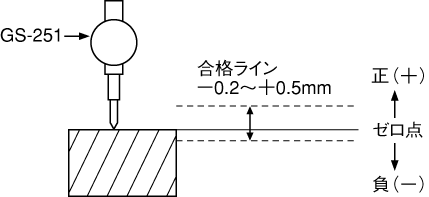
<Setting Example 1> Acceptable range is -0.2 to +0.5 mm.
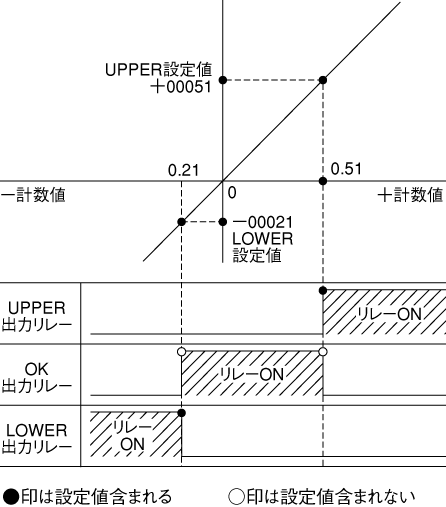
The resolution of the GS-251 GS-1513A is 10μm, so when the lower limit of the acceptable line is -0.2mm, it displays -0.20, and when the upper limit is +0.5mm, it displays 0.50. Values that are deemed acceptable do not include the LOWER and UPPER set values. If LOWER is set to -00021 and UPPER to +00051, the range of 0.2 to 0.5mm will be considered OK.
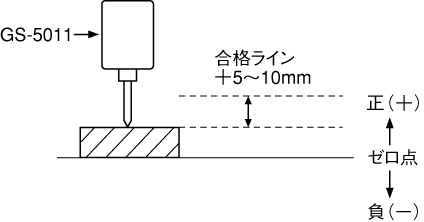
+5 to 10 mm is acceptable.
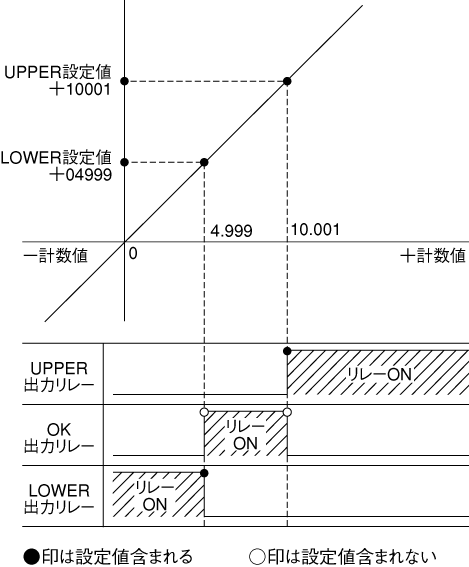
The resolution of the GS-5011 GS-1630A is 1μm, so when the lower limit of the passing line is +5mm, it displays 5.000, and when the upper limit of the passing line is +10mm, it displays 10.000. Values deemed acceptable do not include the LOWER and UPPER set values, so if LOWER is set to +04999 and UPPER to +10001, the range of +5 to +10mm will be considered OK.
Last updated: 2000-12-08