

Frequently Asked Questions about Fuel Flow Meters
Question number FAQ-0015
How to set the date on the FM-2500 flow indicator.
If you are using the FM series for the first time, you need to perform initial setup.
Similarly, if you are changing and using the FP flow detector, setup is also required.
How to set the date on the FM-2500 flow indicator
(1) Set the date. *This step is unnecessary if the date is correct.
Operating Instructions
1.  Press (MENU) to display the settings screen.
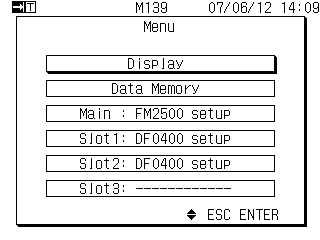 |
|
Select FM2500 setup.
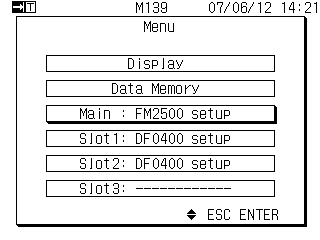 |
|
 select
3. The FM-2500 Setup menu will be displayed.
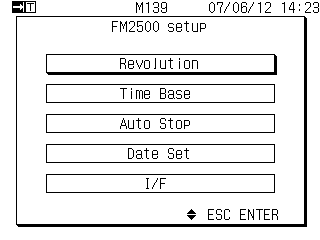
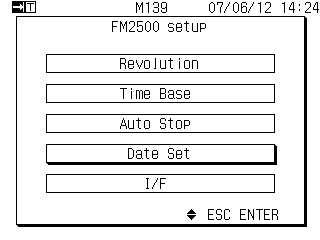 |  or or at at select select when you press when you press |
4. The Date & Time settings menu will be displayed.
|
You can set the numbers for year / month / day hour / minute to be displayed in reverse order. |
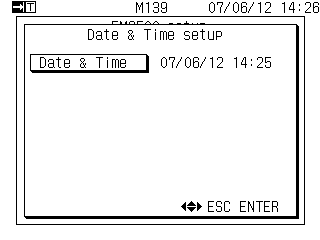
 select
Please set the current date and time.
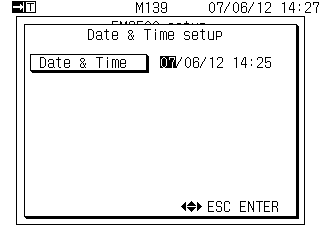 | (Example: The year number is displayed in reverse) |
 or
or Pressing it will move the inverted digit.
6. Confirm date and time settings.Pressing this will confirm the date and time. (The reversal will be canceled.)
7. Pressing it will bring up the measurement display screen.
Last updated: June 18, 2007