

Sound level meter - Frequently Asked Questions
Question number FAQ-1186
How to check the firmware version of a sound level meter
■ How to check the firmware version
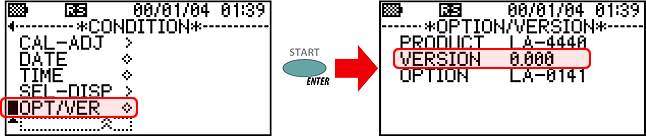
In the Sound Level Meter menu, move the cursor to "OPT/VER" in the "CONDITION menu" and press the [ENTER]/(START) switch to the OPTION/VERSION screen, which displays the Sound Level Meter firmware version and the model names of the installed options, allowing you to check the firmware version.
Last updated: 2009-12-25