

Sound level meter - Frequently Asked Questions
Question number FAQ-1162
Level recording using a level recorder (Sales of the CX-4500 level recorder have ended).
Level recording using a level recorder
By connecting this device to our separately sold CX-4500 level recorder, you can record noise levels. When using our CX-4500 level recorder, please also refer to the CX-4500 instruction manual in addition to this manual.
■Connection procedure with level recorder
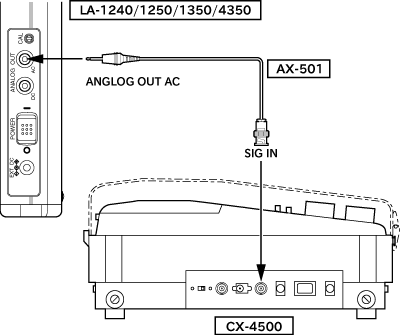
Connect the [ANALOG OUT AC] connector on the sound level meter and the [SIGIN] connector on the CX-4500 level recorder using the included signal input/output cable (AX-501).
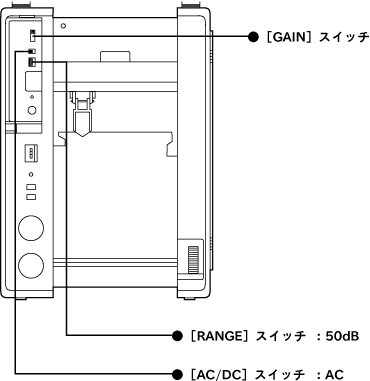
- Switch the [AC/DC] switch on the CX-4500 level recorder to AC.
- Switch the [RANGE] switch on the CX-4500 level recorder to 50dB.
- Switch the [GAIN] switch on the CX-4500 level recorder to 0dB.
- Switch the power on the sound level meter and the CX-4500 level recorder to ON.
■Settings for the Level Recorder CX-4500
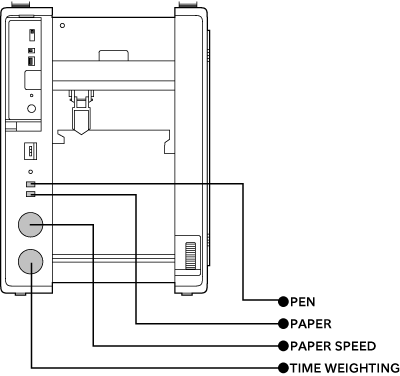
Before using the CX-4500 level recorder, please reset each switch as follows:
| Switching of time constants | The time constant can be changed using the [TIME WEIGHTING] switch. | Set to FAST or SLOW |
|---|---|---|
| Switching paper feed speed | The [PAPER SPEED] switch controls the paper feed speed. | Set to any number |
| Pen/Paper feed ON | Press the [PEN] and [PAPER] switches. | Switch to ON |
■ calibration procedure for the CX-4500 level recorder
To print data more accurately, perform the following calibration steps before using the CX-4500 level recorder.
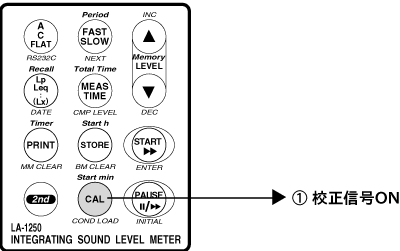
- Press the CAL (COND LOAD) panel switch on the sound level meter to output calibration signal.
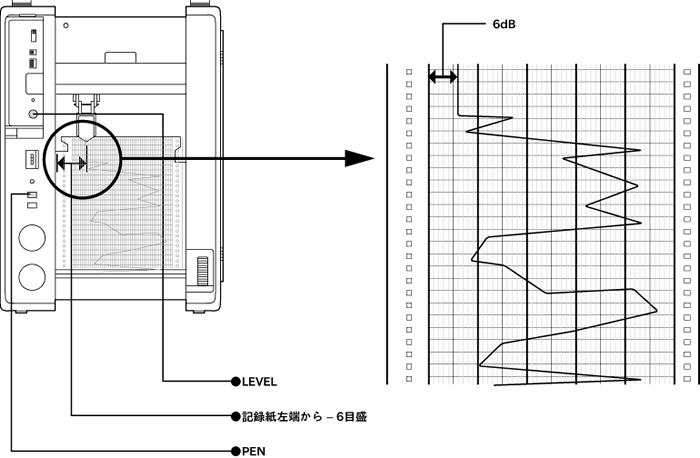
- Press the [PEN] switch on the level recorder CX-4500,
Verify that the pen for the CX-4500 level recorder is working. - Turn the [LEVEL] dial on the CX-4500 level recorder and move the pen to a position 6 divisions away from the left edge of the recording paper.
Last updated: 2002-01-09