

Sound level meter - Frequently Asked Questions
Question number FAQ-1150
Measurement of Noise (LA) / Sound Pressure (LP/LC) Levels
■ Measurement of Noise (LA) / Sound Pressure (LP/LC) Levels
Noise level (LA: A-Weighted Sound Pressure Level) is a quantity that expresses the magnitude of noise by measuring the sound pressure level with frequency weighting (A-weighting).
Methods for measuring noise/sound pressure levels
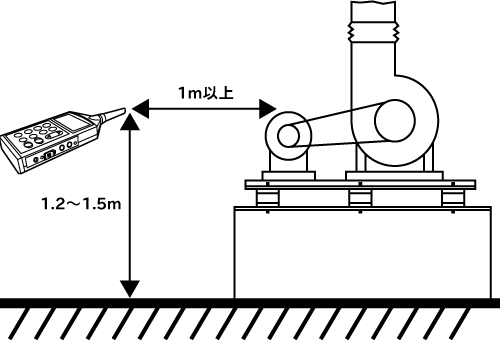
Measurement should begin after the sound level meter's microphone is positioned at the same height as a person's ear. As a guideline, this should be 1.2 to 1.5 meters above the ground and at least 1 meter away from the object being measured (see diagram). At this time, also keep it at least 1 meter away from walls to prevent reflections from affecting the measurement.
Furthermore, when measuring with a handheld sound level meter microphone, extend your arm as far as possible and position the sound level meter away from your body before starting the measurement.
For detailed information on how to measure noise/sound pressure levels, please also refer to "JIS Z 8731 Noise Level Measurement Method".
【Note】
- If wind is a factor, we recommend taking measurements with a windbreak screen installed.
- If acoustic influences such as reflections from the sound level meter itself or the person taking the measurement need to be considered, we recommend using a tripod and extension cable.
Noise/sound pressure level measurement procedure
This section describes the most basic procedures for measuring noise and sound pressure levels. Please read this section to understand the most important points in your measurements.
- Check the power supply.
Prepare the necessary power source for the sound level meter (dry cell batteries or AC adapter) and confirm that the sound level meter is in working order.
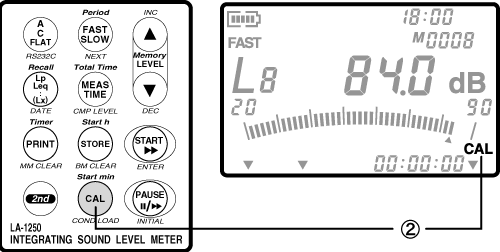
- Run the noise meter calibration.
To obtain accurate measurements, it is recommended to regularly calibration a noise meter. For more details, please refer to the aforementioned 'Chapter 3: Setting Measurement Conditions / 3. calibration of Noise Meters.'
- Set the frequency response.
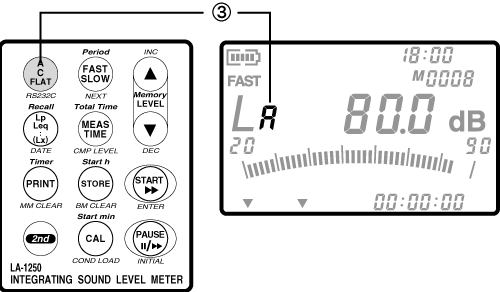
Press the panel switch [A/C/FLAT] to switch the frequency response.
Switch to A for noise measurement.
For example, switch to C when recording AC output, and to FLAT when measuring sound pressure. For details, please refer to "Chapter 3 Setting Measurement Conditions / 4. Setting Frequency Correction Characteristics" mentioned above.
- Set the dynamic characteristics.
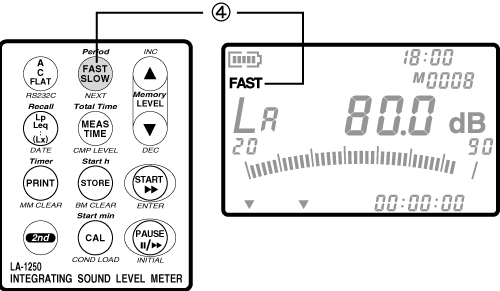
Press the panel switch [FAST/SLOW] to switch the dynamic characteristics.
Switch to FAST for normal measurements.
FAST is a value that approximates the time response of the ear. SLOW is used for a simple measurement of the average level of fluctuating noise. For details, please refer to "Chapter 3 Setting Measurement Conditions / 5. Setting Dynamic Characteristics" mentioned above.
- Set the range.
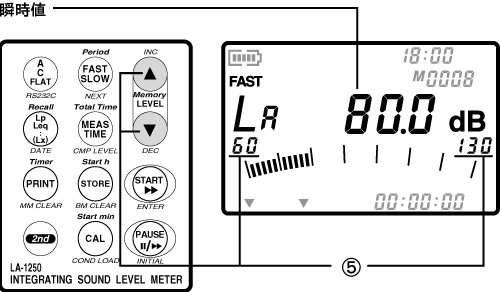
Press the panel switch [LEVEL (▲・▼)] to switch to a range value where OVER or UNDER is not displayed.
The value displayed after completing the above steps (① to ⑤) is the instantaneous value.
The following are general guidelines for different levels. Please refer to them when switching between range values.
| Jet engine | Approximately 130 dB (A) |
|---|---|
| Car horn | Approximately 100dB (A) |
| telephone bell | Approximately 80 dB (A) |
| Quiet residential area | Approximately 40 dB (A) |
For further details, please refer to "Chapter 3 Setting Measurement Conditions / 6. Setting the Level Range" mentioned above.
Last updated: 2002-01-09