

XN-8000 Frequently Asked Questions
Question number FAQ-1118
explanation of calibration items
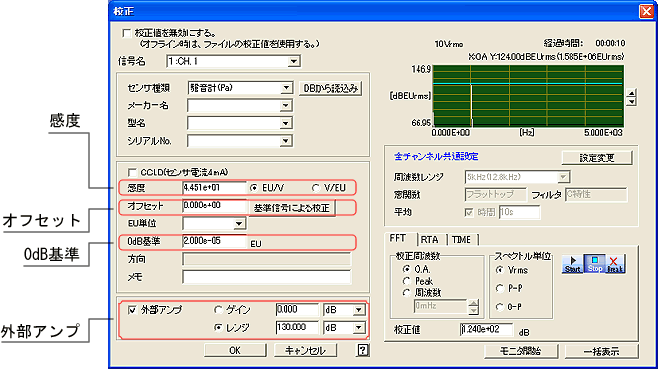
■ Sensitivity
- If EU/V is enabled
Set the physical value per V. For example, if the voltage sensitivity of Accelerometer is 100 m/s 2 /V, the setting value is "100" - When V/EU is on
Set the voltage value per physical unit. For example, if Accelerometer has a voltage sensitivity of 10mV/m/s 2, the set value is "0.01"
Offset
Add the set value to the calibration result as shown in the following formula.
Physical quantity = Sensitivity × Signal voltage (V) + Offset
0dB reference
This is the reference value when converting to logarithmic (dB).
The dB conversion formula is as follows.
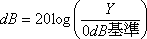 Y: Measured Value
The reference value of 0 dB is as follows in terms of sound and vibration levels.
- Sound: 2.00E-5 Pa
- Vibration level: 1.00E-5 m/s 2
External Amplifier
calibration Used to change the gain or range of an external amplifier both when and during actual measurement. Both gain and range have the same function. "dB" is easier to understand when combined with the name of the external amplifier.
Example: Usage method of a sound level meter.
- Turn on the external amplifier checkbox (check it). Set the range of the sound level meter during calibration. For example, input '130dB' into the range.
- sound level meter will calibration with them.
Measurement
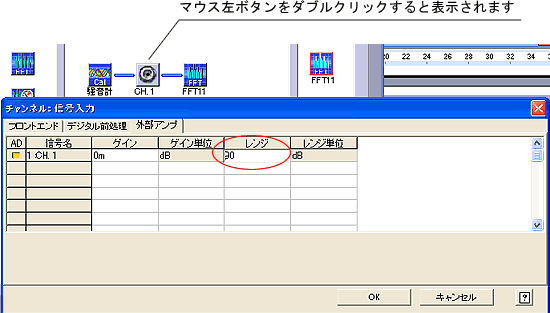
Set the range of the sound level meter to '130dB' during calibration, and when measuring, set the range to '90dB'. In the diagram below, set the range to '90' in the 'Channel: External Amplifier for Signal Input'. This will correct the measurement values according to the range change and display them accurately.
Last updated: June 19, 2006