

XN-8000 Frequently Asked Questions
Question number FAQ-1103
Even though I specify the frequency response function in the graph display data settings, the data is not displayed.
In the analysis function settings, please set the cross-calculation mode to single master. If you are using a combination of multiple master signals, please select multi-master.
■ Cross-operation settings
This function performs calculations to analyze the relationship between two channels and calculates the cross-spectrum (Ver. 2.00 and later).
Click the "Config Board → FFT icon" to open the [Baseband FFT] dialog box and configure the settings.
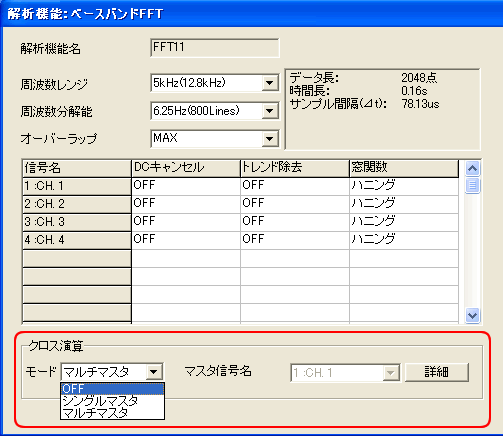
| mode | OFF | No cross-operation will be performed. |
| Single Master | Designate one channel as the master channel and calculate the crossover between the other channels. | |
| Multi-Master | Perform a cross-processing operation by specifying multiple master channels. | |
| Master signal name | When using a single master, specify the master channel (reference). | |
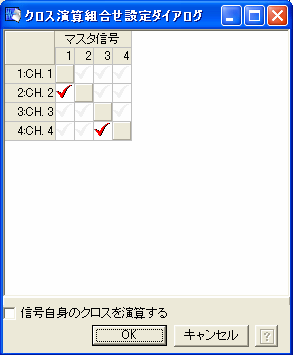
| detail | When you select multi-master, you can set which channel is designated as the master channel and which other channels it will cross-process. The following settings use Ch1 and Ch3 as the master channels. Cross-channel operations are performed between Ch1 and Ch2, and between Ch3 and Ch4.
|
Last updated: 2006-12-18