

XN-8000 Frequently Asked Questions
Question number FAQ-1099
The "External Amplifier" setting appears in both the "calibration" dialog and the "Channel: Signal Input" dialog. What is the relationship between them?
When calibration with external devices (such as sensor amplifiers or sound level meters) connected to the input signal, it may be necessary to change the gain or range of the external device between calibration and measurement. In this case:
The gain and range of the external device during calibration are set in the "calibration → External Amplifier" dialog, and the gain and range of the external device during measurement are set in the "Channel: Signal Input → External Amplifier" dialog.
Set to ;
For example, when analyzing noise frequency with a sound level meter, it is useful to use this when you input a reference sound pressure of 124 dBspl from an acoustic calibration during calibration, set the sound level meter to the "130 dB" range for calibration, and then use the "80 dB" range during measurement.
■ Operating Procedure
In the "calibration- External Amplifier" dialog box, set the range of the sound level meter for calibration. Then, input the reference signal (calibration signal) and perform the "calibration-calibration using Reference Signal" operation.
To open the "calibration" dialog box, follow the numbered steps shown in the diagram below. In the diagram, the level range for calibration of the sound level meter is 130 dB, so this range is set to "External Amplifier: 130 dB" in the "calibration" dialog box. The screen also shows the calibration screen opened after pressing the "[calibration with Reference Signal]" button.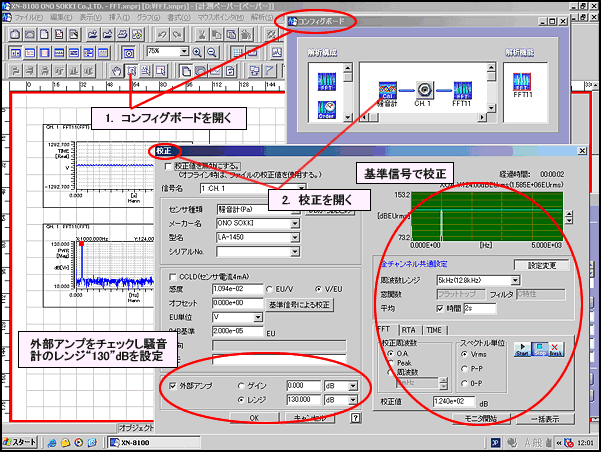
The "calibration" dialog box screenIf you change the range of the sound level meter to perform a measurement, set the gain and range in the "Channel: Signal Input → External Amplifier" dialog box. This will automatically correct the XN8100 to the range used for the sound level meter measurement. For detailed instructions, please refer to "calibration Method with Sound calibration Meter Using Acoustic Calibrator".
To open "Channel: Signal Input → External Amplifier," follow the numbered steps in the diagram below. Although the sound level meter was calibration at a range of "130dB," if you change the sound level meter range to "80dB" during measurement, set the range to "80" and the range unit to "dB" on the "External Amplifier" page of the "Channel: Signal Input" dialog. The process is shown below.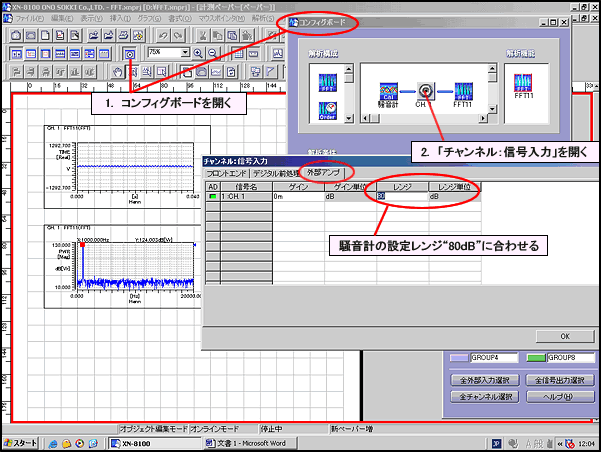
The screen of the "Channel: Signal Input → External Amplifier" dialog box.
Last updated: 2006-08-21