

XN-8000 Frequently Asked Questions
Question number FAQ-1090
What is the frequency range of the ORF file created when saving record data?
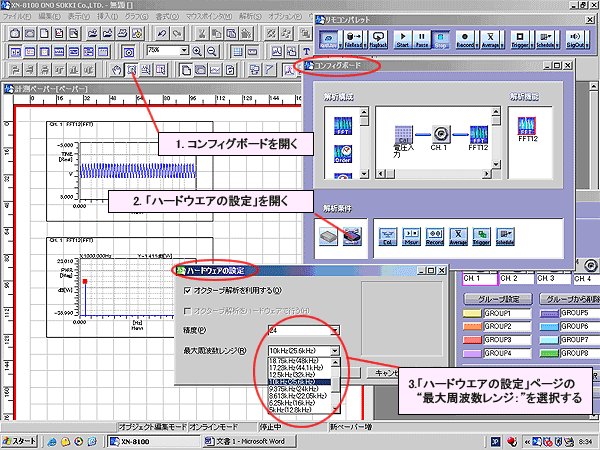
This refers to the "Maximum Frequency Range" specified in the "Hardware Settings" dialog box for the config board's analysis conditions. Please note that this is not the frequency range set in the "Baseband FFT Analysis Function".
■ How to change the "maximum frequency range" of an ORF file
Connect the DS-2100 series hardware before proceeding. Changes cannot be made if the hardware is not connected.
- Click the [Config Board] button.
- Click the "Analysis Conditions" item in the [Config Board] dialog box.
- Select the maximum frequency range in the [Hardware Settings] dialog box.
<Supplementary explanation>
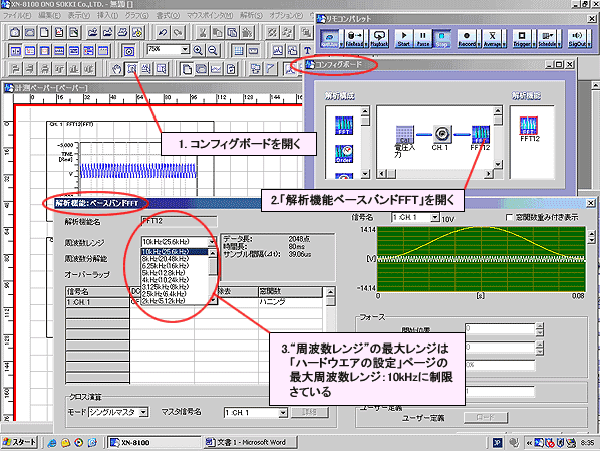
Analysis is not possible at frequencies beyond the maximum frequency range set in the "Hardware Settings" dialog box. The maximum frequency range that can be set in the "Frequency Range" section of the "Analysis Function Baseband FFT" dialog box is limited to the above. The figure below shows what happens when "Frequency Range: 10kHz (25.6kHz)" is set in the "Analysis Function Baseband FFT" dialog box.
Last updated: 2006-01-17