

DS-3000 Frequently Asked Questions
Question number FAQ-0730
How to check if FRAME LINK2 (4-chassis connection) is not working.
If FRAME LINK2 connection fails
Possible cause ①: Incompatible hardware
The enclosure or interface may not be compatible.
● Treatment
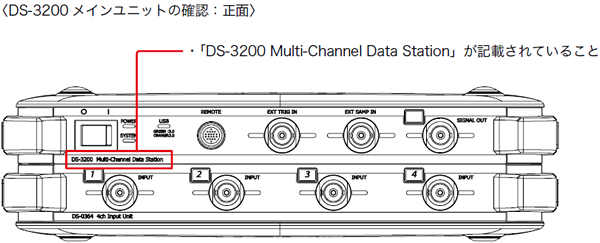
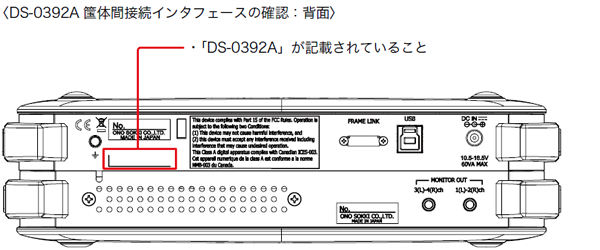
To use FRAME LINK2, you need hardware that meets the following requirements:
| Enclosure | DS-3200 Main Unit |
| Interface | DS-0392A Inter-enclosure connection interface |
Please refer to the following diagram to confirm that your hardware meets the requirements for using FRAME LINK2.
Possible cause ②: Connection cable not connected
The AX-9035/9036 inter-unit connection cable or the AX-9041 USB connection cable may not be connected (disconnected).
● Treatment
Please ensure that the AX-9035/9036 inter-cabinet connection cable or the AX-9041 USB connection cable is properly connected.
Possible cause ③: Incorrect method of connecting the enclosure.
The enclosure (DS-3200 main unit) may not be connected correctly.
● Treatment
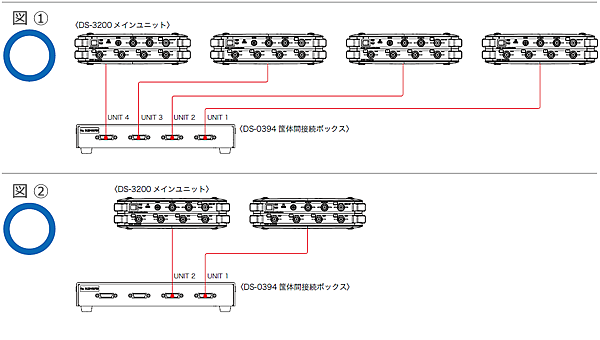
The enclosure (DS-3200 main unit) is connected in order from UNIT1 on the DS-0394 inter-enclosure connection box.
Connect them in the following order: UNIT 1 → UNIT 2 → UNIT 3 → UNIT 4.
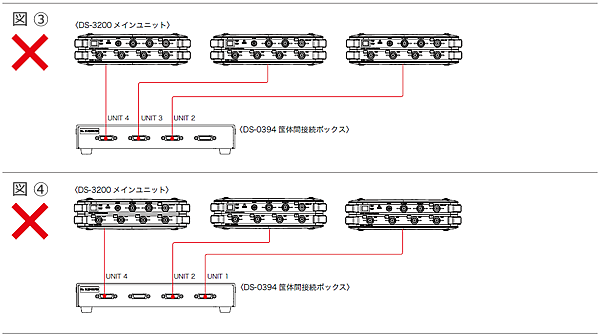
If you leave a gap in the starting number of the connection or skip a number in the sequence, the FRAME LINK2 connection will fail.
Figures ① and ② below show examples of the correct connection method.
When connecting four or fewer units, connect them in order starting from UNIT 1.
Figures ③ and ④ below show examples of incorrect connections.
When connecting three or fewer enclosures, the following diagram ③ does not show them connected in order from UNIT 1.
Also, in the next diagram ④, the connections are made with a gap in between.
Last updated: 2018-02-21