

DS-2000 Frequently Asked Questions
Question number FAQ-0665
A method for treating Fourier spectrum inverse transform (IFFT) data as a time waveform.
The inverse transform (IFFT) display data is saved in text format. This file cannot be displayed as time waveform data directly. To make it usable as a time waveform, please follow the steps below.
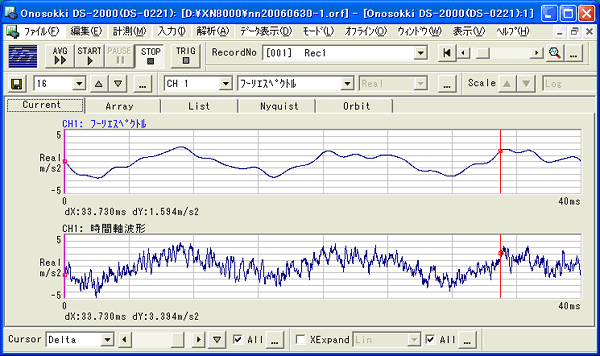
Top screen: Data after bandwidth-limited IFFT Bottom screen: Original data
■Operating Procedure
- Click "Save Display Data" in the File menu.
- Select the file type "Text File (*.txt)" and execute.
- Open the saved text file with Notepad;
Convert the "Fourier spectrum" to a "time waveform".
Change "IFFT" to "Time".
Please rewrite each one. Be careful not to make any mistakes with the characters.
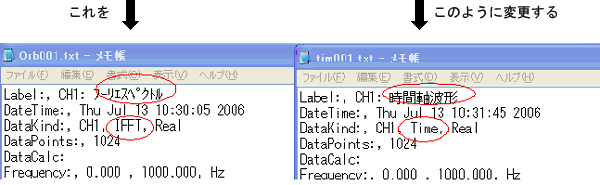
This will now be recognized as a time waveform.
Opening the modified file using "Open Data" from the File menu will display it as a time waveform.
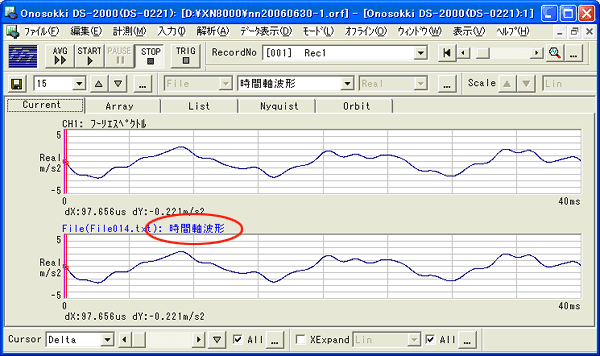
Top screen: Original IFFT data. Bottom screen: TXT data after saving, editing, and playback.
supplement
Similarly, Hilbert transform data can be opened as a time waveform. However, make sure to set the Y-axis to Lin when saving.
Last updated: 2006-07-18