本文にスキップする

Select your region & language

Global

Region

Sound and Vibration Analysis System O-Solution DS-5000
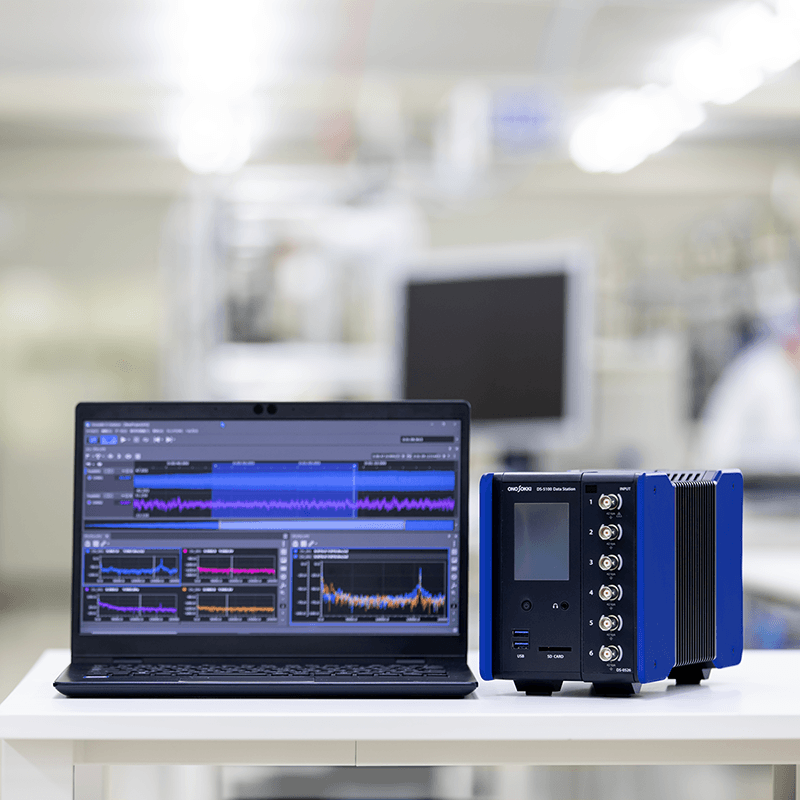
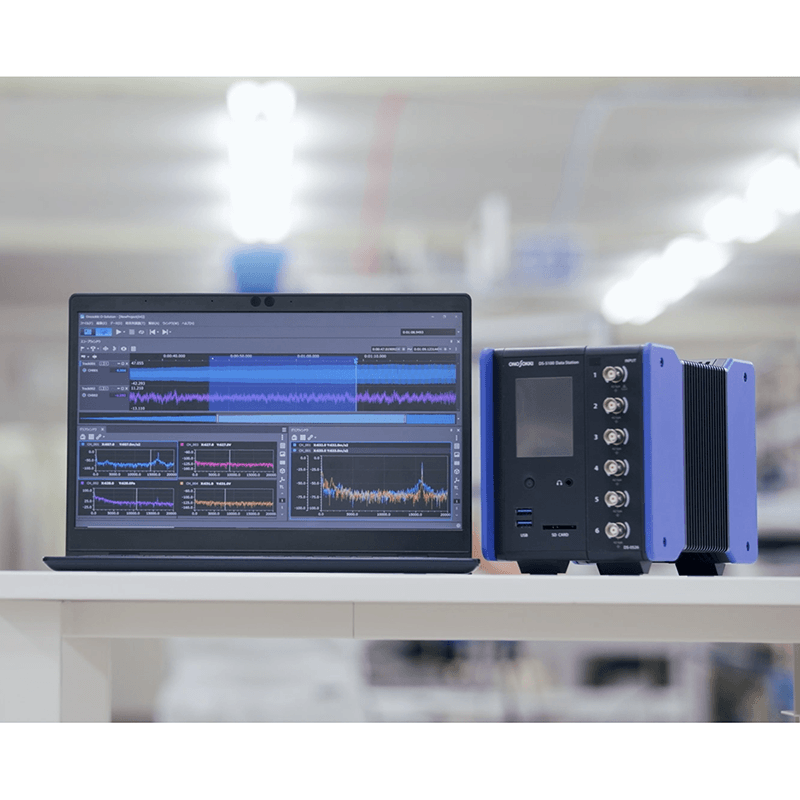
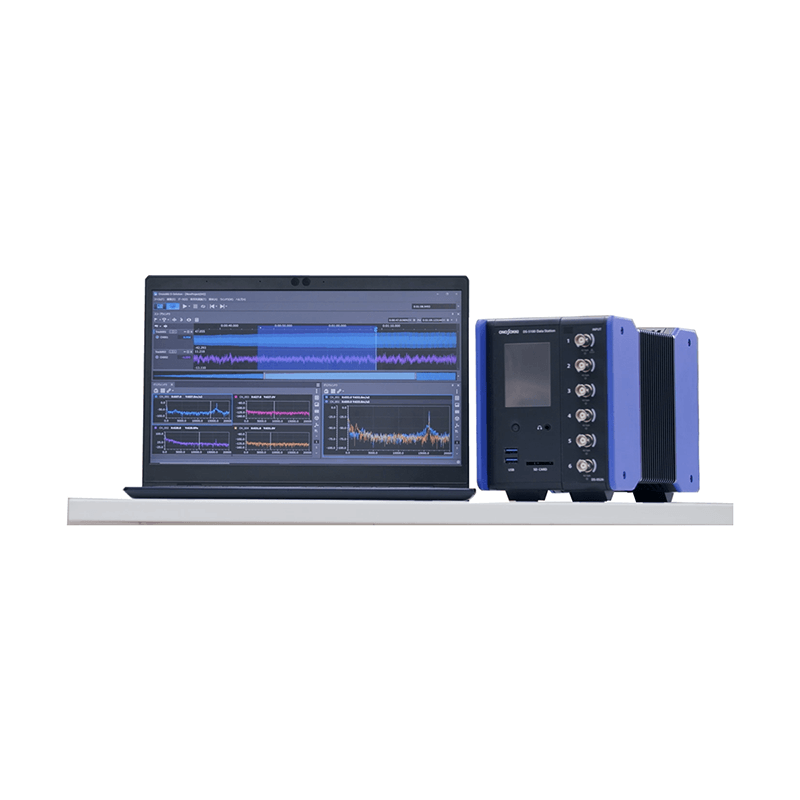
Leveraging our digital signal processing technology cultivated over more than 40 years and feedback from customers in various fields, we have released the O-Solution DS-5000 Sound and Vibration Analysis System, based on the concept of "anywhere, instantly, and easily."

"Anywhere" Compact and lightweight, battery-powered, and features noise-resistant isolation.
Switch between measurement and analysis with a single click and quickly check your data.
"Easily" automate processes with external control functions.

It enables highly accurate measurement and analysis.

characteristics

Conceptual diagram of O-Solution integrating the DS-3000 series and OS-2000 series

Software

O-Solution integrates the real-time measurement software DS-3000 series and the time-series data analysis software OS-2000 series.
It features a measurement mode for use when connected to the DS-5000, and an analysis mode for editing recorded data and performing detailed analysis, allowing you to switch modes with a single click.

From DS-3000 (upper) to DS-5000 (lower)

hardware

The DS-5000 is a further miniaturization of the conventional model DS-3000, supporting multi-channel measurement (up to 240 ch).
It features hardware that is strong against noise with full channel isolation (insulation).

O-Solution (software)

1. Features of O-Solution

Integrated measurement and analysis software

O-Solution is equipped with "Measurement Mode" and "Analysis Mode."
Since you can switch modes with one click, you can smoothly transition from experiments and measurements to post-recording analysis, reducing the chances of operational errors.

  • Left: O-Solution Measurement Mode Right: O-Solution Analysis Mode
    Left: O-Solution Measurement Mode Right: O-Solution Analysis Mode
Measurement Mode

Connect to the DS-5000 to record time series data of vibrations and noise, and perform frequency analysis and tracking analysis in real time.
It is suitable for measuring natural frequencies using exciters or impulse hammers, as well as for measuring rotating machinery.

Analysis Mode

Editing and analyzing the collected time series data.
You can freely manipulate large volumes of time series data and display or overlay data in different formats simultaneously.
It is suitable for more detailed analysis after real-time measurements or for analyzing transient phenomena.

A wide range of applications

The basic data processing functions operate on the platform. The main options can be combined according to the application.
With external control functions, device integration becomes possible.
License-free viewer functionality allows for verification anywhere with anyone using O-Solution Lite.

Applications available in each mode

The features available in the application change depending on the mode.

Specification comparison with OS-2000 series (time-series data analysis software)

  OS-2000 O-Solution Remarks
Corresponding sampling frequency 0.01 Hz to 20 MHz 10 μHz to 100 GHz Supports various data.
number of analyzed data up to 4 data up to 1,000 data the number of data that can be analyzed in one operation
number of output files 1 file up to 1,000 files Number of files that can be output in one operation.
data size 2 GB 1 TB Support for large capacity data
multithreaded processing ✕ ◯ Parallelization of analysis tasks
external control function ✕ ◯ Automation of analysis tasks

2. Application

Viewer O-Solution Lite

It is a license-free viewer function that anyone can use.

  • Viewer O-Solution Lite usage image
Feature 1: Easy data sharing

You can provide files that contain measurement data and analysis results saved with O-Solution to stakeholders, and easily share data by using O-Solution Lite.

Feature 2: Data acquisition using DS-5000

By using O-Solution Lite and DS-5000 (Data Station), they can be utilized as a 'data logger'.

Feature 3: Downloadable from Ono Sokki 's website.

Anyone can download it and use it immediately.

Platform OS-5100

This is software that allows for the free editing and analysis of large and high-capacity time series data. By adding optional features, various analysis results can be obtained.

Various window layouts can be freely changed.
Freely customize the screen layout

You can change the display positions of various windows in the docking window to your preferred layout.

An image of a data manager that lists, searches, and filters multiple data lists.
Data management made easy

O-Solution manages measurement and analysis conditions and acquired data collectively within a project. The data manager allows for a list view of the data, and the search and sorting functions make it easy to compare multiple conditions and channels.

Measurement Mode

A screen displaying a time waveform in the monitor window, confirming the measurement conditions.
The reassurance of being able to see the waveform. A monitor window that lets you understand the measurement status.

A newly equipped monitor window displays the time waveform (for 10 seconds).
You can set and measure while observing the time waveform.

Small channel and multi-channel level monitor screens.
Don't miss out on range

You can change the level monitor screen according to the number of channels and units.

Multi-analysis reduces work time

It is possible to analyze two things simultaneously while recording.

  • Examples of combinations in multi-analysis.

*Simultaneous analysis with the following combinations is not possible.
・Octave + Tracking + REC

Image of the operation of the automatic calibration function.
Reduce calibration time

By using the automatic calibration function, you can shorten work time.

Screen of the numerical magnification display function.
Enlarged numeric display

By enlarging the measurement value of interest, you can confirm the numbers more clearly.

Quick Access Window
Quick Access Window

You can display frequently used operations such as starting a trigger or measurement as large shortcut buttons on the screen. The buttons can also be registered with keyboard shortcut keys. Additionally, if you have the external control function (OS-0510), you can assign repetitive operations to a single button.

Change the analysis conditions and analysis intervals in replay analysis for re-analysis.
Replay Analysis

In measurement mode, you can reanalyze the collected time-series data. You can repeatedly perform preliminary analyses before transitioning to analysis mode, which improves the efficiency of determining analysis conditions.

Measurement Condition List and Analysis Condition List
Measurement condition list/Analysis condition list

You can switch the measurement conditions that have been pre-registered in the list with a single click. This improves work efficiency when there are multiple fixed measurement methods, such as in standard tests. Similarly, the analysis conditions for post-analysis can also be switched with one click.

Registering favorites for graph settings items.
Adding graph settings to favorites

O-Solution provides various settings for graphs, such as scale settings and auxiliary units. By allowing users to register frequently used settings as favorites, it helps prevent operational errors and improves the efficiency of analysis tasks.

Analysis Mode

Data comparison makes it easier to understand physical phenomena

You can freely display various physical quantities (vibration, rotational speed, torque, temperature, etc.) in different formats and sampling frequencies, allowing for simultaneous display, arrangement, and overlay.

  • Example of a screen displaying data in different formats in analysis mode.
  • Example of a screen displaying data with different sampling frequencies in analysis mode.
Example screen for adding markers to long-duration recorded data and specifying the analysis range.
Analyze only the areas of interest with the marker function

You can add markers to the recorded data of long duration at points of interest. You can also set the analysis range based on those markers.
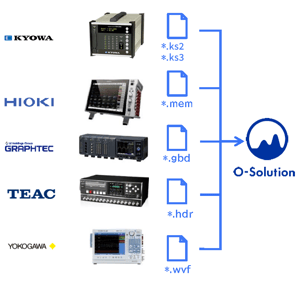
A diagram showing the ability to import data files from various logger manufacturers into O-Solution for analysis.
Directly read files from Logger Maker

You can import and analyze data from various logger manufacturers and Excel data.

Importing an OS-2000 project file

In data verification work on measurement and control benches for automotive development, the OS-2000 series has been used to compare multiple time-series data sets. With O-Solution, you can import the vast amount of measurement data within an OS-2000 series project directly into O-Solution (only restoration of time-series waveforms is supported).

  • Importing an OS-2000 project file
Importer

You can choose to either copy the time series data files into the project file or reference them without copying. If you choose to reference, you can reduce the import time of the files and decrease the size of the project file.

In the case of a file with 96 characters and a recording time of 10 minutes.

Import method for time series data Import time
Copy to the project 296 seconds
Do not copy to the project (reference) 120 seconds ※

* Only orfx files are applicable.
* If the path of the referenced file changes, re-import is necessary.

File merge function
File merging function

You can consolidate any specific channel from multiple recorded data into a single file. By compiling only the data you want to analyze into one file, you can efficiently perform sound comparisons and data comparisons.

Optional Software

We have prepared option software that caters to various uses.

Digital filter function: OS-0521

Quickly find the frequency band of abnormal noise

This function allows you to quickly find the frequency band by applying IIR filters or FIR filters to the recorded data and listening to it when abnormal noise or vibration issues occur. You can also generate new time series data with the applied filters.
It can apply filters simultaneously to the order and frequency, which is useful for investigating abnormal noise in rotating bodies.

FIR filter

  • FIR filter screen

IIR filter

  • IIR Filter Parametric Equalizer Screen
  • IIR filter graphic equalizer screen

FFT analysis function: OS-0522

I want to understand the frequency components and resonance frequencies of vibrations and sounds from structures such as machines and parts.

The most basic function used to observe vibrations, sound levels, and resonance phenomena in detail by decomposing the waveform of the time axis into frequency components. Power spectrum, frequency response function, coherence function, etc., can be calculated.
In conjunction with FFT analysis, octave analysis and tracking analysis can also be measured in real time.
* Tracking analysis function (OS-0523) and octave analysis function (OS-0524) are required for simultaneous measurement.

  • time-domain waveform, power spectrum, frequency response function, coherence
  • power spectrum
I want to check the amplitude of displacement and velocity from acceleration data (Tripartite graph)

It can display a tripartite graph *1 and simultaneously read the frequency (Hz) and three amplitude values (acceleration (m/s 2)/velocity (m/s)/displacement (m)) in real time. It is useful for evaluating floor vibrations when installing precision equipment.

By displaying the VC curve *2, you can quickly assess the allowable vibration standards and installation environment evaluations for vibration-sensitive precision instruments such as semiconductor manufacturing equipment, AFM (Atomic Force Microscopes), electron microscopes, and laser interferometers.

*1 The tripartite graph is a graph that can simultaneously read the amplitudes of acceleration (m/s 2), displacement (m), based on speed (m/s) on the frequency (Hz) axis.


*2 VC curves (Vibration Criterion Curves) are the vibration tolerance reference lines for floors where precision equipment such as semiconductor manufacturing equipment and electron microscopes are installed. They are proposed as a standard for the micro-vibrations that can be tolerated when installing precision machinery. When using VC curves, evaluation is performed in a 1/3 octave bandwidth, and the standard is divided into 7 stages (VC-A, VC-B, VC-C, VC-D, VC-E, VC-F, VC-G) in 6 dB increments, and is divided into guidelines for applications ranging from optical microscopes to laser devices with long optical path lengths.


  • Power Spectrum Diagram of a Tripartite Graph
  • 1/3 Octave Diagram of a Tripartite Graph

Tracking analysis function: OS-0523

I want to understand the acoustic and vibration characteristics of rotating equipment.

This function allows you to understand at which rotational speed each harmonic component generated by rotating bodies such as motors and generators becomes significant. It supports not only constant ratio and constant width tracking analysis but also offset tracking.
Simultaneous FFT analysis can also be measured in real-time along with tracking analysis.
* The FFT analysis function (OS-0522) is required for simultaneous measurement.

  • Tracking diagram
  • Constant Ratio Tracking Analysis Diagram
  • Fixed Width Tracking Analysis Diagram
I want to check the order trend of a rotating machine that cannot be swept.

By combining multiple datasets measured at specific rotational speeds, tracking analysis data can be created (integration of rotational speed reference data). Even without sweep operation, sequential measurements at constant rotational speeds can efficiently identify problematic orders within the range of rotational speeds.

  • Bundle the analysis data based on rotational speed to create tracking analysis data.

Octave analysis function: OS-0524

I want to measure environmental noise and vibration

The human ear has a logarithmic characteristic to frequency, and octave analysis is an analysis that is well-suited to this ear characteristic. It is often used when understanding noise levels, vibration levels, and for measurements in accordance with ISO and JIS standards.
With the multi-analysis function, it is possible to measure FFT analysis and octave analysis simultaneously.
In measurement mode (real-time measurement), octave analysis of 1/1, 1/3, 1/6, 1/12, 1/16, and 1/24 is possible.

  • Octave analysis result image No.1
  • Octave analysis result image No.2
  • Octave analysis result image No. 3
  • Octave analysis result image No. 4

Sound power level: OS-0541

Compliant with standards applicable to various objects

While the general noise level can vary due to the distance from the noise source and the testing environment, the acoustic power level is determined unambiguously by the noise source itself. Therefore, it serves as a global indicator used in environmental labels (Eco Mark, Blue Angel) and noise regulations. The measurement methods are defined by international standards. The O-Solution DS-5000 allows for compliant measurements and easy verification of sound sources and frequency peaks, enabling efficient noise control.

Information technology equipment option: OS-0542

Compliant with individual standards for office equipment

The measurement of radiated sound from computers, printers, and multifunction devices is defined by the individual standard ISO 7779. This individual standard is referenced for obtaining environmental labels. In addition to sound power levels, it calculates the radiated sound pressure levels at the operator position or bystander position, and significant discrete sounds as necessary.

Sound quality evaluation function: OS-0525

Sound quality evaluation that takes into account human hearing characteristics

Generally, the measures and evaluations of sound generated by equipment are based on sound pressure levels, FFT analysis, 1/3 octave analysis, and so on.
However, such analyses do not take into account human auditory characteristics, and the impression of the sound can differ even with the same results.
Additionally, when a person hears sound, various sensations arise regarding the sound, such as "loudness," "sharpness," and "roughness."
With the OS-0525 sound quality evaluation function, it is possible to obtain sound quality evaluation indices that correspond to various sensations related to sound, considering human auditory characteristics such as "loudness," "sharpness," "roughness," "temporal variation," and "tonality."

Fluctuation sound analysis function: OS-0526

Evaluating time-varying sounds

Although the volume of sound is not particularly loud, there are many "annoying sounds" in the world. These include noises from interior parts of cars, such as "clattering" and "buzzing," which can occasionally be heard while driving, as well as unusual sounds like the "humming" mixed with the rotation noise of small motors. Sounds with significant temporal fluctuations often feel bothersome even if their volume (level) is not very high. The time-varying sound analysis function OS-0526 can extract only the large components of time variation that are not influenced by level, allowing for the quantification of various characteristics of time-varying sounds that were difficult to detect with roughness or fluctuation intensity. Additionally, it features a function to compare sounds with fluctuations to those without (fluctuating sound simulator).

Time-frequency analysis function: OS-0527

Evaluating transient phenomena

FFT analysis can evaluate transient phenomena that are difficult to capture. It can clearly display the time variation of frequency components while maintaining frequency resolution. It is equipped with short-time Fourier transform and wavelet transform.

Statistical analysis function: OS-0531

Various statistical analyses in one window

By performing bivariate analysis of command values and feedback values, various statistical analyses, including the calculation of correlation coefficients, can be done in a single window.

Statistical Analysis Function

Basic Statistical Analysis
Histogram, Autocorrelation Function, Normal Probability Plot

Bivariate Analysis
Scatter Plot, Cross-Correlation Function, Stereogram, Interval Statistics

Trivariate Analysis
3D Scatter Plot, 3D Interval Statistics

Video playback function: OS-0532

I want to understand the phenomenon while observing the behavior of the target object.

You can import video files recorded with video cameras or smartphones into O-Solution and play them back along with analysis results such as sound and vibration. By displaying the video alongside time-series data and FFT analysis results, it helps in understanding phenomena in parts that may cause issues during the operation of the subject.
Since audio data from smartphones can also be analyzed, it can be utilized for frequency analysis of video files sent from field workers, for example.

The audio data obtained from smartphones cannot be calibrated or converted to accurate decibel (dB) values without calibration data. Please treat the amplitude values as reference values only.

  • Motor speed command, arm vibration, large vibrations when the motor decelerates.
Importable video file formats

AVI files / MP4 files / MOV files / WMV files / M4A files

* Video data can be displayed rotated vertically or horizontally (fine adjustments are also possible)
* If the starting positions of the data recorded with the DS-5000 and the video data are misaligned, it is possible to align the positions for each data using the time series alignment function.
* For details on supported codecs, please check the specifications.

Changes in road noise due to differences in road surface.

Frequency analysis and fatigue life estimation: OS-0533

I want to analyze strain and stress data.

Automobiles, machinery, structures, and other objects are subjected to irregularly changing fluctuating loads. To accurately capture phenomena such as stress and vibration that change over time, it is necessary to understand their frequency distribution and correlations. Frequency analysis is effective when you want to understand the magnitude and frequency (number of occurrences) of a particular stress or vibration during long-term measurements.

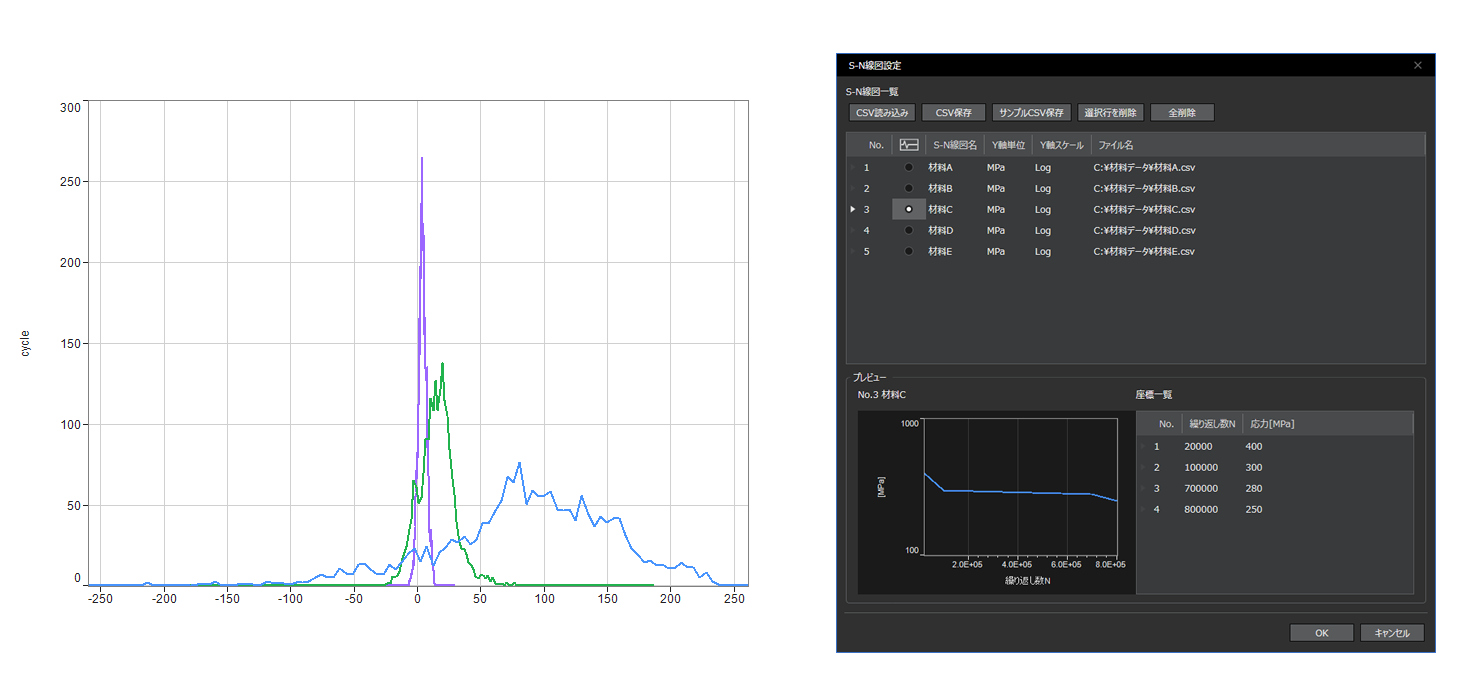
The frequency analysis and fatigue life estimation function analyzes the occurrence frequency (count) for each stress amplitude in each channel and can output it as a graph or CSV file. Furthermore, by combining it with an S/N diagram (material fatigue characteristics), it is possible to calculate the degree of damage at each stress level and the total cumulative damage using linear cumulative damage laws such as Minor's law and modified Minor's law, and to consistently estimate the fatigue life, which is useful for evaluating the durability and safety of products.

  • Frequency analysis and fatigue life estimation: OS-0533
The following analysis methods are available:

Frequency analysis: Extreme value method / Maximum value method / Minimum value method / Maximum/Minimum value method / Rainflow method / Amplitude method
Linear cumulative damage law: Minor's law / Modified Minor's law

Field Balancing: OS-0551

I want to perform balance adjustments on-site for rotating equipment.

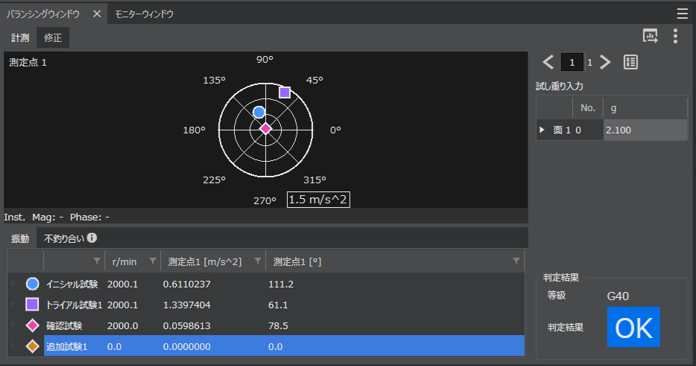
By performing on-site balance adjustments without disassembling rotating machinery, vibration and noise can be reduced, extending the lifespan of the equipment and maintaining its performance.
By combining it with other optional functions such as frequency response analysis and tracking analysis, it can help investigate and clarify the root cause of the entire vibration problem.

  • Field Balancing: OS-0551

External control function: OS-0510

Want to save time by automating repetitive tasks?
I want to use it as a product inspection device

By using the O-Step API library for external control functions of O-Solution, you can communicate via TCP/IP with the software created by the customer.

Image of TCP/IP communication between O-Step API and user application.

Example 1:
Capable of automatic measurement, analysis, and storage of large data, saving time

Example 2:
Incorporated as an NV evaluation function for testing equipment

※Supported languages
C#, Python, MATLAB, LabVIEW, C++, VBA

Demonstration of external control.

DS-5000 Hardware Control Library: DS-0511

I want to control the DS-5000 directly.

You can obtain time series data and more in real time from the DS-5000 hardware without going through O-Solution.
If you are considering this, please contact us.

Hardware connecting function: OS-0512

I want to measure in real time

By using the hardware connection function (OS-0512), you can connect to the DS-5000 and utilize the FFT analysis function, tracking analysis function, and octave analysis function in measurement mode.

  • A scene of performing real-time analyses such as FFT analysis and tracking analysis.

3. License Type

4. Operating environment

The DS-5000 series data station can be connected to personal computers that meet the following specifications.

Specifications

common specifications
mandatory interface LAN port 1000base-T, TCP/IPv6
OS Microsoft® Windows® 10 Pro (64-bit version)
Microsoft® Windows® 11 Pro (64-bit version)
Microsoft® Windows® 11 Enterprise LTSC (64-bit version) ※
  • For details about the version, please refer to Software Environment 【Windows】.
  • When using compatibility mode or Microsoft® Virtual PC to launch the supported operating system, the operation of the software cannot be guaranteed.
  • Even if the OS environment is compatible, our software products may not function properly due to the influence of the customer's environment or peripheral devices.
  • Windows 11 Enterprise ※ has been tested in a Windows environment with standard settings (under standard policy settings).
    Operation in environments where security settings, group policy changes, or the introduction of third-party security software have altered the standard settings is not guaranteed. Therefore, support may be limited.
essential software

.NET Core 3.1 Desktop Runtime(〜Ver. 2.1.7)
.NET 6.0 Desktop Runtime(Ver. 3.0.0〜)
.NET 8.0 Desktop Runtime(Ver. 4.6.0〜)

  • Included in the O-Solution installer.
optical drive

DVD-R

  • During installation and updates using a DVD.
Recommended specifications: for measurement and data recording of 96 channels or less.
CPU

Intel Core i7 processors of the 8th generation and later

  • 4 cores and 8 threads or more, base clock frequency of 1.8 GHz or more
Memory more than 16 GB
storage

At least 32 GB of free disk space

  • When using an external HDD or SSD as a storage destination, a USB 3.2 (Gen1) / USB 3.1 (Gen1) / USB 3.0 port is required.
Display above 1920 × 1080
Recommended Specification ②: In the case of measurement and data recording of 96 channels or more.
CPU

Intel Core i7 processors of the 8th generation and later

  • 6 cores and 12 threads or more, base clock frequency of 2.5GHz or more
Memory more than 16 GB
storage

At least 32 GB of free disk space

  • When using an external HDD or SSD as a storage destination, a USB 3.2 (Gen1) / USB 3.1 (Gen1) / USB 3.0 port is required.
Display above 1920 × 1080
minimum specifications
CPU

Intel Core i5 processors of the 8th generation and later

  • 4 cores and 8 threads or more, base clock frequency of 1.6 GHz or more
Memory more than 8 GB
storage

Available disk space of 16GB or more.

  • When using an external HDD or SSD as a storage destination, a USB 3.2 (Gen1) / USB 3.1 (Gen1) / USB 3.0 port is required.

The minimum required specifications refer to the capability to record and measure up to 18 channels. For measurements with a larger number of channels, please be sure to use a personal computer with the recommended specifications.

Recommended specifications for server PC (network license)

Recommended Hardware
CPU 1.6 GHz or higher (Intel Xeon series recommended)
Memory 16-bit OS, more than 8GB
Hard disk more than 100 GB of free space
DVD drive for installation from DVD
Software Requirements
OS (64-bit) Windows Server 2019
Windows Server 2016
essential software .NET Core 6.0 Desktop Runtime

DS-5000 (hardware)

Features of DS-5000

  • Easy to connect even if small-sized.

    Easy to connect even if small-sized.

    We adopted a pitch that makes it easy to connect cables. Even with a compact body, connections can be made easily.

  • easy to notice measurement mistakes

    easy to notice measurement mistakes

    The connector features arc-shaped LEDs on both sides,
    allowing you to quickly notice channels that are over the range.

  • easy to carry

    easy to carry

    A concave bottom has been designed for easier transport. The shape makes it easy to install in places like tables, carts, and narrow spaces.

  • Battery-operated and can be measured anywhere.

    Battery-operated and can be measured anywhere.

    Measurements can be taken in various locations where power is not available, such as outdoors or in factories. With a 6-channel input unit, approximately 4 hours of measurement is possible.
    ※ The battery unit is optional.

    By equipping the power interlock function (DS-0502), the power supply of the control panel itself can be linked with the power supply of the DS-5000 main unit.
    ※ The installation of the battery unit (DS-0501) is required.

  • can be measured while listening to the sound.

    can be measured while listening to the sound.

    The main unit is equipped with a headphone monitor output connector. You can confirm the measurement signals from the input unit through sound.

  • less susceptible to external noise influence

    less susceptible to external noise influence

    Isolation has been adopted for each signal input channel. Measurements can be safely conducted even in environments or on objects where ground loop noise and potential differences are likely to occur.

Measurement system configuration can be tailored to your needs

It adopts a stack structure, allowing for unit configuration according to its application. A single unit can measure up to 48 channels. Up to 5 units can be connected to achieve multi-channel measurement.

  • Measurement system configuration tailored to your needs No.1
  • Measurement system configuration tailored to the purpose No.2

High-precision measurement without a PC; standalone recording function (from O-Solution Ver.3.0)

High-precision measurement without a PC Standalone recording function (from O-Solution Ver.3.0)

By importing the condition files (calibration values, voltage ranges, etc.) prepared in advance by O-Solution into the DS-5000, you can use the DS-5000 as a high-precision recorder without a PC.

It is convenient for situations where space for equipment is limited, such as in-vehicle measurements, sites where a PC cannot be brought in, and sites where the time for on-site measurements is limited.

  • Start recording immediately with the touch panel.

    Start recording immediately with the touch panel.

    You can easily start and stop recordings using the touch panel of the DS-5000.

  • Operation from smartphones and tablets.

    Operation from smartphones and tablets.

    To make it easier to check and change recordings and settings during standalone recording, we provide a remote control app for smartphones and tablets.

    The remote control app does not require installation and can be used as long as you have a web browser.

lineup

The DS-5000 series data station is a modular measurement system that can be configured according to applications and purposes by adding various units such as input and signal output units, batteries, and others, in the required quantities to the base DS-5100 main unit.

  • lineup
model name Product Name Remarks
DS-5100 main unit Equipped with a touch panel and LCD. Select the channel to listen to with headphones.
DS-0501 Battery Unit With the configuration of DS-5100 and DS-0526, it can be used for approximately 4 hours.
DS-0502 Power Supply Interlocking Function The DS-5000 will start up in conjunction with the installation of the power supply. *The DS-0501 battery unit is essential.
DS-0523 3ch 40 kHz Input Unit  
DS-0526 6ch 40 kHz Input Unit You can connect the 3-axis acceleration pickup without crossing units.
DS-0532 2ch 100 kHz Input Unit  
DS-0534 4ch 100 kHz Input Unit  
DS-0542 2ch External Input Unit  
DS-0543 2ch External Input & 1ch Signal Output Unit It is a convenient unit that integrates trigger input, rotation input, and signal output.
DS-0544 4ch External Input Unit  
DS-0545 2ch Signal Output Unit  

Outline Dimensions

  • Outline Dimensions

Specification comparison with DS-3000 (DS-3000 series)

  DS-3000 DS-5000 Remarks
Maximum measurement channel count 128 ch 240 ch Realizing multi-channel measurement.
maximum number of channels in the frame 32 ch 48 ch Realizing multi-channel measurement.
number of input channels for maximum rotation pulse 2 ch (2 ch: when connected between enclosures) 4 ch (10 ch: when connected between enclosures)  
Maximum number of hardware connections 4 frames 5 frames  
Hardware connection method star-shaped Daisy Chain Direct connection between enclosures is possible only with cables.
Recording performance 128 ch - 10 kHz 240 ch - 10 kHz  
Real-time rate performance 64 ch - 20 kHz 96 channels or more - 20 kHz  
dynamic range 110 dB 130 dB  
Inter-channel phase accuracy ±0.4 ° ±0.1 ° less than 20 kHz  
Temperature range 0~40 °C -10 to 50 °C  
DC power supply 15 V 10 to 24 V  
AC adapter two types one type  
Fan equipped with 5 or more stages Equipped with (silent)  

Hardware to Hardware Connection

By utilizing chassis interconnection, it is possible to temporarily build a multi-channel measurement system, effectively utilizing existing assets.
Up to 5 chassis can be connected.

Case 1

When an unexpected need for multi-channel measurement and analysis arises, the DS-5000 devices, which are usually allocated to each laboratory, can be interconnected to create a multi-channel measurement and analysis system.

  • Indirect Connection Case 1 No.1
  • Indirect Connection Case No. 2
  • Indirect Connection Case 1 No.3
Indirect Connection Case 1 No.4
  • Indirect Connection Case 1 No.5
  • When wanting to increase measurement efficiency using multiple channels.

  • When different measurements are needed during a trouble occurrence compared to normal operations.

  • When simultaneous multi-channel measurement is necessary during a transitional phenomenon.

Case 2

The sounds and vibrations that occur when closing a door are transient phenomena and are not reproducible. When simultaneous measurement is necessary for transient phenomena, interconnecting enclosures is effective. By connecting up to five enclosures with 48 channels each, a maximum measurement of 240 channels can be achieved.

model name Product Name quantity
DS-5100 main unit 5
DS-0526 6ch 40 kHz Input Unit 8x5
OS-5100 platform 1
OS-0522 FFT Analysis Function 1
OS-0512 Hardware Connecting Function 8x5
  • Indirect Connection Case 2 No.1
  • Indirect Connection Case 2 No.2

Case Studies

Measurement of sound power levels of office equipment in a semi-anechoic chamber

Measurement of acoustic power levels of office equipment in a semi-anechoic chamber.

Sound power levels are used in various industries, primarily for products equipped with motors and inverters. They are utilized for displaying operating noise in air conditioners and office equipment, and in recent years, they have expanded into the automotive parts and home appliance industries. By measuring according to standards, a more accurate understanding of the overall sound of the product can be achieved.

model name Product Name quantity
DS-5100 main unit 1
DS-0526 6ch 40 kHz Input Unit 2
OS-5100 platform 1
OS-0524 Octave Analysis Function 1
OS-0541 Sound Power Level Tool 1

Natural frequency and damping ratio measurement

Measurement of natural frequency and damping ratio

To understand the inherent vibration characteristics of structures such as machinery and automotive parts, measurements of frequency response functions can be conducted using impulse hammers and exciters. The half-width method and Hilbert transform can also be used to calculate damping ratios and logarithmic decrements.

model name Product Name quantity
DS-5100 main unit 1
DS-0526 6-channel 40kHz Input Unit 1
OS-5100 platform 1
OS-0522 FFT Analysis Function 1
OS-0512 Hardware Connecting Function 1

The above structure refers to the '6ch FFT set'.

Identifying the frequency band of abnormal noise from motors and office equipment

Identification of the frequency range of abnormal sounds in motors and office automation equipment.

When an abnormal sound issue occurs, it is necessary to identify the frequency band. By applying IIR or FIR filters to the recorded data and listening to it, the frequency band of the abnormal sound can be quickly found.

model name Product Name quantity
DS-5100 main unit 1
DS-0523 3-channel 40kHz Input Unit 1
OS-5100 platform 1
OS-0522 FFT Analysis Function 1
OS-0521 digital filter function 1
OS-0512 Hardware Connecting Function 1

The above is an example.

Identifying the cause of abnormal vibrations using a portable vibration meter

The Portable Vibration Meter VW-3100 can record measurements and inspections on-site. By returning to the office and importing the recorded data into O-Solution, you can listen to the sounds with filters applied and identify the causes of anomalies through FFT analysis.

  • Investigation of the causes of abnormal vibrations using a Portable Vibration Meter.
model name Product Name quantity
OS-5100 platform 1
OS-0521 digital filter function 1
OS-0522 FFT Analysis Function 1

Tracking analysis measurement of rotating equipment

Tracking Analysis Measurement of Rotating Machinery

Measurements can be made to understand at which rotational speeds the various harmonic components increase for sounds and vibrations generated by rotating bodies such as motors, generators, and transmissions. Tracking analysis of carrier noise based on the switching signals emitted by inverters (offset tracking) is also possible.

model name Product Name quantity
DS-5100 main unit 1
DS-0526 6-channel 40kHz Input Unit 1
DS-0542 2ch External Input Unit 1
OS-5100 platform 1
OS-0522 FFT Analysis Function 1
OS-0523 Tracking Analysis Function 1
OS-0512 Hardware Connecting Function 1

The above configuration is the '6ch tracking set'.

Torsional vibration measurement for motors, engines, etc.

Measurement of torsional vibrations in motors and engines.

Torsional vibrations in engine components such as the crankshaft and propeller shaft can cause issues like shaft damage and noise vibrations. Therefore, it is important to measure torsional vibrations and understand the phenomenon of torsional resonance.

model name Product Name quantity
DS-5100 main unit 1
DS-0526 6-channel 40kHz Input Unit 1
DS-0542 2ch External Input Unit 1
OS-5100 platform 1
OS-0522 FFT Analysis Function 1
OS-0523 Tracking Analysis Function 1
OS-0512 Hardware Connecting Function 1

The above configuration is the '6ch tracking set'.

Offset Tracking Analysis

In the automotive parts manufacturers where the electrification of components is progressing, measures are being taken to avoid the increase of the natural frequency and harmonic components of the parts themselves by intentionally varying the carrier frequency of the inverter, thus preventing the occurrence of unpleasant sounds. Offset tracking analysis is used to follow the changes in carrier frequency corresponding to rotation and perform harmonic ratio analysis.

Image of measurement results (fixed-width tracking analysis)

Measurement result image (constant width tracking analysis)

By specifying the offset frequency and the lower and upper limits of the rotation speed, it is possible to analyze specific orders even when the carrier frequency changes stepwise at a certain rotation speed.

model name Product Name quantity
DS-5100 main unit 1
DS-0526 6-channel 40 kHz Input Unit 1
DS-0542 2-channel External Input Unit 1
DS-0501 Battery Unit 1
DS-0502 Power Supply Interlocking Function 1
OS-5100 platform 1
OS-0522 FFT Analysis Function 1
OS-0523 Tracking Analysis Function 1
OS-0512 Hardware Connecting Function 1

Ultrasonic vibration measurement

Vibration measurement in the ultrasonic domain.

By using a 100 kHz unit and a Laser Doppler Vibrometer, it is possible to measure vibrations in the ultrasonic range for applications such as inverters, piezoelectric elements, MEMS, ultrasonic head parts of bonding machines, and ultrasonic cleaning tanks.

model name Product Name quantity
DS-5100 main unit 1
DS-0532 2-channel 100 kHz Input Unit 1
DS-0545 2-channel Signal Output Unit (*) 1
OS-5100 platform 1
OS-0522 FFT Analysis Function 1
OS-0512 Hardware Connecting Function 1

This is necessary when using a vibrator for measurements.

Outdoor/factory measurements, vehicle measurements

Outdoor and factory measurements, measurements during vehicle operation.

With a battery unit, it is possible to conduct vibration and acoustic measurements in locations where a power supply cannot be provided, such as outdoors or in factories.

model name Product Name quantity
DS-5100 main unit 1
DS-0526 6-channel 40 kHz Input Unit 1
DS-0501 Battery Unit 1

If the viewer function of O-Solution Lite is available, no license is required, and recording can be done on-site.

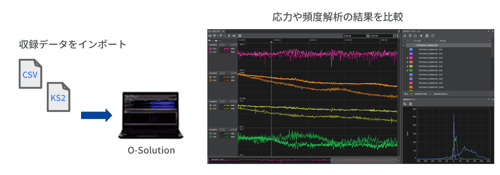
Frequency analysis

Comparing the results of stress and frequency analysis.

This method is effective for analyzing measured strain data obtained from test course driving tests to ensure the durability and reliability of vehicles, as well as from component vibration tests using vibration exciters.
By loading time-series data from a data logger into the software and performing stress transformation, frequency analysis, and fatigue life calculation in a series of steps, the stress applied to each part is accurately captured, and the degree of damage to the object is quantitatively evaluated from the measured data.

model name Product Name quantity
OS-5100 platform 1
OS-0533 Frequency Analysis and Fatigue Life Estimation 1

Visualization of structural vibration status

Visualization of structural vibration state

By combining O-Solution with ME's scope, it is possible to visualize the natural vibration frequencies and vibration shapes of structures such as motors and car bodies. By using a multi-channel configuration, simultaneous multi-point measurements can be conducted, greatly reducing measurement time.

model name Product Name quantity
DS-5100 main unit 2
DS-0526 6-channel 40 kHz Input Unit 7x2
DS-0545 2-channel Signal Output Unit 1
OS-5100 platform 1
OS-0522 FFT Analysis Function 1
OS-0512 Hardware Connecting Function 7x2
AX-9055 Enclosure indirect connection cable (3 m) 1
- LAN cable (for chassis interconnection) 1

* It is necessary when measuring using a shaker as shown in the example on the right.
* To perform modal analysis and actual operation analysis, the experimental modal analysis system software ME'scope is required separately. ME'scope is a product of System Plus Co., Ltd.

Measuring floor vibration and micro-vibration using tripartite graphs and VC curves

Measurement of floor vibrations and micro-vibrations using tripartite graphs and VC curves.

By using multiple sensors, it is possible to measure floor vibrations simultaneously at multiple locations. The measurement results are displayed in a tripartite diagram, and by also showing the VC curve, it enables quick reading of vibration values.

model name Product Name quantity
DS-5100 main unit 1
DS-0526 6-channel 40 kHz Input Unit 1
OS-5100 Platform 1
OS-0522 FFT Analysis Function 1
OS-0512 Hardware Connecting Function 1
NP-7320N10 Ultra-high sensitivity low noise
TEDS Tri-axial Accelerometer
2

Vehicle motion, evaluation of ride comfort

Connect the GPS speedometer to the IMU (Inertial Measurement Unit) to synchronize the measurement of vehicle speed and behavior.
It can be used for evaluating vehicle motion and ride comfort, which are gaining attention with the spread of autonomous driving.

Main measurement items

  • Vehicle motion, evaluation of ride comfort
  • Horizontal speed (vehicle speed)

  • 3-axis acceleration

  • three-axis angular velocity

  • pitch angle

model name Product Name quantity
LC-8300A GPS Speedometer 1
LC-0092 or
LC-0855
Inertial Measurement Unit (IMU) or
High-Precision IMU
1
LC-0836 Data output function for LC-8300A IMU 1
LC-0827/LC-0831 Main body acceleration testing function / acceleration and deceleration testing software 1
CT-6710 Motor and Engine Tachometer 1
IP series engine rotation detector 1
model name Product Name quantity
DS-5100 main unit 1
DS-0526 6-channel 40 kHz Input Unit 1
DS-0501 Battery Unit 1
OS-5100 O-Solution Platform 1
OS-0522 FFT Analysis Function 1
OS-0527 Time Frequency Analysis Function 1
NP Series acceleration detector 1

Actual Vehicle NV Testing

By combining the FFT analyzer and GPS speedometer, we conduct real vehicle NV tests.
Input the digital output of the LC-8300A into the DS-5000 to trigger and perform synchronized recording. By using the rich features of the LC-8300A to automatically start/stop recording, we can conduct tests with reproducibility.

  • Actual Vehicle NV Test No.1
  • Actual Vehicle NV Test No. 2
model name Product Name quantity
DS-5100 main unit 1
DS-0526 6-channel 40 kHz Input Unit 1
DS-0542 2-channel External Input Unit 1
DS-0501 Battery Unit 1
OS-5100 O-Solution Platform 1
OS-0522 FFT Analysis Function 1
OS-0523 Tracking Analysis Function 1
OS-0512 Hardware Connecting Function 1
NP Series acceleration detector 1
MI Series Microphone 1
LC-8300A GPS Speedometer 1
LC-0866 general-purpose input/output cable 1
OM-1500 Motor/Engine Rotation Detector 1
CT-6710 Motor and Engine Tachometer 1

Multi-channel multi-comparator for efficient NV inspection on production lines

Multi-channel multi-comparator to enhance the efficiency of NV inspections on production lines.

This is software with a comparator function for abnormal diagnosis based on acoustic and vibration analysis. It can measure data, perform frequency analysis/tracking analysis using two rotation inputs, and simultaneously conduct a pass/fail judgment. It is ideal for inline inspection of CVT (continuously variable transmission) vibration analysis and motor carrier noise analysis.

model name Product Name quantity
DS-5100 main unit 1
DS-0526 6-channel 40 kHz Input Unit 1
DS-0542 2-channel External Input Unit 1
DS-0501 Battery Unit 1
DS-0502 Power Supply Interlocking Function 1
GN-1200 noise testing software 1

Specification

DS-5100 (hardware) specifications list

  • Main Unit (DS-5100)
    system configuration
    maximum number of input channels 40 kHz system: 48 ch ※1
    100 kHz system: 4 ch
    Maximum number of external input channels (rotation, trigger) 40 kHz system: 4 ch ※2
    100 kHz system: 4 ch
    Maximum output channel count ※3 40 kHz system: 6 ch
    100 kHz system: 2 ch
    Maximum number of input/output units ※4 40 kHz system: 8 units
    100 kHz system: 3 units
    Number of connections in the enclosure 40 kHz system: 5 units
    100 kHz system: none
    Interface
    LCD with touch panel Status display
    Battery status, etc.
    LAN
    RJ45 connector
    Connection terminals 2 locations
    ・For connection to a computer
    ・For inter-device connection
    enclosure interconnection connector Connect between two or more main units
    IN × 1 / OUT × 1
    Output connector for headphone monitor Stereo 3.5 mm connector

    *1 When all the units installed are input units
    *2 When connecting chassis, up to 10 channels from the start of the chassis connected to the PC
    *3 Only the chassis connected to the PC
    *4 Excluding the main unit and battery unit

  • 40 kHz input unit (DS-0523 / 0526)
    100 kHz input unit (DS-0532 / 0534)
    number of input channels 【40 kHz】
    DS-0523:3 ch※5
    DS-0526:6 ch
    【100 kHz】
    DS-0532:2 ch※5
    DS-0534:4 ch
    Input Connector BNC
    input impedance 1 MΩ ±0.5 % below 100 pF
    Input combination DC or AC
    ・-3 dB at 0.5 Hz ±10 %
    ・Automatically set to AC when using CCLD
    Isolation 42.4 Vpk
    ・Between BNC ground and chassis, and between each BNC ground
    Constant Current Drive for Sensors +23 V~26 V / 4 mA ±25 %(25℃)
    TEDS function - IEEE 1451.4 Ver.0.9, 1.0 accelerometer, microphone
    - Compatible with IEEE 1451.4 Ver.1.0 force sensor
    Input Voltage Range -30 / 0 / +30 dBVrms (3 ranges)
    Absolute Maximum Input Voltage 50 Vpk(DC~100 kHz)
    input level monitor Red LED lights up due to excessive input (lights up at range FS).
    Frequency Range 【40 kHz】
    DC~40 kHz
    【100 kHz】
    DC~100 kHz
    sampling frequency 2.56 times the frequency range
    Analog to Digital Converter 24 Bit Delta-Sigma type
    dynamic range
    【40 kHz】
    130 dB 40 kHz range, 0 dBVr range, 4096 point analysis, above 1 kHz
    【100 kHz】
    120 dB 100 kHz range, 0 dBVr range, 4096 point analysis, above 1 kHz
    Inter-channel phase accuracy Chassis internal channel
    ・Less than 20 kHz ±0.1 °
    ・Above 20 kHz ±0.7 ° when connected between chassis (only 40 kHz)
    ・Less than 20 kHz ±0.6 °
    ・Above 20 kHz ±1.2 °

    *Note: Models DS-0523 and DS-532 cannot be equipped with more than two units.

  • External Input Unit (DS-0542 / DS-0544)
    number of input channels DS-0542:2 ch
    DS-0544:4 ch
    Maximum external input channels ※6 (rotation, trigger) Up to 4 channels for both 40 and 100 kHz
    ・DS-0542 × 2 units not allowed
    ・Can be mixed with DS-0543
    Maximum input voltage 30 Vrms(42.4 Vpk)
    Absolute Maximum Input Voltage 50 Vpk
    hysteresis level Optional setting
    ・Initial value 0.5 V
    ・Range 0.02 V to 80 V
    Input pulse count per rotation 0.5~3600 P/R
    Input Pulse Division Function 1 to 3600 minutes
    ・Input frequency must be 4 kHz or higher
    Input combination AC or DC
    input impedance 100 kΩ ±0.5 %
    Isolation 42.4 Vpk
    ・Between BNC ground and chassis, and between each BNC ground
    Input frequency Maximum 300 kHz (with out-of-band filter)

    When connecting enclosures, up to 10 channels from the beginning of the connected enclosure to the PC.

    External Input / Signal Output Unit (DS-0543)
    number of input channels 2 ch※7
    maximum output channel number
    1 ch※8

    *7 External input 2 ch configuration specifications are equivalent to DS-0542, DS-0544
    *8 Signal output 1 ch configuration specifications are equivalent to DS-0545

  • Signal Output Unit (DS-0545)
    number of output channels 2 ch
    maximum output channel number Up to 40 kHz 6 ch
    ・DS-0545 supports up to 3 units
    ・Can be mixed with DS-0543
    ・When connecting enclosures, only the enclosure connected to the PC can be used
    Up to 100 kHz 2 ch
    ・DS-0545 supports up to 1 unit
    ・Cannot be mixed with DS-0543
    Types of output signals
    • Sine wave
    • Swept sine
    • Random (uncorrelated between channels)
    • Pseudo-random
    • Impulse
    • Octave band noise
    • Pink noise
    • Recorded data
    Adaptive FFT analysis length 64 to 16384 (powers of 2)
    burst function Available (continuous, single shot)
    taper function exist
    Output terminal shape BNC
    output impedance 0 Ω or 50 Ω ±10%
    Digital to Analog Converter 24-bit Delta-Sigma type
    Isolation
    42.4 Vpk
    ・Between BNC ground and chassis, and between each BNC ground
    output voltage amplitude ±1 mV~±10 V
    offset voltage ±10 V
    maximum output current 10 mA
    Frequency Range
    40 kHz:0~40 kHz
    100 kHz:0~100 kHz
    External Input / Signal Output Unit (DS-0543)
    number of input channels 2 ch※7
    maximum output channel number
    1 ch※8

    *7 External input 2 ch configuration specifications are equivalent to DS-0542, DS-0544
    *8 Signal output 1 ch configuration specifications are equivalent to DS-0545

  • Battery Unit (DS-0501)
    External DC power supply input voltage DC10~28 V
    Battery pack (accessory) Lithium-ion battery pack
    ・1 unit of RRC Corporation RRC2020 99.6 Wh
    driving time About 4 hours
    ・At an outside temperature of 25 °C
    ・When using DS-5100 & DS-0526
    charging time Approximately 4 hours
    ・When the main unit is powered OFF
    ・When the battery pack is at 0%
    Dedicated charger (sold separately) Dedicated charger manufactured by RRC
    Cable for external DC power supply (sold separately) 5 m (crocodile mouth, with fuse)
  • General specifications (minimum to maximum configuration)
    Outline Dimensions 130~450 mm(W) × 160 mm(H) × 220 mm(D)excluding protrusions
    ※ For the dimensional diagram, please see here.
    power consumption below 67 W
    Operating Temperature Range -10 °C to 50 °C (humidity 20% to 80% RH, with no condensation)
    Storage Temperature Range -20 °C to 60 °C (humidity 20% to 80% RH, without condensation)
    Weight Minimum configuration 2,800 g (DS-5100 & DS-0526)
    Maximum configuration 8,900 g (DS-5100 & DS-0501 & DS-0526 × 8)
    cooling fan Available (silent fan)
    DS-5000 with 48 ch configuration has an acoustic power level (Lw A-weighted) of 38 dB or less
    Operates only during internal temperature rise
    Conformity to standards (CE marking) Low Voltage (LVD) Directive 2014/35/EU EN61010-1
      EMC Directive 2014 / 30 / EU EN61326-1
      RoHS Directive 2011/65/EU EN IEC 63000
    Accessories
    AC power adapter: 1 unit
    Power cable for AC adapter: 1 piece.
    LAN cable (3 m): 1 piece
    Cable for connecting the DS-5000 series data station to a personal computer.
    Instruction manual: 1 book
    AC adapter
    Input Voltage / Current AC100~240 V 50-60 Hz / 1.2A MAX.
    Output Voltage / Current DC19 V / 4.74 A
    Recommended product for standalone recording function.
    model name Product Name Item Code*
    TL-WN725N wireless LAN module PE19B2375

    Our company usage code

    * For the latest information on recommended SDHC cards, please see here.

O-Solution (software) specifications list

  • Viewer (O-Solution Lite)
    Time series data recording (measurement mode only)
    Recording performance
    (The number of channels includes external input channels *1 *2)
    1~20 ch:40 kHz
    21~40 ch:25 kHz
    41~120 ch:20 kHz
    121~240 ch:10 kHz
    1 to 4 channels (when using a 100 kHz input unit): 100 kHz

    *1 In the case of standalone recording, it supports only one unit (the maximum number of channels is up to 48 ch).
    *2 In the case of standalone recording, the maximum number of channels at 40 kHz is up to 18 ch. The maximum number of channels for frequencies other than 40 kHz is as shown in the table above.

  • Platform (OS-5100)
    response data
    sampling frequency
    Measurement Mode
    This is the time series data that can be obtained with the DS-5000 series data station.
    ・40 kHz input unit (DS-0523 / DS-0526): 2.56 Hz to 102.4 kHz (frequency range: 1 Hz to 40 kHz)
    ・100 kHz input unit (DS-0532 / DS-0534): 2.56 Hz to 256 kHz (frequency range: 1 Hz to 100 kHz)
    Analysis Mode 10 μHz to 100 GHz (frequency range: 3.9 μHz to 39 GHz)
    Time series data import
    number of files up to 1000 files
    Number of Channels Maximum 65536 channels
    data points up to 1 TB
    File Import Format
    (Time Series Data)
    ORFX file
    UFF file
    ASCII files
    WAVE file
    - MDF file
    ORF file
    FAMS file
    Graphtec GBD files
    TEAC TAFFmat file
    • HIOKI MEMORY HiCORDER file
    Yokogawa Measurement WDF / WVF files
    Kyowa Electric KS2/KS3 files
    File import format
    (Analysis data)
    • DATX file
    • DAT file
    • TEXT file
    • TRC file
    File export format
    (Time series data)
    • ORFX file
    • UFF file
    • CSV file
    • WAVE file
    • PNG file (image)
    File export format
    (Analysis data)
    • DATX file
    • UFF file
    • CSV file
    • TEXT file
    • PNG file (image)
    Time Axis Preprocessing
    Overview Function to perform processing on the time waveform obtained before executing FFT analysis.
    digital filter - LPF, HPF, and BPF are all 6th order Butterworth filters.
    Since BPF also has 6th order filter coefficients, the slope will be -18 dB/oct instead of -36 dB/oct.
    absolute value 〇
    time axis calculus first derivative, second derivative, single integral, double integral
    DC removal function before integration 〇
    Trigger
    source
    Measurement Mode Internal, external, level
    Analysis Mode Item
    mode Repeat、OneShot
    action Start, Stop, Start & Stop
    Others
    Equipped with double hammer cancel, average undo, pre-recording function (capable of recording a few seconds before detecting the trigger), data acquisition using the trigger function during recording, and display function (time monitor and time waveform).
    Recording (Measurement Mode only)
    Simultaneous recording of analysis a function that analyzes while recording
    An optional feature is required to execute the analysis.
    pre-recording function A feature that allows recording to start a few seconds before the trigger is activated.
    Trigger Stop Function Use the trigger function to stop recording.
    Statistical Processing Window
    statistical value Difference value / Total value / Average value / Median value / Maximum value - Minimum value / Maximum value / Minimum value / Standard deviation / Effective value / Maximum value - Minimum value / Maximum value / Minimum value / Skewness / Kurtosis / Waveform ratio / Wave height ratio / Absolute mean value / Area / Area + / Area - / Left endpoint value / Right endpoint value
    file output CSV output
    Others Linked with the selection range of the scope window.
    Replay analysis (measurement mode only)
    Overview A feature that allows for the reproduction of a state where real-time measurements are being taken in measurement mode, using collected time series data.
    Others It is possible to set intervals for time series data subject to replay analysis.
    The playback speed of replay analysis can be set in the range of 0.25 to 2.0 times.
    It is possible to synchronize the cursor in the scope window with the playback position of the replay analysis.
  • Digital Filter Function (OS-0521)
    FIR filter (analysis mode only)
    processing section the entire section or a section set arbitrarily
    Preview Settings frame length 128 / 256 / 512 / 1024 / 2048 / 4096 / 8192 / 16384 /32768 / 65536
    average processing Cumulative Average Processing (Frequency)
    Smooth function Type1 / Type2
    Frequency Range The lower and upper frequency limits of the filter can be set arbitrarily.
    level setting Adjustable at any level
    ・The upper and lower limits are ±100 dB
    It is possible to add a slope to the filter using linear interpolation
    IIR filter parametric equalizer (analysis mode only)
    filter application Frequency and Order
    number of filters up to 20 items
    Filter type PE / HPF / BPF / BRF / LPF
    Adjustment of filter shape level adjustment Adjustable if desired
    The upper and lower limits are ±40 dB.
    Q value You can set arbitrary values
    with a range of 0.01 to 100.
    harmonic Capable of processing multiple N-th order frequencies simultaneously.
    Adjustment of filter shape
    (BPF, BRF)
    Pole 1~10
    1/NOCT 0.1~24
    Adjustment of filter shape
    (HPF, LPF)
    Pole 1~10
    Range of rotational speed ~38,400 r/min
    IIR filter graphic equalizer (analysis mode only)
    filter application [1/3 octave frequency bands]
    20 / 25 / 31.5 / 40 / 50 / 63 / 80 / 100 / 125 / 160 / 200 / 250 / 315 / 400 / 500 / 630 / 800 / 1 k / 1.25 k / 1.6 k / 2 k / 2.5 k / 3.15 k / 4 k / 5 k / 6.3 k / 8 k / 10 k / 12.5 k / 16 k / 20 kHz
    number of filters 31 pieces
    Adjustment of filter shape level adjustment Settings can be configured optionally
    ・The adjustable range is ±40 dB
    ・Can be set in 0.1 dB increments
  • FFT Analysis Function (OS-0522)
    Number of measurement channels [Measurement Mode]
    3 to 240 ch
    [Analysis Mode]
    Executed on imported time series data
    Maximum analyzable frequency range 1~20 ch:40 kHz
    21~120 ch:20 kHz
    121~240 ch:10 kHz
    1 to 4 channels (when using a 100 kHz input unit): 100 kHz
    FFT sampling points
    (number of spectral lines)
    [Measurement Mode]
    512 points (200 lines) to 32768 points (12800 lines)
    ・For 97 channels or more, 32768 points (12800 lines) cannot be selected.
    [Analysis Mode]
    512 points (200 lines) to 524288 points (204800 lines)
    Analysis Frequency Range Measurement Mode 1 Hz to 40 kHz (40 kHz unit)
    1 Hz to 100 kHz (100 kHz unit)
    Analysis Mode 3.9 μHz to 39 GHz (depending on the sampling frequency of the import file)
    Audio sampling frequency range: 1.56 kHz to 37.5 kHz (sampling frequency range: 4.0 kHz to 96 kHz)
    Frequency Zoom Analysis Limited to the analyzable frequency range that can be set on the DS-5000 series data station.
    window function Rectangular
    Hanning
    Hamming
    Flat-Top
    Blackman-Harris
    Exponetial
    Force
    calculus function first derivative, second derivative, single integral, double integral
    Fuel Density Meter Calculation PSD、ESD
    averaging function Time axis cumulative average・exponential average
    Power spectrum cumulative・exponential average
    Power spectrum peak hold
    Power spectrum sweep
    Power spectrum MaxO.A.
    Fourier spectrum cumulative・exponential average
    Fourier spectrum MaxO.A.
    Calculation function (time axis) Time waveform (1 frame)
    Autocorrelation function
    Cross-correlation function
    Impulse response
    Hilbert transform
    Calculation function (frequency axis) Power spectrum
    Fourier spectrum
    Cross spectrum
    Frequency response function
    Coherence function
    Bundled octave analysis (1/1, 1/3)
    frequency weighting A characteristics, C characteristics, user-defined
    Overlap settings
    (Percentage specification)
    90 % / 75 % / 66.7 % / 50 % / 25 % / 0 %
    Overlap settings
    (Specify number of samples)
    Arbitrary settings
    Specification of time intervals
    (Function to specify overlap by time)
    0.1 s / 0.2 s / 0.5 s / 1 s / 2 s / 5 s / 10 s / 20 s / 30 s / 1 min / 2 min / 5 min / 10 min
    special graph Nyquist diagram, orbit diagram, mode circle, tripartite graph
    Operational functions of frequency response functions Function type (H1 / H2) / Loop function (closed ⇔ open loop) / Reciprocal operation
    Others Phase Unwrapping / Noise Reduction Filter / Inter-Channel Delay / Calculation Function Between Analysis Results
  • Tracking Analysis Function (OS-0523) *9
    common specifications
    Tracking Method Rotation, fixed time
    Range of rotational speed 30 to 260,000 r/min
    The upper and lower limits vary depending on the setting of the base sample clock count.
    rotating ramp Rise / Fall / Continuous Rise and Fall
    Display Tracking Number of Line Diagrams Up to 24 items (can be registered during calculations)
    Tracking three-dimensional array display 3D array display (monochrome/color)
    Color map display
    Other functions Arbitrary unit setting (horizontal axis)
    FFT Tracking (OS-0522 & OS-0523)
    data type Power spectrum, Fourier spectrum, cross spectrum
    Sampling points
    (Number of spectral lines)
    512 points (200 lines) to 32,768 points (12,800 lines)
    number of analyses 6.25 times to 3200 times (6.25 / 12.5 / 25 / 50 / 100 / 200 / 400 / 800 / 1600 / 3200) can be set to any frequency.
    maximum block count 5,000
    Other functions Multi-analysis support (simultaneous analysis of fixed width and fixed ratio)
    Campbell diagram
    Offset tracking
    File averaging function
    Restart function
    Mode circle
    Octave Tracking (OS-0523 & OS-0524)
    data type Measurement Mode 1/1 octave, 1/3 octave
    Analysis Mode 1/1 octave, 1/3 octave, 1/6 octave, 1/12 octave, 1/24 octave
    maximum block count 10,000

    The OS-0523 tracking analysis function requires either OS-0522 or OS-0524.

  • Octave Analysis Function (OS-0524)
    Measurement Channel *10 3 to 40 ch (frequency range 25 kHz)
    3 to 48 ch (frequency range 20 kHz) (when using single chassis and chassis interconnection)
    Types of Octaves *11 1/1, 1/3, 1/6, 1/12, 1/24 octave (Filter: 6th order Butterworth)
    JIS C 1513-1:2020 (IEC 61260-1:2014) Class 1 filter
    JIS C 1514: 2002 Class 1
    time constant
    None / 10 ms / 35 ms / 125 ms(FAST) / 630 ms / 1 s(SLOW) / 8 s / IMPULSE
    Analysis Frequency Range
    1 to 16 kHz (1/1 octave)
    0.8 to 20 kHz (1/3 octave)
    0.75 Hz to 21.1 kHz (1/6 octave)
    0.73 Hz to 21.8 kHz (1/12 octave)
    0.72 Hz to 22.1 kHz (1/24 octave)

    In measurement mode, there is a limit on the number of channels for 1/N octave.
    ・30 ch (1/1 octave)
    ・24 ch (1/12 octave)
    ・12 ch (1/24 octave)

    *The above number of channels includes input channels and external channels.
    frequency weighting
    A, C, G, Vv, Vh, Vhand, user-defined filter (CSV format)
    displayed calculation value
    Instantaneous value / Maximum value hold / Minimum value hold / Power average value / Power total value
    Power computation time 0~24 h
    Time Rate Level Calculation Function (Lx) L1、L5、L10、L50、L90、L95、L99
    Other functions
    Display of time trends, inter-channel operations

    *10 Includes external input ch. When performing 1/N octave analysis, it must be set to 25 kHz.
    *11 1/N octave is for analysis mode only.

  • Sound Quality Evaluation Function (OS-0525)
    data type
    ISO532-1 steady sound loudness
    ISO532-1 non-steady sound loudness
    non-steady sound loudness
    roughness
    fluctuation strength
    tonality
    sharpness [DIN45692, Aures, Bismarck]
    CI (Comfort Index)
    TNR (Tone-to-Noise Ratio)
    PR (Prominence Ratio)
    time rate loudness 5 %、10 %、95 %
    Time Rate Sharpness 50 %
    sound field Freedom, diffusion
  • Fluctuation Sound Analysis Function (OS-0526)
    Fluctuating Sound Analysis
    data type Variable Sound Core, Variable Sound Mask Loudness Variation Core, Loudness Variation Mask
    variable frequency 0.5~200 Hz
    overlap [% specification] 0 % / 25 % / 50 % / 75 %
    [Time specification] Depends on the lower limit of variable frequency (maximum 3998 ms)
    sound field Freedom, diffusion
    fluctuating sound simulator
    output type Processing (removing the variable parts), Extraction (extracting only the variable parts)
    modulation index 0 to 5 times
    Fluctuating Sound Reference Value 0~1
  • Time-Frequency Analysis Function (OS-0527)
    Short-Time Fourier Transform
    frequency resolution 0.001~100000 Hz
    window function Rectangular
    Hanning
    Hamming
    Flat-Top
    Blackman-Harris
    length of the window function 512 to 1,048,576 points
    calculus function first derivative, second derivative, single integral, double integral
    frequency weighting A, C, User-defined
    wavelet transform
    Gabor function 1/3 octave, 1/6 octave, 1/12 octave, 1/24 octave
    Analysis of Frequency Range 1 octave to 12 octaves
  • Time-Frequency Analysis Function (OS-0531)
    data type Histogram
    Autocorrelation
    Normal probability plot
    Scatter plot (regression analysis)
    Cross-correlation
    Strogram
    Interval statistics
    3D scatter plot
    3D interval statistics
    histogram
    slice level Auto scale -1.797693e+308~1.797693e+308
    specified by the number of divisions 2~1000000(10 / 20 / 30 / 40 / 50 / 60 / 70 / 80 / 90 /100)
    Specify by partition size. A value that is 2 or greater for the split size.
    Fuel Density Meter Calculation Probability density, cumulative density
    autocorrelation
    Sample score 2~1000000(10 / 50 / 100 / 500 / 1000 / 5000)
    overlap percent 0~99 %(90 % / 75 % / 66.7 % / 50 % / 25 % / 0 %)
    sample size Below sample score
    maximum lag 1 to sample points/2 or less
    DC cancel 〇
    Confidence interval (95%) 〇
    mutual correlation
    Sample score 2~1000000(10 / 50 / 100 / 500 / 1000 / 5000)
    overlap percent 0~99 %(90 % / 75 % / 66.7 % / 50 % / 25 % / 0 %)
    sample size Below sample score
    maximum lag 1 - Sample points / 2 or less
    DC cancel 〇
    Confidence interval (95%) 〇

    Option

    Scatter Plot (Regression Analysis)
    regression analysis least squares method
    stereogram
    X-axis slice level Auto scale -1.797693e+308~1.797693e+308
    specified by the number of divisions 2~1000000(10 / 20 / 30 / 40 / 50 / 60 / 70 / 80 / 90 / 100)
    Specify by partition size. A value that is 2 or greater for the split size.
    Y-axis slice level Auto scale -1.797693e+308~1.797693e+308
    specified by the number of divisions 2~1000000(10 / 20 / 30 / 40 / 50 / 60 / 70 / 80 / 90 / 100)
    Specify by partition size. A value that is 2 or greater for the split size.
    Interval Statistics
    slice level Auto scale -1.797693e+308~1.797693e+308
    specified by the number of divisions 2~1000000(10 / 20 / 30 / 40 / 50 / 60 / 70 / 80 / 90 / 100)
    Specify by partition size. A value that is 2 or greater for the split size.
    statistical type total value, average value
    Three-dimensional interval statistics
    X-axis slice level Auto scale -1.797693e+308~1.797693e+308
    specified by the number of divisions 2~1000000(10 / 20 / 30 / 40 / 50 / 60 / 70 / 80 / 90 / 100)
    Specify by partition size. A value that is 2 or greater for the split size.
    Y-axis slice level Auto scale -1.797693e+308~1.797693e+308
    specified by the number of divisions 2~1000000(10 / 20 / 30 / 40 / 50 / 60 / 70 / 80 / 90 / 100)
    Specify by partition size. A value that is 2 or greater for the split size.
    statistical type total value, average value
  • Video Playback Function (OS-0532)
    data import format AVI files / MP4 files / MOV files / WMV files / M4A files
    Supported frame rate 〜1000 fps
    maximum number of monitors 1 window 4 screens (up to 2 windows)
    Supported Codec*
    file extension codec
    AVI Video DV(Digital Video) / Microsoft Video 1 / Motion JPEG / MPEG-4 part 2 / H.263 / H.263+ / H.264 / AVC
    voice AAC / MP2 / MP3 / PCM
    WMV Video Windows Media Video 7 / Windows Media Video 8 / Windows Media Video 9(VC-1)
    voice Windows Media Audio 1 / Windows Media Audio 2
    MOV Video Apple ProRes / MPEG-4 part 2 / H.263 / H.263+ / H.264 / AVC
    voice AAC / ALAC / MP3 / PCM
    MP4 Video AV1 / MPEG-2 video / MPEG-4 part 2 / H.264 / AVC / VP8 / VP9 / VC-1
    voice AAC / AC-3 / MP3
    M4A voice AAC / AC-3 / MP2 / MP3

    Some files may not be supported depending on the video format (such as codec and encoding method).

  • Frequency analysis and fatigue life estimation (OS-0533)
    Section setting
    All sections, time specified, markers
    Slice level setting 
    How to specify Division size, number of divisions
    Typical values of stress Median, minimum, maximum
    Normalization
    time, any
    SN Diagram Settings
    File import format CSV
    File export format CSV
    Number of coordinates 2~10 points
    Frequency analysis methods
    Extreme value method, maximum value method, minimum value method, maximum/minimum value method, rainflow method, amplitude method
    linear cumulative damage law
    Minor rule, modified Minor rule
  • Sound Pressure Method Acoustic Power Level (OS-0541)※1
    Corresponding Standards 【Free sound field, quasi-free sound field on reflective surfaces】
    ISO 3744: 2010
    ISO 3745: 2012
    ISO 3746: 2010
    JIS Z 8732: 2021
    JIS Z 8733: 2000
    【Diffuse sound field (comparison method only)】
    ISO 3741: 2010
    JIS Z 8734: 2021
    【High frequency (only applicable to broadband sound sources without discrete sound)】
    ISO 9295: 2015
    measuring surface hemisphere, parallelepiped, others
    Calculated Items A characteristic acoustic power level 𝑳 𝑾𝐀
    Directivity index 𝑫 𝐈
    Surface sound pressure level non-uniformity index 𝑽 𝐈
    Time-averaged sound pressure level 𝑳 𝒑
    Sound pressure level range
    Background noise correction values 𝑲 𝟏、𝑲 𝟏𝒊、𝑲 𝟏𝐀
    Environmental correction values 𝑲 𝟐、𝑲 𝟐𝐀
    (Corresponding to absolute comparison method, direct method, double surface measurement method, and estimation method)
    Weather correction values 𝑪 𝟏、𝑪 𝟐、𝑪 𝟑
    Level difference with background noise Δ𝑳 𝒑、Δ𝑳 𝒑𝒊
    Standards regarding background noise (relative judgment, absolute judgment)
    Analysis of Frequency Range 1/3 octave: 50 Hz to 20 kHz
    Can be extended to 0.8 Hz in the low range *

    1/1 octave: 63 Hz to 16 kHz
    Can be extended to 1 Hz in the low range *

    *Low range extension is only supported by ISO 3744 and 3745.
    Number of analysis channels Channels 1 to 40
    File import format DATX
    File export format XLSX (report file)
    LWDATX (binary file)
    sound pressure level distribution Only corresponds to the measurement surface of hemispheres and parallelepipeds.
    Types of analysis [Acoustic Power Level Compliant with Standards]
    Octave Analysis (1/1, 1/3 only)
    [FFT and Instantaneous Acoustic Power Level (Reference Value) ※2]
    Octave Analysis (1/1, 1/3 only)
    FFT Analysis
    FFT Tracking Analysis (Fixed Width Only)
    essential software Microsoft® Excel 2016, 2019, or Office 365

    *1 OS-0524 is required.
    *2 OS-0522 or OS-0523 is required.

  • Radiation Sound Measurement Option (Information Technology Device) (OS-0542)※3
    Corresponding Standards [Acoustic Power Level of Information Technology Equipment]
    ISO 7779:2018, JIS X 7779:2012
    [Radiated Sound Pressure Level]
    ISO 11201:2010
    [Radiated Noise Emission Value]
    ISO 9296:2017
    Calculated Items ・A-weighted sound power level 𝑳 𝑾𝐀
    ・A-weighted sound pressure level 𝑳 𝒑𝐀
    Operator position (up to 2 points)
    Bystander position (up to 8 points)
    ・Radiated noise display value
    Displayed A-weighted sound power level 𝑳 𝑾𝐀,𝐦
    Displayed A-weighted sound pressure level 𝑳 𝑝𝐀,𝐦
    Verification statistical addition value 𝑲 𝐕
    ・Significant discrete sound (TNR, PR) ※4

    *3 OS-0541 is required.
    *4 OS-0525 has the same functions as TNR and PR.

  • Field Balancing (OS-0551)
    common specifications
    Number of corrected surfaces / Measurement conditions
    One condition on one side, two conditions on one side, two conditions on two sides
    Analysis average condition number of times 1 to 65535 times 
    time 0.1 s ~ 999.9 s
    Target rotational speed range 30 to 260,000 r/min (varies depending on base sample clock and maximum analysis order)
    Frequency calculus OFF / First derivative / Second derivative / Single integral / Double integral
    Additional testing functions Up to 5 times
    export CSV format, BLCDX format
    Rotor mode
    Rotation speed mode
    1 speed, 2 speed
    Correction position division function
     
    Equal intervals 3 to 32 divisions
    Unequally spaced Import in CSV format
    Judgment function The balance grade as defined in JIS B0905:1992 is displayed.
    Sharpening mode
    Number of balance pieces 2、3

Operating environment

operating environment
Please refer to the O-Solution operating environment (operating environment page here)

License

O-Solution offers three types of licensing options. Please choose the appropriate license type according to your usage and environment.

O-Solution license type

License 1. Standalone (Keyless) 2. Network License (Keyless) 3. USB license key (paid)
Sales type perpetual license Subscription perpetual license
Subscription
Trial version ◯
(Correspondence)
✕
(non-supported)
✕
(non-supported)

* The subscription is available for sale only within Japan.

1. Standalone License (Keyless)

1. Standalone license (keyless)

License authentication and usage method for a specific PC

Node-locked license method
The license can only be used on the authenticated PC.
It can also be used in an environment disconnected from the network.
By revocation, the license can be transferred to another PC.

2. Network License (Keyless)

2. Network License (Keyless)

Manage licenses on a server PC and use the product on multiple PCs up to the number of authenticated licenses

Authenticate licenses on the server PC and distribute licenses to multiple clients (users).
Floating license method
By enabling commuter licenses, it can be used even in environments disconnected from the network.

Recommended specifications for server PC
Recommended Hardware
CPU 1.6GHz or higher (Intel Xeon series recommended)
Memory 16-bit OS 8GB or more
Hard disk more than 100GB of free space
DVD drive for installation from DVD
Software Requirements
OS (64-bit) Windows Server 2019
Windows Server 2016
essential software .NET Core 2.1 Desktop Runtime
3. USB license key (paid)

3. USB license key (paid)

Method of using the product with a USB license key

Authentication method using a USB license key and license file
By moving the USB license key, it can be used on another PC

年間サポート

年間サポートの特長

「O-Solution年間サポート」はお客様に、より満足いただけるサービスを提供する1年更新のサポート制度です。サポート期間中は、最新バージョンに追加される新機能がご使用できます。また、専用サポートページやその他特典もご用意しています。

最新版の追加機能

最新バージョンに追加される新機能がご使用できます。

専用サポートページ ※

手順書のダウンロードや有償セミナーの期間限定視聴などがご利用できます。また、サポートページ内にあるカスタマーサクセスサイトからO-Solutionが使いやすくなるTipsなども紹介しています。

※ ご利用にはEID登録が必要です。

専用サポートページのサービス例

Tips紹介

便利な操作を動画で知り、計測・解析作業の効率が向上します。

  • Tips紹介 No.1
  • Tips紹介 No.2
  • Tips紹介 No.3
操作手順動画

はじめてでも安心して操作方法を確認できます。

  • 操作手順動画 No.1
  • 操作手順動画 No.2
  • 操作手順動画 No.3

年間サポート費 O-Solutionソフトウェア × 10 %

詳細は弊社営業所へお問い合わせください
※ 未サポート期間がある場合別金額となります。
※ OS-0512ハードウェア接続機能は、年間サポート費に含まれません。

年間サポート キャンペーン特典

O-Solutionの年間サポート契約中の方、DS-5000とO-Solutionをご購入いただく方、音質評価機能・変動音解析機能をご検討中の方にお得なご案内です。

サブスクリプション / 特別プラン / セット / パック

サブスクリプションを利用したプランやO-SolutionとDS-5000をセットにしたお得なセットをご用意しています。

O-Solutionの販売形態

サブスクリプション

期間限定ライセンスとサービスが一緒になった販売形態です。
最新バージョンのソフトを必要な期間に応じてお求めやすい価格でご利用できます。

  • 特長1 初期費用を抑えて導入できる 高機能なオプションも手軽に利用可能

  • 特長2 常に最新バージョンが使える 契約期間中は最新バージョンの利用可能

  • 特長3 様々なサービスを受けられる 便利ツールの利用、セミナーや操作方法の動画閲覧

サブスクリプションの活用

急なトラブルで計測器が必要になったり、開発期間を短縮するため解析ソフトウェアの本数を増やしたい事があります。
そのような時にO-Solutionサブスクリプションが役に立ちます。

  • 計測器を購入する時の課題
    計測器を購入する時の課題

    ・計測器は高くてすぐに買えない
    ・費用対効果の説明や設備申請に時間がかかる
    ・予算の都合で、来期からしか導入できない
    ・予算が足らず、一部のオプションが利用できない

  • サブスクリプションで 課題解決
    サブスクリプションで課題解決

    ・必要な期間を魅力的な価格で利用できる
    ・設備申請せず、部内の経費で購入できる
    ・フルオプションのソフトウェアを利用できる
    ・いつでも最新バージョンが使える

プラン Basic Standard Professional
model name OS-5340 OS-5350 OS-5360
期間 12ヶ月 12ヶ月 12ヶ月
model name Product Name Basic Standard Professional
OS-5100 platform ● ● ●
OS-0521 digital filter function - ● ●
OS-0522 FFT Analysis Function ● ● ●
OS-0523 Tracking Analysis Function - ● ●
OS-0524 Octave Analysis Function - ● ●
OS-0525 Sound Quality Evaluation Function - - ●
OS-0526 Fluctuation Sound Analysis Function - - ●
OS-0527 Time Frequency Analysis Function - ● ●
OS-0531 Statistical Analysis Function - ● ●
OS-0532 動画再生機能 - ● ●
OS-0533 Frequency Analysis and Fatigue Life Estimation - ● ●
OS-0512 Hardware Connecting Function ● ● ●
OS-0510 external control function - ● ●
OS-0541 Sound Power Level Using Sound Pressure - ● ●
OS-0542 放射音計測オプション
(情報技術装置)
- - ●
OS-0551 フィールドバランシング - ● ●
サービス 専用サポートページにログインする事で以下のサービスを受ける事ができます。
  • 各種マニュアル、操作手順書、便利ツールのダウンロード
  • 操作手順動画やセミナー動画の閲覧
専用サポートページはこちらです。
  • O-Solutionサブスクリプションプランのライセンス形態は、スタンドアローンライセンスもしくはネットワークライセンスの2種類になります。
  • 中途解約でも、頂いた費用は返金いたしません。
  • 更新時のプラン変更、契約途中でのプラン変更は別途費用が発生します。
  • ご利用の場合は、「規約」をご確認ください。
  • O-Solutionサブスクリプションは、多くの教育機関の皆様にご使用いただけるようアカデミック価格を用意しております。詳細は弊社営業所へお問合せ下さい。

特別プラン

DS-5000特別プラン(O-Solutionサブスクリプション専用)

サブスクリプション契約のお客様には、DS-5000を特別プランにて提供します。

  3 ch 40 kHzシステム
DS-5100 main unit ●
DS-0523 3 ch 40 kHz入力ユニット ●
  • システムアッセンブル費、ACアダプター、ACアダプターケーブル、通信用LANケーブルは含まれています。
  • 3 chから6 chに変更する場合は、DS-0526とDS-0523の差額にて提供します。
  • DS-5000特別プランは、1台につきO-Solutionサブスクリプションを新規に1契約必要です。(同時発注もしくは1か月以内にO-Solutionサブスクリプションをご契約して頂く必要があります。)
  • ハードウェアは買取です。
  • CHを増設したい場合は、最寄りの営業所までお問い合わせください。

セット

ハードウェア(DS-5000)とソフトウェア(O-Solution)をセットにしたお得なセットをご用意しています。
3chのセットもございます。詳細は、当社営業所またはお近くの販売店にお問い合わせください。

6 ch 40 kHz FFTセット
ハードウェア(DS-5000) ソフトウェア(O-Solution)
model name Product Name model name Product Name
DS-5100 main unit OS-5100 platform
DS-0526 6-channel 40 kHz Input Unit OS-0522 FFT Analysis Function
    OS-0512 Hardware Connecting Function
6 ch 40 kHz オクターブセット
ハードウェア(DS-5000) ソフトウェア(O-Solution)
model name Product Name model name Product Name
DS-5100 main unit OS-5100 platform
DS-0526 6-channel 40 kHz Input Unit OS-0522 FFT Analysis Function
    OS-0524 Octave Analysis Function
    OS-0512 Hardware Connecting Function
6 ch 40 kHz トラッキングセット
ハードウェア(DS-5000) ソフトウェア(O-Solution)
model name Product Name model name Product Name
DS-5100 main unit OS-5100 platform
DS-0526 6-channel 40 kHz Input Unit OS-0522 FFT Analysis Function
DS-0542 2-channel External Input Unit OS-0523 Tracking Analysis Function
    OS-0512 Hardware Connecting Function
6 ch 40 kHz SVセット
ハードウェア(DS-5000) ソフトウェア(O-Solution)
model name Product Name model name Product Name
DS-5100 main unit OS-5100 platform
DS-0526 6 ch 40kHz入力ユニット OS-0522 FFT Analysis Function
DS-0543 2 ch外部入力 & 1 ch信号出力ユニット OS-0523 Tracking Analysis Function
    OS-0524 Octave Analysis Function
    OS-0512 Hardware Connecting Function

※セットには、以下が含まれています

  • システムアッセンブル費

  • ACアダプター、ACアダプターケーブル

  • 通信用LANケーブル

ソフトウェア パック

ソフトウェア(O-Solution)のオプション機能を組み合わせたお得なパックをご用意しています。
詳細は、当社営業所またはお近くの販売店にお問い合わせください。

パック名 FFT解析パック 音質評価パック 変動音解析パック
model name OS-5120 OS-5150 OS-5160
model name Product Name License
OS-5100 platform ● ● ●
OS-0521 digital filter function ● ● ●
OS-0522 FFT Analysis Function ● ● ●
OS-0524 Octave Analysis Function - ● ●
OS-0525 Sound Quality Evaluation Function - ● ●
OS-0526 Fluctuation Sound Analysis Function - - ●