Skip to content

Select your region & language

Global

Region

Features

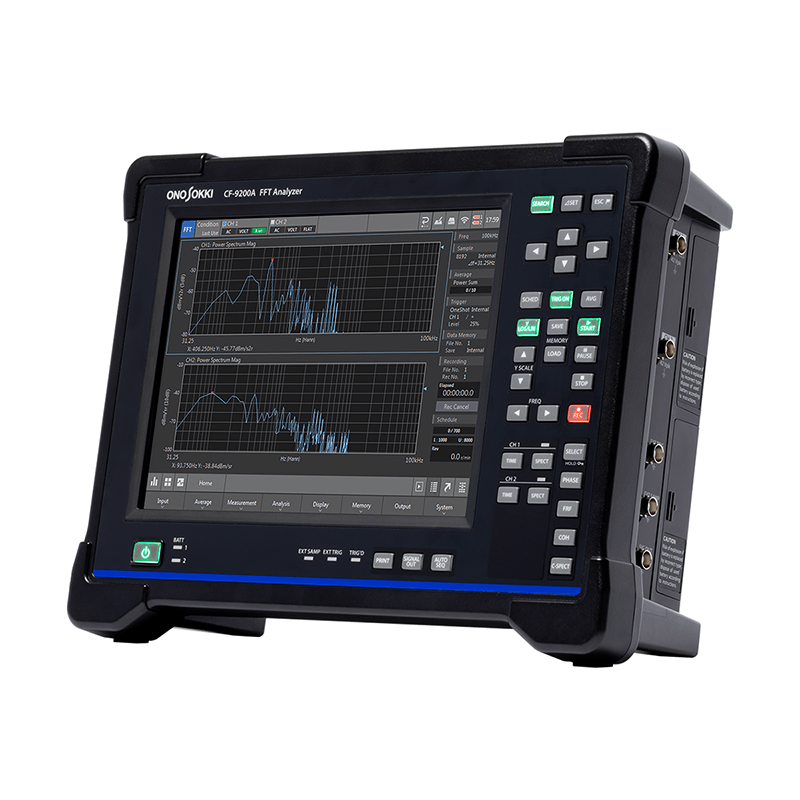
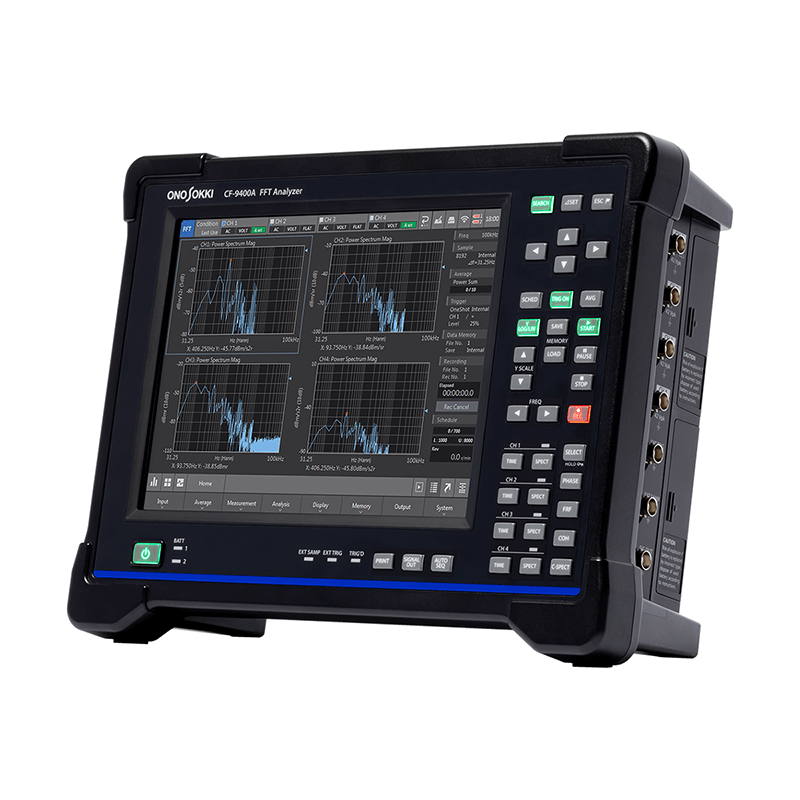
Fast, smooth, and intuitive operation with key and touch panel.

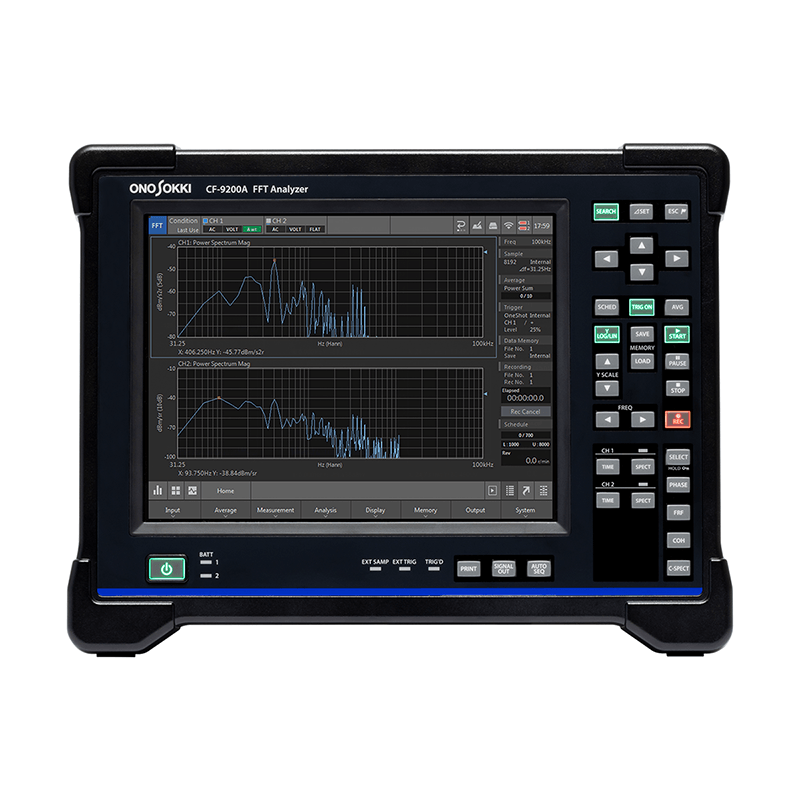
Examples of touch panel operation on the CF-9400A and key operation section on the CF-9200A.

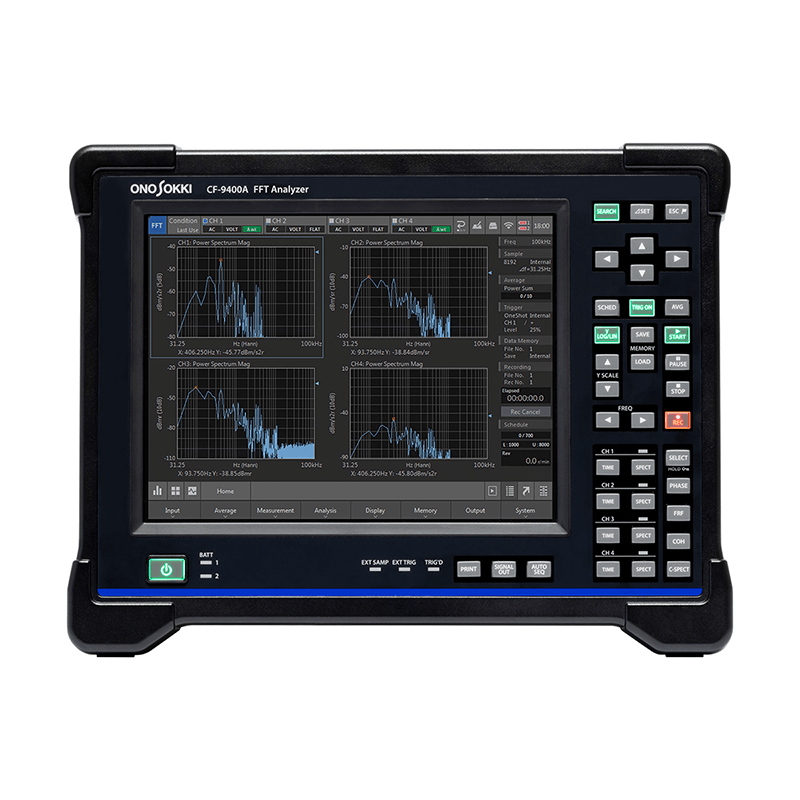
The CF-9200A/CF-9400A allows you to perform basic FFT analyzer operations such as display, measurement, stop, recording, and readout using large hard keys. This ensures reliable and speedy operation.

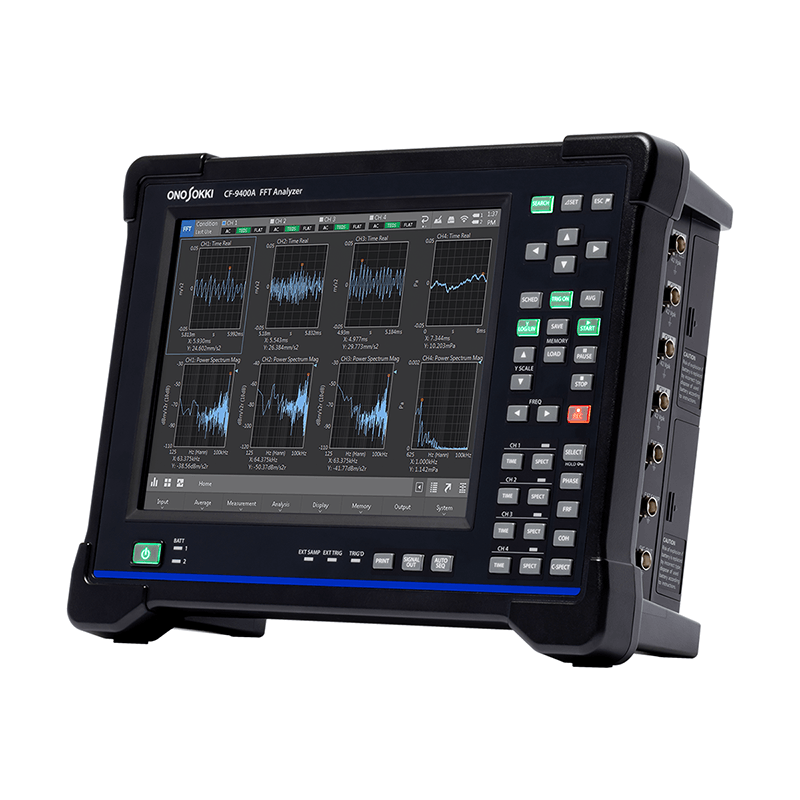
Setting the number of waveforms displayed and zooming in and out of the X and Y axes can be done intuitively using swipes and pinches on the touch panel. You can easily change to your desired scale.

8 hours continuously * Cordless operation; battery can be replaced while the power is on. maneuver

The measuring instrument has two battery packs installed.

The CF-9200A/CF-9400A features two high-capacity lithium-ion rechargeable batteries, enabling up to 8 hours of continuous cordless operation.

Furthermore, the hot-swap mechanism allows for battery replacement while the power is on, enabling measurement work to continue without interrupting analysis or recording or requiring reconfiguration. The built-in battery can also be charged while in operation*.

* It takes approximately 7-8 hours to fully charge with the power on.
With the power off, it lasts approximately 7-8 hours (at an operating environment of 20°C).

FFT, RTA, vibration control & simultaneous recording- versatile

Example of analysis screen for CF-9200A/CF-9400A

This portable device condenses not only FFT analysis, real-time octave analysis (RTA) *1, and rotational tracking analysis *2, but also linear/log sweep analysis using signal output, and amplitude excitation control of electromagnetic exciters *3.

Simultaneous recording during analysis is possible, and offline analysis can be performed using the CF-9200A/CF-9400A unit or its peripheral software.

*1 Octave analysis function (CF-0923) is required.
*2 Tracking analysis function (CF-0922) is required.
*3 Log sweep/vibration control function (CF-0942) is required.

Fanless and spindleless for silent, vibration-free operation.

CF-9400A unit installed in an anechoic chamber

The CF-9200A/CF-9400A achieves high performance without a fan or spindle. It emits no mechanical noise or vibration. In acoustic and vibration measurement and recording environments, the CF-9200A/CF-9400A unit itself will not be a source of noise or vibration.

By installing a wireless LAN adapter, you can operate the CF-9200A/CF-9400A unit using a tablet or other device without touching the unit itself *.

Real-time tripartite graph / VC curve (Vibration Criterion Curve*)

Real-time tripartite graph display function

The CF-9200A/CF-9400A allows for real-time simultaneous reading of frequency (Hz) and three amplitude values (acceleration (m/ ), velocity (m/s), and displacement (m)) using a tripartite graph * 1.
Furthermore, by performing a 1/3 octave adjustment and displaying the VC curve *2 (Vibration Criterion Curves), it is possible to quickly determine the permissible vibration standards and installation environment evaluation for vibration-sensitive precision equipment such as AFMs, electron microscopes, and laser interferometers.

Unlike conventional methods that required individual differentiation and integration processing using frequency analysis functions to convert amplitude values, this new feature enables speedy reading of each amplitude value.

*1 The tripartite graph (Figure) allows for amplitude readings of acceleration (m/ ) and displacement (m), based on velocity (m/s) on the frequency (Hz) axis.

*2 The VC curve is proposed as a standard for the acceptable level of micro-vibration when installing precision machinery. When using the VC curve, evaluation is performed at a 1/3 octave bandwidth, and the standard is divided into five stages (VC-A, VC-B, VC-C, VC-D, VC-E) in 6 dB increments, serving as a guideline for various applications, from optical microscopes to laser devices with long optical path lengths.

Generic Vibration Criteria for Vibration-Sensitive Equipment, Colin G.Gordon, SPIE99Evolving criteria for research facilities: I-Vibration

Wide dynamic range

Wide dynamic range

The CF-9200A/CF-9400A features a newly developed front-end with a 24-bit A/D converter, achieving a wide dynamic range of over 120 dB. This eliminates the need to frequently change the voltage range due to A/D overshoot, which was common in typical acoustic and vibration measurements.

The elimination of the need to redo measurements and data recordings has significantly accelerated measurement and analysis work, and it has also made it possible for novice users unfamiliar with FFT analyzers to use it with confidence.

Full input isolation

Full input isolation

The CF-9200A/CF-9400A features complete isolation (isolation) of all signal input channels.
It offers high immunity to ground loops and noise superposition, enabling reliable measurements in measurement environments and targeting situations where potential differences are likely to occur.

Furthermore, it protects critical FFT systems from sensors and signals that may be exposed to dangerous transient voltages.

CCLD * Equipped with TEDS * Compatible

Each input channel is equipped with a CCLD (sensor power supply). Accelerometer with built-in preamplifiers, charge converters for charge output type Accelerometer, and measurement microphones can be directly driven from the CF-9200A/CF-9400A compatible power supply.
Furthermore, using a TEDS sensor automatically handles power supply and unit calibration.

* CCLD (Constant Current Line Drive) refers to a sensor interface that uses a constant current drive method. By supplying a constant current power supply to accelerometers with built-in Accelerometer or measurement microphone preamplifiers, it can be directly connected to inputs such as FFT analyzers without the need for an external amplifier. Typically, it provides a constant current power supply of around 2 to 4 mA.

* TEDS (Transducer Electronic Data Sheet) is a general term for a format that describes sensor-specific information embedded in measurement sensors, and is defined in the IEEE 1451 series. By directly connecting a TEDS sensor with embedded TEDS information, the information is automatically read, eliminating the need for cumbersome calibration work, shortening measurement preparation time, and enabling reliable measurements.

Easy operation with gestures

Swipe to zoom in

The CF-9200A/CF-9400A features a 10.4-inch LCD with a capacitive touch panel.

The FFT graph manipulation now utilizes gesture controls such as tapping and swiping. This allows for easy and intuitive scaling of the measurement bandwidth and gain.

Waveform amplitude graph scale fitting, waveform swapping, time and frequency axis scaling, waveform offset, and span adjustment can all be done with simple gesture controls.

Large hard keys for reliable operation

Large hard keys

The CF-9200A/CF-9400A uses newly developed large hard keys for power on/off, major operations, switching display data types, and saving data.

It provides quick and reliable operation even in unstable and confined spaces, preventing data loss and malfunctions.

It also features a lock function (HOLD) for the hard keys and touch panel to prevent accidental operation or setting changes due to unintended contact.

Good visibility. LED indicator.

LED indicator

The CF-9200A/CF-9400A displays the main operating status of the FFT by illuminating LEDs.

LEDs are built into the main hardware keys, as well as the startup process, the charge status of the built-in rechargeable battery, and the A/D converter's Over status, allowing the operator to monitor the FFT's operation status even from a distance.

Wire break detection function

Wire break detection function

Automatically detects cable breaks or connector failures in Accelerometer and microphones *.

This prevents problems before the actual measurement takes place.
The CF-9200A/CF-9400A also allows you to disable the wire break detection function.

* Built-in constant current drive (CCLD) type preamplifier

MEMORY

SSD (built into the CF-9200A/CF-9400A unit)

The CF-9200A/CF-9400A's built-in SSD (Solid State Drive) allows for recording of time-series waveforms digitized with 24-bit A/D conversion while performing FFT analysis. Offline FFT analysis of recorded data is also possible. Furthermore, various analysis results can be saved in the memory area.

SSD/SDHC/SDXC memory card

It supports SD/SDHC/SDXC cards, with a maximum capacity of 128GB (SDXC). In addition to saving various FFT data, it can also save record data (ORF).

USB flash drive

The CF-9200A/CF-9400A can use general-purpose USB memory sticks. In addition to saving various FFT data to the USB memory stick, it is also possible to transfer FFT data and record data stored on the built-in SSD.

DATA SHARING

LAN connection shared folder function (standard feature)

You can directly access FFT measurement data and record data (ORF) stored on the built-in SSD of the CF-9200A/CF-9400A from a Windows® PC*.
Data extraction and graphing using dedicated software can be done easily.
You can easily copy and save data stored on the CF-9200A/CF-9400A to your PC.

PC requirements: Windows® 10 (32-bit and 64-bit versions)

LAN connectivity is a partial option.

LAN connectivity

By connecting the CF-9200A/CF-9400A to a Windows® PC using a LAN cable, you can copy and write various measurement data, operate the PC using the remote desktop function *1, and project the CF-9200A/CF-9400A screen using a projector.

Furthermore, by using the optional LAN external control function (CF-0947), the CF-9200A/CF-9400A can be controlled programmatically.

PC requirements: Windows® 10 (32-bit and 64-bit versions)

Wireless LAN connectivity option

Wireless LAN connection function

By attaching a wireless LAN adapter *2 to the CF-9200A/CF-9400A unit, you can wirelessly transfer FFT data and record data stored on the CF unit to a Windows® PC.

Furthermore, by using the remote desktop function *1, you can view the screen and remotely control the CF-9200A/CF-9400A series from a Windows® PC or various portable information terminals.

Short-range wireless communication connection function

cf9200a-cf9400a-22png

By attaching a short-range wireless communication adapter *2 to the CF-9200A/CF-9400A unit, you can wirelessly print graphs from the display screen to a mobile printer *3 simply by pressing the "PRINT" button on the unit. You can also connect keyboards and other devices wirelessly.

*1 Using Microsoft® Remote Desktop
*2 Please use a TP-Link Bluetooth® adapter.
*3 Please use the recommended product.

FFT Basic Analysis Function

Time axis waveform

Time-axis waveform display screen of CF-9200A/CF-9400A

It performs A/D conversion on voltage signals from sensors such as vibration, noise, strain, and current probes, and displays them as time-domain data.

You can directly read the X and Y axis values of any point using the search cursor, and easily read time differences and level differences using the delta cursor function.

The time-axis statistical analysis function allows for quantitative analysis of time-based waveforms such as the mean (MEAN), effective value (RMS), and crest factor, as well as anomaly diagnosis.

Power Spectrum

Power spectrum display screen for CF-9200A/CF-9400A

The power spectrum is calculated by performing FFT analysis to determine the intensity of each frequency component contained within the captured time-domain waveform, calculating the power for each frequency bandwidth (frequency resolution Δf), and then graphing it with frequency on the horizontal axis.

Power spectrum analysis allows for the measurement of vibration and noise levels, equipment anomalies that are difficult to estimate from time waveforms alone, and the natural frequencies of structures.

Frequency response function

Frequency response function

The frequency response function (FRF) in mechanical or electrical circuits represents the ratio of input to output on the frequency axis using gain and phase characteristics.

The gain characteristic represents how the amplitude changes as the input signal passes through the transfer system being evaluated, with the Y-axis representing the ratio of the output amplitude to the input amplitude.

The phase characteristic indicates the phase lead or lag between the input and output signals, and the Y-axis is displayed in degrees or radians.

Optional Analysis Software

Tracking analysis function (CF-0922)

Tracking analysis function (CF-0922)

The tracking analysis function (CF-0922) automatically saves vibrations, noises, and other phenomena generated when various rotating machines rotate in the low to high speed range while performing FFT analysis, and allows for the analysis of physical phenomena such as vibrations and noises that change with speed, based on the rotational speed.

Rotating machinery, such as engines, gearboxes, turbines, and electric motors, operates across a wide range of speeds, from low to high RPMs. At certain rotational speeds, the components can resonate, generating significant vibrations and noise. To reduce the risk of damage and improve the quietness of the equipment, it becomes necessary to evaluate the relationship between rotational speed and the natural frequencies of the components.

The tracking analysis function (CF-0922) allows you to visualize and analyze the relationship between rotational speed and the resulting physical phenomena from various perspectives, such as color maps, three-dimensional graphs, and order components based on one rotation, for a specified range of rotational speeds.

Octave analysis function (CF-0923)

Octave analysis function (CF-0923)

An octave refers to twice the frequency, and because the frequency response perceived by the ear is geometrically uniform, octave analysis (CF-0923) is effective for noise analysis.

Within the frequency range of the noise being measured, the sound pressure level for each band can be determined by passing it through a bandpass filter specified to a 1/1 octave or 1/3 octave standard.

Log sweep/vibration control function (CF-0942)

Log sweep/vibration control function (CF-0942)

The Log Sweep function allows you to continuously change the frequency of the driving sine wave from the 1-channel signal output module (CF-0971) and evaluate the resonance point of the target transmission system.

By performing a sine sweep on the frequency axis using a logarithmic scale, the gain and phase can be determined for each frequency, allowing for the acquisition of an accurate response function with a high signal-to-noise ratio.

Furthermore, the excitation control allows the amplitude of the exciter to be controlled within an arbitrary range during excitation and sweeping, enabling excitation tests to be conducted without considering the frequency characteristics of the electromagnetic exciter.

Configuration diagram of Log Sweep vibration control

* The Log Sweep/Excitation Control function (CF-0942) requires a 1-channel signal output module (CF-0971).

System Configurations

  • Example system configuration centered around CF-9400A/CF-9200A

CF-9200A/CF-9400A × O-Solution

O-Solution allows you to import and browse data recorded and saved with the CF-9200A/CF-9400A.
This software series enables smooth data editing, processing, and analysis.

  • CF-9200A/CF-9400A × O-Solution

Specification

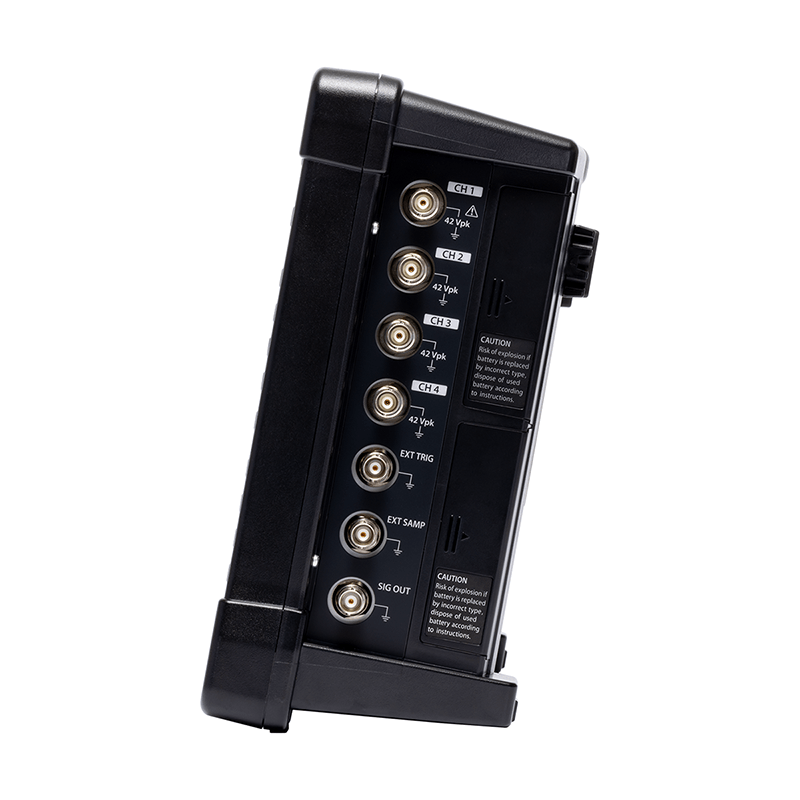
  • Number of input channels CF-9200A: 2 channels / CF-9400A: 4 channels
    Input format Single-ended
    Isolation Each channel is isolated (at all times).
    Input connector BNC (CO2 type)
    Input Impedance 1 MΩ ±0.5% 100 pF or less
    Input Coupling DC or AC (0.5 Hz - 3 dB ± 10%)
    Constant current drive for sensors (CCLD) Current is supplied coaxially to a constant-current sensor via an input connector (BNC terminal):
    +23 V to 26 V / 4 mA±25% (25 °C)
    Wire break detection function Cable breakage detected when using CCLD.
    TEDS * Note) IEEE1451.4 Template Ver.0.9/1.0 Accelerometer, Microphone,
    IEEE1451.4 Template Ver.1.0 Force Sensor
    Absolute Maximum Input Voltage AC 70 Vrms for 1 minute (50 Hz)
    Input voltage range 1 Vrms, 31.62 Vrms (2 ranges)
    DC Offset -60 dB FS or less (with auto-zero ON)
    Input Level Monitor Red LED lights up when input is excessive (lights up in range FS)
    Frequency range DC to 100 kHz
    A/D converter 24-bit ΔΣ type
    Dynamic Range 120 dB or higher (for FFT frame lengths of 4096 points or more and 1 kHz or higher)
    Amplitude flatness Below 20 kHz: ±0.1 dB,
    Above 20 kHz: ±0.2 dB
    harmonic distortion Below 20 kHz: -80 dB
    Above 20 kHz: -75 dB
    Aliasing -80 dB or less
    Full-scale accuracy ±0.1 dB (at 1 kHz)
    Amplitude linearity ±0.0015% (at full scale)
    Inter-CH crosstalk -100 dB or less (at 1 kHz)
    Inter-channel gain accuracy Below 20 kHz: ±0.05 dB
    Above 20 kHz (within the same range): ±0.1 dB
    Inter-channel phase accuracy Below 20 kHz: ±0.3°
    Above 20 kH: ±0.7°
    Anti-aliasing filter 4th-order Butterworth: LPF 450 kHz -3 dB
    Digital Filter FFT Aliasing Filter Baseband: 10th-order ellipse
    When zoomed in: 6th-order ellipse
    Real-time octave band filter Butterworth Class 6 IEC 61260-1:2014 Class 1
    JIS C 1513-1:2020 Class 1 (compliant with filter shape)
    Acoustic filter Acoustic A, C characteristics IEC 61672-1:2013 Class 1
    ANSI S1.4-2014/Part 1 Class 1
    JIS C 1509-1:2017 Class 1 (compliant with filter shape)
    External sample input Input terminal BNC (C02 type)
    Input voltage range ±12 V
    Input Impedance 100 kΩ
    Input Coupling AC/DC
    Detection level 12V to 12V in 0.025V steps
    slope + (rising point) or - (falling point)
    Hysteresis Level Customizable (initial value 0.5 V, range 0.025 V to 24 V)
    Input frequency range 0–300 kHz (Out-of-band filter 300 kHz -3 dB)
    Absolute Maximum Input Voltage AC/DC 30V
    Input pulses/revolution 0.5–1024 P/R
    Input pulse division function R1 to 1024 frequency divider; required if the Step 1 input frequency exceeds 4 kHz.
    Waveform monitor Waveforms can be viewed on the screen.
    External sample input LED When a pulse is detected, the LED (EXT SAMP) lights up green.
    External trigger input Input terminal BNC (C02 type)
    Input voltage range ±12 V
    Input Coupling AC/DC
    Detection level -12 V to 12 V in 0.025 V steps
    slope + (rising point) or - (falling point)
    Hysteresis Level Customizable (default value 0.5 V, setting range: 0.025 V to 24 V)
    Input frequency range 0–300 kHz (Out-of-band filter 300 kHz -3 dB)
    Absolute Maximum Input Voltage AC/DC 30V
    Waveform monitor Waveforms can be viewed on the screen.
    External trigger input LED

    When a pulse is detected, the LED (EXT TRIG) lights up green.

    * Note: If you are using a TEDS-compatible sensor from another manufacturer: Depending on the type of TEDS-specific chip inside the sensor, it may not be possible to read TEDS information.
    1. If you are considering purchasing sensors from other manufacturers, please contact the respective TEDS-compatible sensor manufacturer or retailer to confirm their operation.
    2. If you wish to use your existing TEDS-compatible sensor with our TEDS-compatible measuring instrument, please have it tested using our demo unit. (Please contact your nearest sales office.)

  • size 10.4-inch
    Resolution 800 x 600 pixels
    method TFT color LCD capacitive touch panel
    Brightness adjustment Bright/Dark (2 levels)
    Lighting (backlight) LED

    * While TFT color LCD displays are manufactured using highly advanced technology, some pixels (dots) may be non-illuminated or constantly illuminated. The effective dot ratio is 99.999% or higher for an 800x600 dot display. Color unevenness and brightness unevenness may be visible depending on the viewing angle and temperature changes, but these are not defects, and therefore we cannot accept exchanges or returns. Please understand this in advance.

  • Power switch Press and hold for about 1 second to turn the device on or off. If you continue to press and hold while the device is on, it will force a power off.
    Soft keys Detailed settings for each function can be configured using the soft keys below the LCD screen.
    Direct Key Cursor & Selector Keys Up/down/left/right, SEARCH, ⊿SET, ESC
    Measurement unit switch SCHED, TRIG ON, AVG, START, STOP, etc.
    Waveform selection section TIME, SPECT, PHASE, FRF, COH, C-SPECT, SELECT
    Erroneous operation prevention function Press and hold SELECT to lock and unlock soft keys and direct keys (excluding the power switch).
    Print key PRINT: Direct printing of screen display when connecting a recommended printer.
    Auto Sequence Playback Key AUTO SEQ plays back registered sequence of operations.
    Frequency range switching key FREQ left and right
    Y-axis scale toggle key Y SCALE Top and Bottom
    Signal output ON/OFF SIGNAL OUT (Effective when CF-0971 option is installed)
  • frequency range 100 mHz to 100 kHz
    Frequency accuracy ±0.005% (±50 ppm) of the reading
    Sampling Frequency Frequency 2.56 times the analysis range (during internal sampling)
    Sampling points / Analysis points
    Sampling points Analysis points
    256 100
    512 200
    1024 400
    2048 800
    4096 1600
    8192 3200
    16384 6400
    Overlap processing MAX/66.7%/50%/0%/Optional
    window function Rectangular / Hanning / Flat Top / Force / Exponential / User Defined
    Delay function It is possible to delay the time frames of other channels by 0 to 8191 points relative to CH1.
    Time waveform processing function First and second derivatives / single and double integrals
    Absolute value conversion / DC cancellation / Trend removal / Smoothing
    FFT Real-time Rate 100 kHz/4CH (FFT frame length 2048 points or less, internal sampling)
    Averaging function Number of times averaging is set 1 to 65535 times
    Averaging setting time 0.1 to 999 seconds, in 0.1-second increments.
    It is possible to stop the average at either the number of trials or the time interval.
    time domain Averaged average / Exponential average
    frequency domain Additive average / Exponential average / Peak hold / Subtractive average / Sweep average / Fourier average / Max overall
    amplitude area Average
    A/D over-cancellation / double hammer cancellation function / averaging allow selection function (ADD+1) / averaging undo function
    Trigger function When triggered, the LED (TRIG'D) blinks green.
    Trigger level -99 to 99 (Unit: %) Default = 25%
    Thresholds can be set using amplitude units (including user-calibrated values).
    Hysteresis Level 0-99 (Unit: %) Default = 2%
    position ±16383
    mode Free / Repeat / Single / One Shot
    sauce CH1/CH2 (CF-9200A) to CH3/CH4 (CF-9400A) / External trigger input
    slope +/-/± (Internal trigger) +/- (External trigger)
    FFT operation 32-bit floating-point (IEEE single-precision format)
  • time domain Time-domain waveform / Autocorrelation function / Cross-correlation function / Impulse response / Cepstrum
    amplitude area Amplitude probability density function / Amplitude probability distribution function
    frequency domain Power spectrum / Fourier spectrum / Lifted spectrum / Cross spectrum
    Calculation function (time-axis statistical processing) Mean value / Absolute value / Mean value / RMS value / Standard deviation / Maximum value / Minimum value
    Crest factor / Skewness / Kurtosis
  • Recording device You can choose between internal storage or an SD/SDHC memory card.
    Record function
    frequency range 100 kHz (max)
    Recording Channels CH1/CH2 (CF-9200A) CH1~CH4 (CF-9400A),
    Rotation information can also be recorded.
    Recording time 4 GB: Approximately 32 minutes, 50 kHz range, 4-channel recording, rotation information OFF, 2048 sample points.
    Recording format ORF
    Maximum recording capacity SD/SDHC/SDXC (up to SDXC 128 GB)
    data file 9990 (999 data x 10 blocks) data
    DAT/TXT/BMP (Analysis data can be recorded simultaneously in three different formats (TXT and BMP are selectable))
    File formats Analysis data can be recorded simultaneously in three different formats (TXT and BMP are selectable).
    DAT/TXT/BMP (List data can also be saved when saving as TXT)
    Panel Condition Memory Store and recall measurement conditions (up to 50 types)
    Handwritten notes It remembers handwritten notes written on the touch panel.
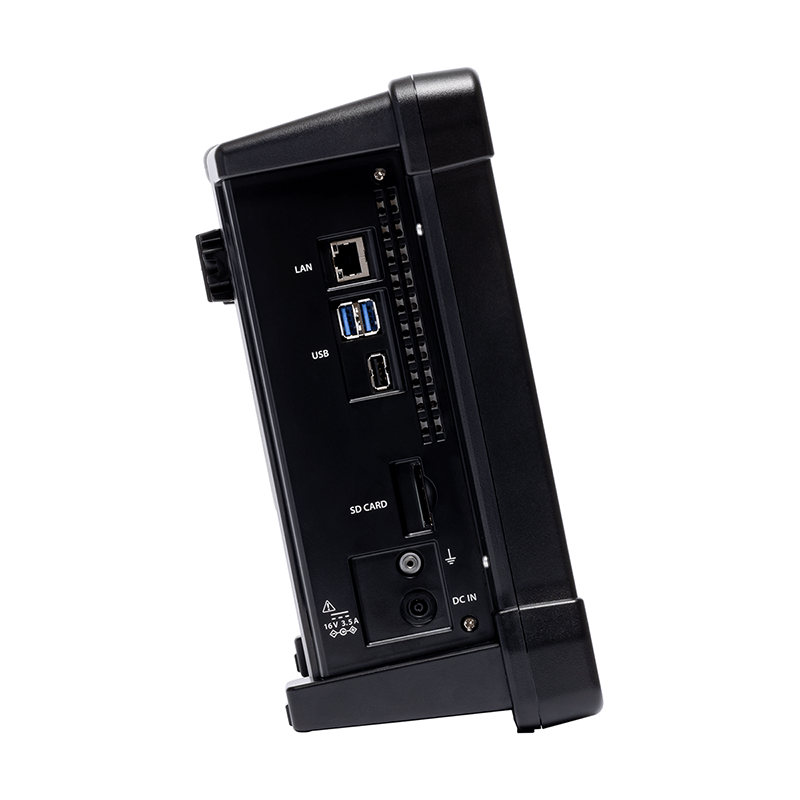
  • USB Number of ports 3 (USB3.0 x 2, USB2.0 x 1)
    USB (Type A) For USB flash drives (USB 3.0 and USB 2.0), wireless LAN modules, and Bluetooth® adapters.
    Wireless connection Wireless LAN module Recommended products from TP-Link
    Bluetooth® adapter Recommended products from TP-Link
    SD card slot Number of slots 1
    Supports SD / SDHC / SDXC cards. Capacity: up to SDXC 128 GB
    (We do not guarantee the operation of all SD/SDHC/SDXC cards.)
    LAN Number of ports 1
    10BASE/100BASE-TX/1000BASE-T Remote desktop, external control
    Printer output Print using the PRINT key on the device.
    Interface USB or Bluetooth® (when using a TP-Link Bluetooth® adapter)
    Compatible printers MW-270, manufactured by Brother Industries, Ltd.
    Output data Screen copy / List view copy
  • Condition View Display the list of settings conditions
    clock Display year, month, and day, hour, minute, and second.
    Operation confirmation sound / warning sound Can be turned on/off arbitrarily
  • Power supply Included AC adapter or included battery
    Power consumption CF-9400A
    (When the CF-0971 signal power option is installed)
    87 VA or less (when using AC adapter, battery not charged)
    150 VA or less (when using an AC adapter and charging the battery)
    CF-9200A
    (When the CF-0971 signal output option is installed)
    73 VA or less (when using AC adapter, battery not charging)
    150 VA or less (when using an AC adapter and charging the battery)
    Operating temperature range 0 to +40°C (humidity 20 to 80% RH, non-condensing)
    Storage temperature range -10 to +50 °C (including lithium-ion rechargeable batteries) (humidity 20 to 80 %RH, non-condensing)
    Functional ground terminal Noise reduction grounding terminal
    Outline drawings Less than 333 (W) x 248 (H) x 112 (D) mm *Excluding handlebars, stand, and protrusions

    CF-9200A Outline Dimensions Diagram

    Main unit cooling Natural air cooling (fanless)
    Weight Approximately 3.8 kg without battery
    Approximately 4.8 kg with two batteries installed.
    CE marking Low Voltage (LVD) Directive 2014/35/EU Standard EN61010-1
    EMC Directive 2014 / 30 / EU Standard EN61326-1
    RoHS Directive 2011 / 65 / EU Standard EN IEC 63000
    Accessories AC adapter (AC adapter power cable (2 m)) Quantity 1
    Battery (RRC2020 (100496-15) Lithium-ion secondary battery) quantity 2
    Instruction Manual (CF-9200A/CF-9400A User's Guide Booklet) Quantity 1
    CD-ROM (Reference guide, utilities, DLLs for external controls, etc.) Quantity 1
    SD card (4 GB) Quantity 1
  • Input voltage AC 100-240V
    Input Frequency 50/60 Hz
    Output voltage Rated 16V
    Output current Rated 4A
    safety standards PSE/CE/UL/GS
  • battery Lithium-ion rechargeable battery
    Built into the main unit (hot-swappable)
    quantity 2 pieces can be installed
    Operating time 8 hours of continuous operation (with 2 new batteries installed)
    4-channel 100 kHz analysis / Signal output OFF / LCD backlight (bright) /
    USB port not used
    Battery status display Main screen When a rechargeable battery is installed, the remaining capacity is displayed on the device screen.
    Battery LEDs (BATT1, BATT2) Orange light when charging, green light when fully charged.
    (When AC adapter is connected)
    When the battery is low, the indicator lights up red (it lights up when the battery level is below 5%).
    (When running on battery power without AC adapter)
    A low battery warning message is displayed when the battery level is below 15%.
    Processing when remaining battery level is at its lowest When the battery level drops below 3%, a low battery warning message is displayed and the device automatically shuts down.
    Remembers the previous panel condition.
    Charging time When the main unit is in operation Approximately 7 to 8 hours (depending on usage)
    When power is OFF Approximately 7-8 hours
    External charger (recommended) Approximately 4.5 to 5 hours
  • Number of Channels 1
    Output terminal shape BNC (C02 type)
    Isolation Non-insulated
    Output Voltage Swing ±1 mV to ±10 V (amplitude + DC offset)
    Output format unbalanced output
    Output coupling DC
    protection circuit Short-circuit protection
    Output Independence 0 Ω or 50 Ω ± 10%
    Maximum Output Current 10 mA
    Offset Voltage ±10 V
    D/A converter 16-bit
    Conversion rate up to 512 kHz
    D/A converter 16-bit
    Output waveform Sine wave / Swept sine wave / Pseudo-random / Random / Impulse
    THD and spurious -75 dB or less (sine wave 1 kHz, amplitude ±1 V output)
    Adaptive FFT analysis length 256~16384
    Zoom Analysis Support (linked to zoom analysis range)
    Voltage amplitude accuracy Within ±0.5 dB (at 1 kHz, 1 V0-p, 1 MΩ load)
    Frequency accuracy ±50 ppm
    Digital Filter Smoothing filter When a rechargeable battery is installed, the remaining capacity is displayed on the device screen.
    When zoomed in: 6th degree ellipse
    Octave band filter 1/1 or 1/3 octave
    6th Butterworth
    Pink filter Analog system: -3 dB/oct ±1.0 dB (specified for 20 Hz to 20 kHz)
    Burst function Single burst, continuous burst
    Burst cycle sine wave Cycles 1-32767
    Swept sign / pseudo-random / impulse 1-32767 FFT frames
    random 1 ms to 32 s
    Cycle setting unit
    and burst interval
    sine wave One cycle of a sine wave
    Swept sign / pseudo-random / impulse 1FFT frame
    random 1 ms
    Taper Function The output can be gradually increased or decreased when the signal is turned ON/OFF.
    1 ms to 32 s (in 1 ms increments)
    However, this function is disabled when the burst function is ON.
    Spectral flatness 20 kHz to 100 kHz: within ±1.0 dB
    0–20 kHz: Within ±0.2 dB
    Crest Factor sine wave Approximately 1.41
    Swept sign Approximately 1.4 to 1.6
    Pseudo-random 3.3 or less
    random 3.3 or less
    Impulse 32.0 or less

Optional software specifications

  • Measurement mode (FRA mode)
    Measurement frequency range 10 mHz to 100 kHz
    Frequency resolution (log sweep) 10, 20, 40, 50, 80, 100, 120, 160, 200, 250, 300, 320, 400, 500 pieces/decade
    Frequency resolution (linear sweep) 100, 200, 400, 500, 800, 1000, 2000, 2500, 4000, 5000 lines / full bandwidth
    Average number of times 1, 2, 3, 4, 5, 6, 7, 8, 9, 10, 20, 25, 30, 40, 50, 60, 80, 100, 120, 150, 180, 200 times and any number of times
    Frequency range division setting mode The measurement frequency range can be divided into up to 10 sections, and measurements can be taken by changing the number of summations and signal output level for each section.
    Automatic resolution control function A function that automatically optimizes the decade of each frequency band to allow for accurate observation of characteristics across the entire frequency range.
    Frequency resolution expansion function It is possible to generate a sine wave with a frequency resolution 20 times finer than the frequency range resolution used during measurement, and then perform a remeasurement.
    Calculation function Frequency axis calculus function (first derivative, second derivative, single integral, double integral)
    Four arithmetic functions
    Display
    Display of frequency response function Bode plot (horizontal axis: frequency / vertical axis: gain and phase)
    Display of frequency response function Nyquist plot (horizontal axis: real part / vertical axis: imaginary part) allows for logarithmic display of amplitude.
    Display mode

    FRF mode (3-screen display)
    1) FRF (Bode plot), COH (display can be turned ON/OFF)
    2) Either Nyquist or SPEC (overwriting 1 and 2 channels)
    3) TIME, instantaneous spectrum (can be displayed overlaid and channel can be specified)

    List mode, 1-screen display
    1) Measurement conditions
    2) A list of all measurement data: No./Frequency/FRF Gain/FRF Phase/COH/FRF Real Part/FRF Imaginary Part/SPEC1/SPEC2/Number of Additions
    Peak List mode: 2 or 3 screen display
    In the Bode plot display of FRF, frequency, gain, and phase are listed in two ways.
    1. Gain peak point (automatic search)
    2. Any point
    Memory mode
    1) FRF in current state
    2) List of memorized waveforms
    3) Overlay display of the waveforms selected in 2) (up to 20 screens)
    Calculation screen (4-screen display)
    1) Current FRF
    2) Memory-stored FRF
    3) Waveforms resulting from arithmetic operations and calculus on 1) and 2), and waveforms resulting from opening/closing loop conversion on 1) and 2). *The waveform of the calculation result can also be displayed.
    4) Nyquist plot of the calculation result in 3)
    Display function Phase unwrap display
    Search Delta function
  • Tracking analysis types Phase tracking
    Amplitude tracking
    Sampling method Stoichiometric tracking (external sample): Up to the maximum order of analysis
    Constant-width tracking (internal sampling): The frequency range is the same as in the FFT analysis.
    FFT sampling points Power Spectrum Index Average
    Fourier spectrum exponential mean
    Maximum analysis order 800th order (6.25, 12.5, 25, 50, 100, 200, 400, 800)
    Maximum number of blocks 1000(100、200、400、800、1000)
    Analysis screen display 6 screens / Tracking display list available
    Display function Time-domain waveform, frequency analysis (amplitude, phase), order ratio analysis (amplitude, phase),
    Stoichiometric tracking analysis (amplitude, phase), constant-range tracking analysis (amplitude, phase),
    Fixed frequency tracking analysis (amplitude, phase), time tracking analysis (amplitude, phase),
    Three-dimensional map, Campbell diagram
    Number of tracking lines displayed 8 pieces (MAX ord, O.A separate)
    Schedule function Rotation schedule (with automatic descent detection function)
    Time schedule (time trend)
    Upper and lower limit setting for rotation speed UP (lower limit → upper limit)
    DOWN (upper limit → lower limit)
    UP/DOWN (lower limit → upper limit → lower limit)
    DOWN/UP (Upper limit → Lower limit → Upper limit)
    Simultaneous analysis and recording function Supports fixed-width tracking only.
  • Octave types 1/1 octave and
    1/3 octave (filter: 6th order Butterworth)
    JIS C 1514:2002 Class 1, IEC 61260 Ed.1.0 (1995) Class 1ANSI
    Complies with 1ANSI S1.11:2004 Class 1.
    Time weight (time constant) 10 ms、35 ms、125 ms(FAST)
    630ms, 1s (SLOW), 8s,
    IMPULSE: Rise time 35 ms / Fall time 1.5 s
    Conforms to JIS C 1509-1:2005 Class 1 and IEC 61672-1:2002 Class 1.
    Analysis frequency range 0.8–20 kHz (1/3 octave)
    1–16 kHz (1/1 octave)
    Calculation function Instantaneous value, maximum value every second, maximum value hold, minimum value hold
    Average power, total power, linear Leq
    Analysis screen display Up to 6 screens (with data overlay)
    Features a list function for real-time octave display.
    Simultaneous analysis and recording function correspondence
    Option CF-0922 (Tracking analysis function)
  • Client PC (OS) Microsoft® Windows® 11 Pro (64 bit version),
    Microsoft® Windows® 11 Enterprise LTSC (64 bit version) *,
    Microsoft® Windows® 10 Pro (64 bit version)
    software Microsoft® Visual Studio 2019 (VB, C#)
    Microsoft® Office Excel 2016
    .NET Microsoft® .NET Framework 4
    Network Cable LAN cable ** Category 6
    • Windows® 11, Windows® 10, Microsoft® Visual Studio, and Microsoft® Excel are registered trademarks or trademarks of Microsoft Corporation in the United States and other countries.
    • Windows 11 Enterprise* has been tested and confirmed to work in a standard Windows environment with standard settings (standard policy settings).
      Operation in environments where security settings, group policies, or third-party security software have been modified from the standard settings is not guaranteed. Therefore, support may be limited.
    • LAN cable**: Depending on your equipment, a straight cable connection may not be possible. If you are using a straight cable, please ensure that your equipment supports Auto MDI/MDI-X.

Option

Model name Product name
CF-0922 Tracking analysis (software option)
CF-0923 RTA analysis (software option)
CF-0942 Log Sweep/Excitation Control (Software Option) *Requires CF-0971
CF-0947 LAN external control function (software option)
CF-0971 1-channel signal output module (installation fee separate)
CF-0951A Reference Guide (Japanese version) - printed booklet (PDF version included on the accompanying CD-ROM)
CF-0951AE Reference Guide (English version), printed booklet (PDF version included on the accompanying CD-ROM), August 2014 onwards.
CC-0025A Soft carrying case
CC-0091 Hard carrying case
RRC2020 *1
(100496-15)
Battery (2 included with purchase)
PS-P20025A Battery charger set (set includes charger and AC adapter. AC power cable required separately)
  Security software

*1: The RRC2020 (100496-15) battery is for the CF-9200A/CF-9400A. It cannot be used with the CF-9200/CF-9400.

Recommended products

Model name Product Name / Manufacturer
UB400 Bluetooth® adapter manufactured by TP-Link.
TL-WN725N Wireless LAN module manufactured by TP-Link.
MW-270 Mobile printer manufactured by Brother Industries, Ltd.