Skip to content

Select your region & language

Global

Region

Remote Monitoring System
WEB-REMOTE

This product condenses the expertise we have cultivated as a manufacturer of measurement and control systems.
We monitor the testing site and provide our customers with peace of mind.

Remote Monitoring System is a web application that allows you to check the status of automotive testing anytime, anywhere. Since its launch in 2020, it has continuously evolved to meet customer needs. The latest update adds features such as the ability to display information from building equipment, including power consumption and gas levels, as well as a mobile dashboard and PC screen mirroring functionality. We will continue to provide our customers with peace of mind through the ever-evolving Remote Monitoring System and Ono Sokki 's "connectivity" technology.

Features

New features

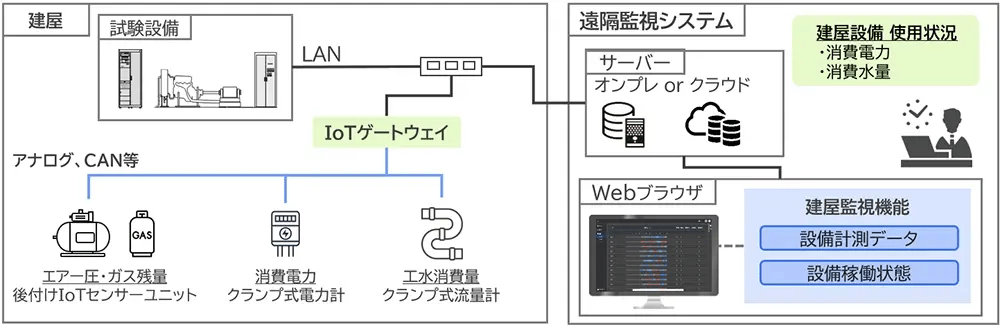
Building equipment monitoring function (NEW)

The system now supports recording and displaying data on the status of various utilities that are not part of the test equipment, such as building power consumption and gas levels.
By connecting each sensor and other device to Remote Monitoring System via an IoT gateway, it is now possible to centrally check usage status and other information on this system.
This can be used to improve equipment operation and visualize energy consumption in order to realize a carbon-recycling society.

  • Building equipment monitoring function

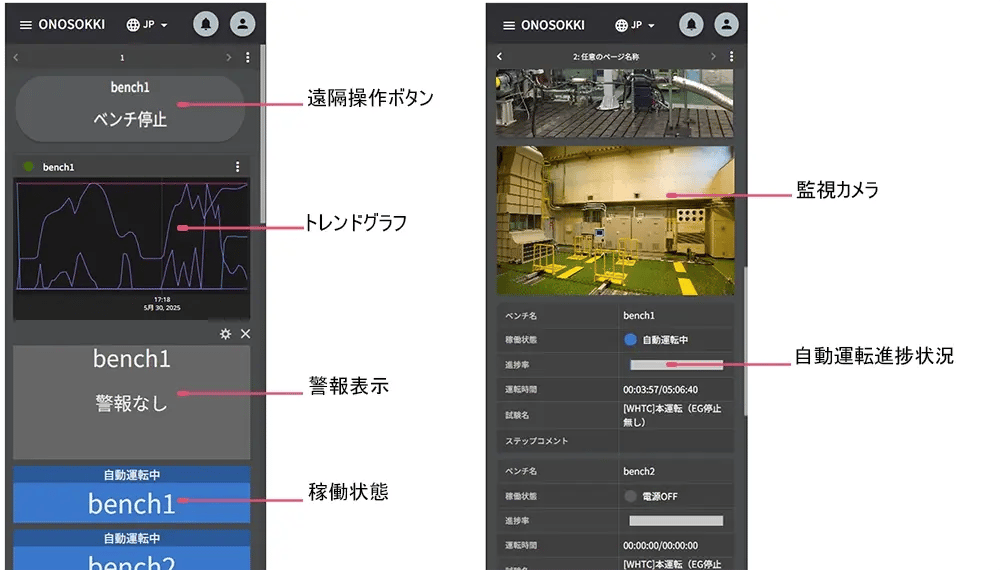
Mobile Dashboard NEW

We've added a vertical-scrolling dashboard optimized for smartphones.
It's now easier than ever to see the operating status, trend graphs, alarm displays, surveillance camera images, and autonomous driving progress.
Additionally, remote control buttons are available.

  • Mobile Dashboard

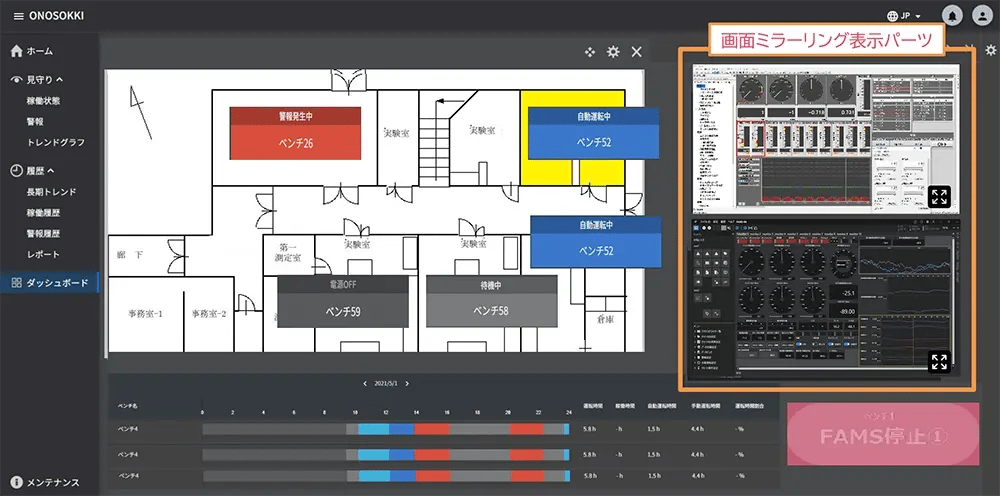
PC screen mirroring function (NEW)

This function captures the current operating screen of the test equipment and displays it on the dashboard.
The captured images are automatically updated at regular intervals, allowing you to check the current state of your familiar driving screen from a distance or share it with multiple people.

  • PC screen mirroring function

Basic Features

Applications that utilize web browsers

By utilizing a web browser, you can monitor the status of your bench system from anywhere using various devices such as smartphones, tablets, and PCs.

  • Applications that utilize web browsers

Watching over the examination site

It visualizes the status of multiple test benches in real time, and supports remote testing with an easy-to-understand management screen and a function to output operational history data.
We assist in realizing unmanned autonomous driving and remote monitoring of test equipment at overseas locations.

Monitoring the operating status and measured values of the test equipment.

Trend graphs and simultaneous display of operating status allow users to understand the progress and performance of multiple ongoing test benches, providing support to bench operators. When an anomaly occurs, information such as the type of anomaly (e.g., serious failure, warning) and the nature of the anomaly are displayed.

  • Trend graph: Display any measurement item for each bench.
    Trend graph: Display any measurement item for each bench.
  • Operating status: Displays a list of statuses such as running, standby, alarm activated, etc.
    Operating status: Displays a list of statuses such as running, standby, alarm activated, etc.

(Hover your mouse over the image and click to enlarge it.)

Camera image display

The system captures video footage from surveillance cameras installed in the testing room and displays it on a web application.

  • Camera image display
  • Camera function screen: View the status of multiple benches on a single screen.
    Camera function screen: View the status of multiple benches on a single screen.
Email / Buzzer / Signal Tower Activation

This function promptly notifies you via email and activates signal towers and buzzers in the event of an anomaly.
Even during unmanned operation, abnormalities can be detected as quickly as possible.

  • Email / Buzzer / Signal Tower Activation
Dashboard

This screen allows you to freely customize the layout of the parts.
You can freely arrange the following parts, and save layouts for each user ID.

Test equipment operating status, alarm display, trend graph, surveillance camera images, operating history, autonomous operation progress, remote control buttons, arbitrary images, arbitrary text, digital meter, control panel PC screen, building equipment operating status, trend graph for building equipment.

  • Dashboard
Remote control

The remote control buttons on the dashboard now allow for remote stopping of the autonomous driving mode.
We offer even greater peace of mind in the event of an unforeseen situation.

  • Remote control

Assisting business processes

By accurately understanding the situation and centralizing management, we reduce routine work and assist in cutting man-hours. We promote the effective use of data, which can be used as a trigger and indicator for operational improvements.

Centralized management of operational history

You can view the daily operating history and operating hours of multiple benchmarks using bar graphs and numerical data.
You can also select any benchmark and check its usage percentage on a monthly or daily basis.
Furthermore, since work details and comments can be added for each operational result, more detailed information can be shared and managed.

  • Operation History ①: Daily, weekly, and monthly views of multiple benchmarks are available.
    Operation History ①: Daily, weekly, and monthly views of multiple benchmarks are available.
  • Operation History ②: Allows display of daily, weekly, and monthly data for any single bench.
    Operation History ②: Allows display of daily, weekly, and monthly data for any single bench.

(Hover your mouse over the image and click to enlarge it.)

  • Power OFF

  • stand-by

  • Manual operation

  • Autonomous driving

  • Alarm triggered

Operation history report output function

It is possible to output data such as centrally managed operating rates and autonomous driving ratios.

  • Reports: Allows output of any items or time period.
    Reports: Allows output of any items or time period.
Autonomous driving progress display

This feature displays the progress of the autonomous driving pattern.
When connected to our Automatic Measurement Control System "FAMS-R6" and "FAMS-R5," it is possible to display the progress for each operating pattern.

  • Autonomous driving progress display
  • Power OFF

  • stand-by

  • Manual operation

  • Autonomous driving

  • Alarm triggered

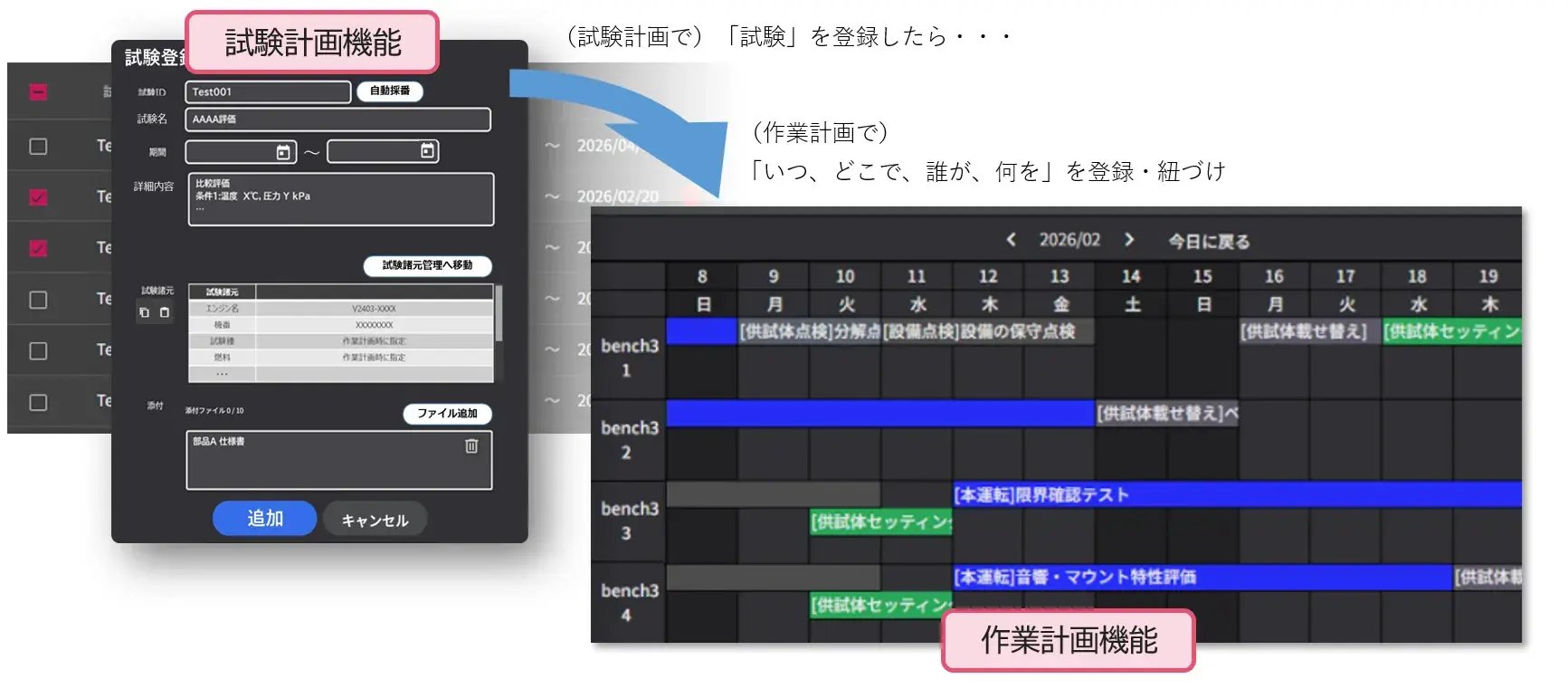
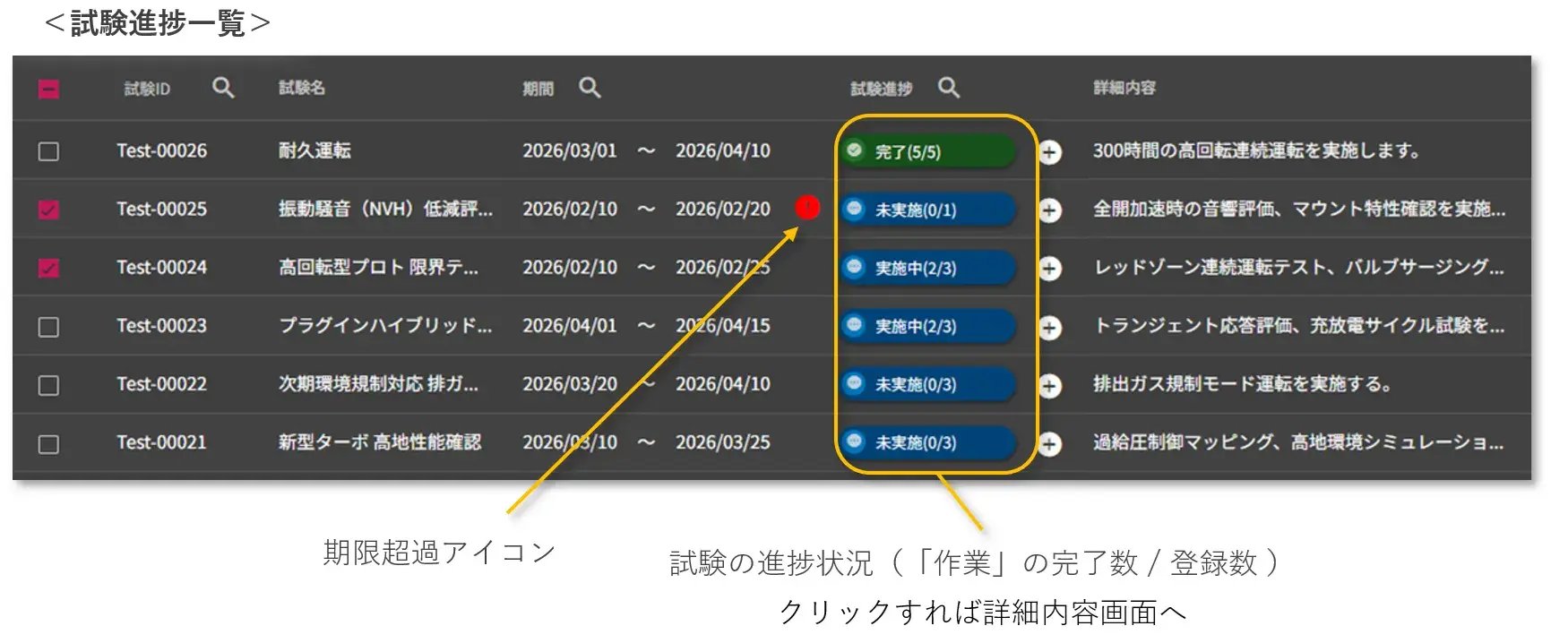
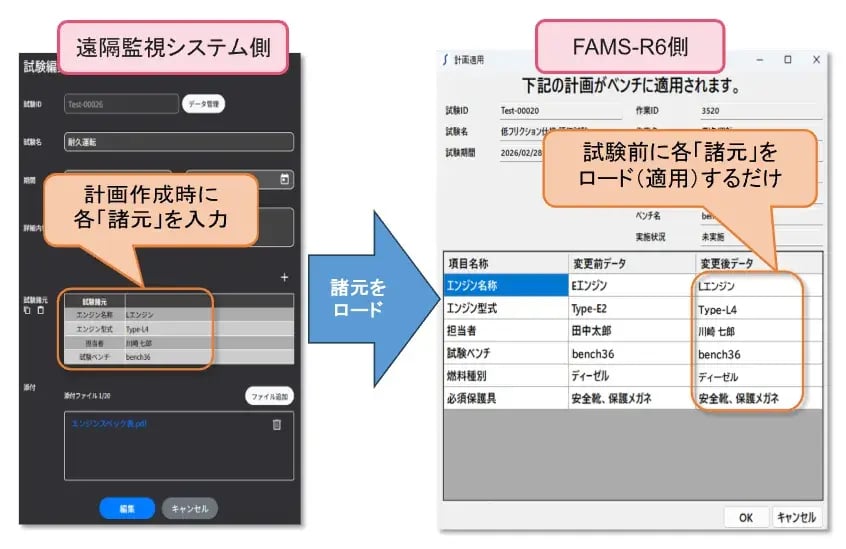
Centralization of work plans

This function centralizes the management of work plans such as tests and inspections.
You can attach various files to individual plans and share them. You can also assign workers and send email notifications.

  • Work plan: See the test schedule for multiple benches at a glance.
    Work plan: See the test schedule for multiple benches at a glance.
  • Registration of test plans: In addition to adding comments, it is possible to link work procedure manuals to the instructions.
    Registration of test plans: In addition to adding comments, it is possible to link work procedure manuals to the instructions.
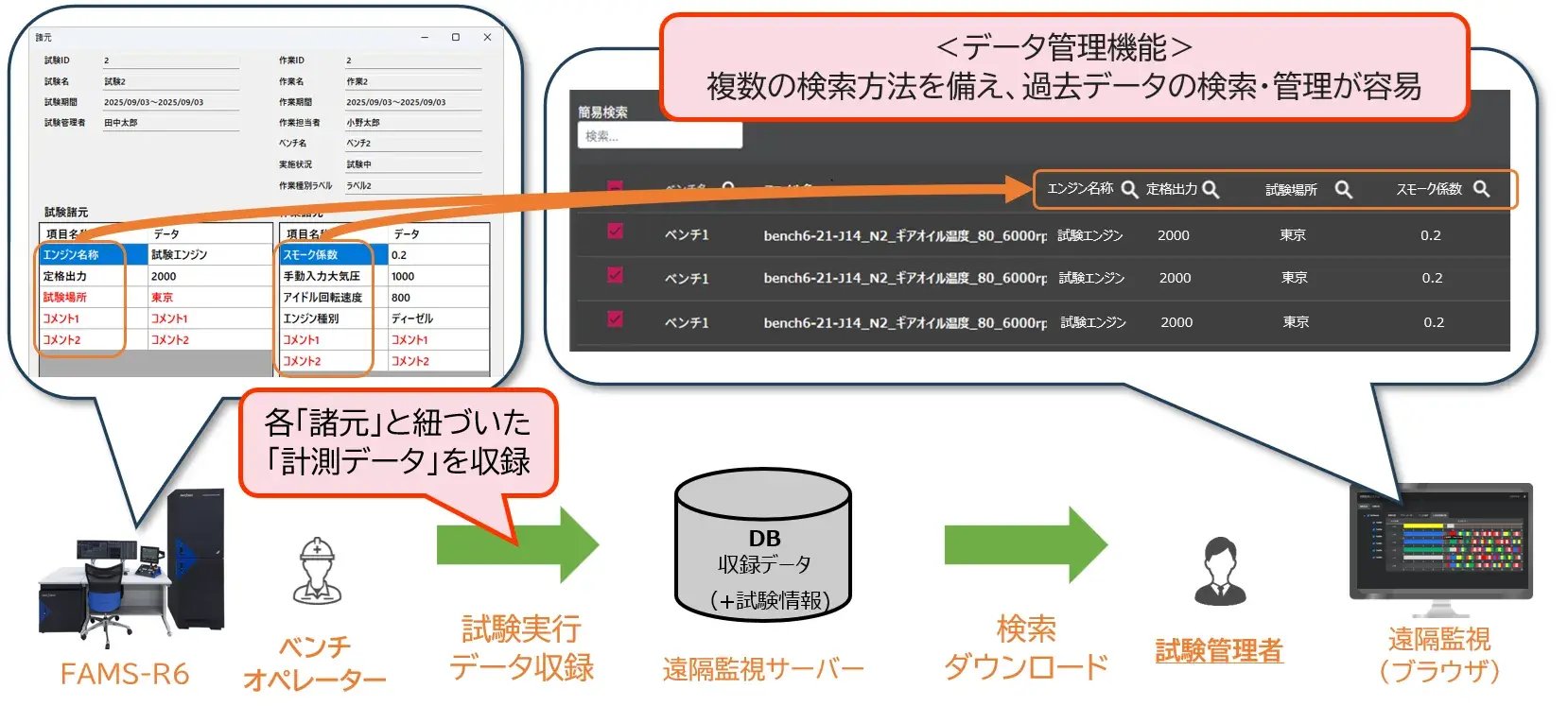
Data Management

This function automatically collects and manages measurement data.
Data files are automatically uploaded to the server. Saved data can be easily searched using features such as filtering and sorting.

  • Data Management
  • Data management screen: You can search for the data you have recorded.
    Data management screen: You can search for the data you have recorded.

System Configurations

Please choose from two types: "on-premise" (where servers are installed within your company's network) and "cloud computing" (cloud).

  • Composition No. 1
  • Composition No. 2
  • Number of connected benches

    On-premise type: A maximum of 100 benchmarks per server is a guideline.
    Cloud-based: Unlimited
    * License fees will be charged according to the number of benchmarks.

  • Compatible with our company's measurement and control systems (FAMS-R6, etc.)

    * System configuration varies depending on the baseline.

  • We have a proven track record of connecting with testing equipment from other manufacturers.

    * For further details, please contact our dealer or sales office.

最終更新日:2025/09/03